Hybrid RAG ใน Production: ลงมือทำครบทั้งระบบด้วย n8n + Airflow
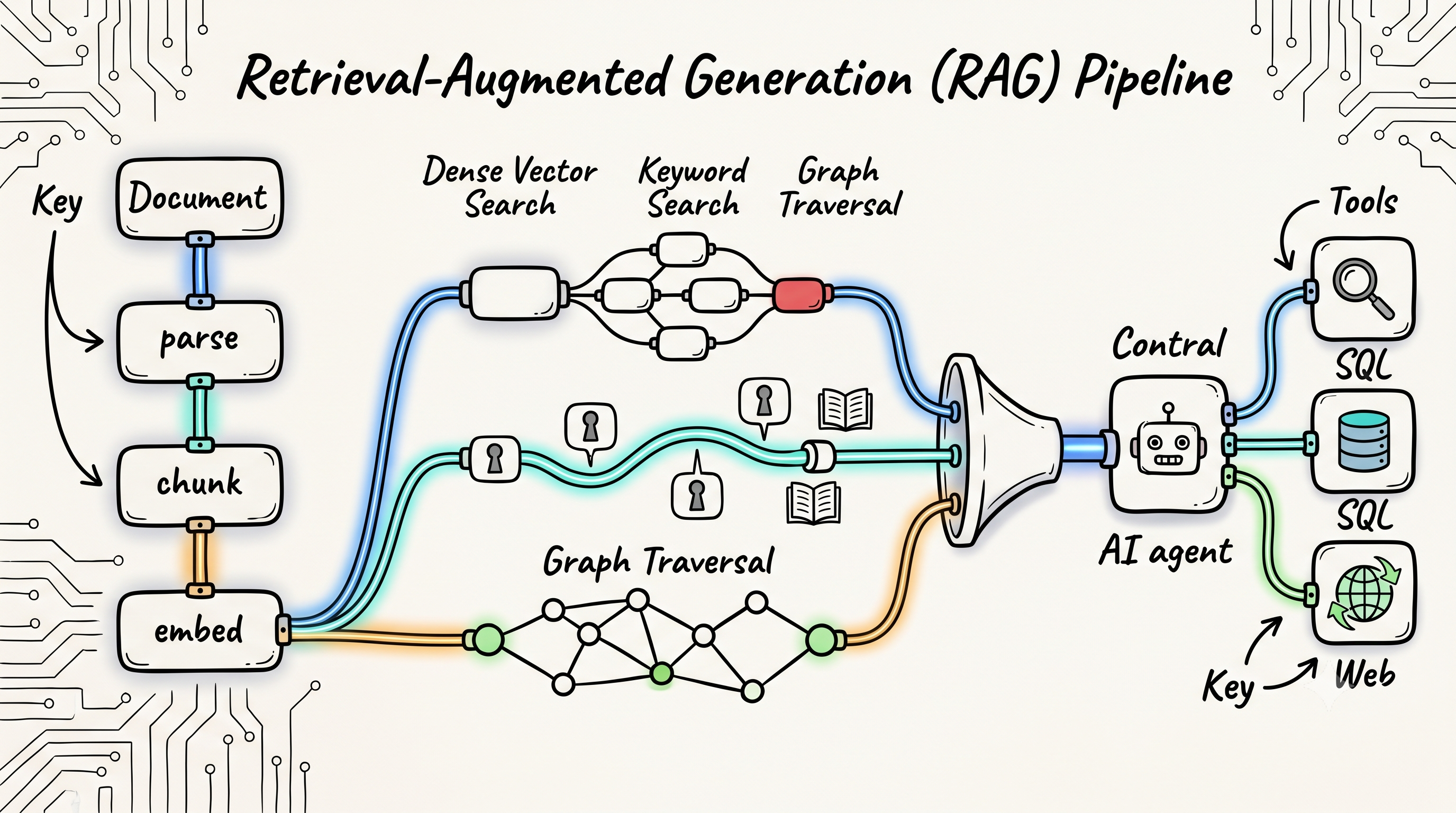
Concept คุณรู้ครบแล้ว ทั้ง chunking, hybrid search, reranking และ GraphRAG โพสต์นี้คือ wiring diagram ของจริง เป็นระบบ hybrid RAG ครบชุดที่ import แล้วรันได้ทันที ฝั่ง ingestion รันบน Apache Airflow ฝั่ง query pipeline รันบน n8n ส่วน retrieval ดึงผลจาก dense, BM25, GraphRAG และ live web มา fuse รวมกัน
โพสต์นี้เป็นภาคลงมือทำของ Agentic Retrieval: The Complete Guide ผมย้ายทุกเทคนิคในนั้นมาเป็น node และ DAG task ที่คุณคลิก รัน และปรับต่อได้เลย ทุก component ที่เป็น cloud ยังมีตัวเลือกแบบ local-first ให้สลับด้วย
ทำไมต้อง n8n
n8n เป็น workflow automation platform แบบ fair-code ที่มี LangChain integration มาในตัว AI cluster node อย่าง Vector Store, Embeddings, Text Splitter, Reranker และ AI Agent คือ wrapper ระดับ production ที่ครอบ primitive ชุดเดียวกับที่คุณต้องต่อเองใน Python ต่างกันตรงที่ตั้งค่าบน visual canvas ได้ จะสลับ component ตัวไหนก็ไม่ต้อง deploy code ใหม่
พอเป็นเรื่อง hybrid RAG โดยเฉพาะ n8n ช่วยได้หลายอย่าง:
- Ingestion pipeline แบบ visual ที่ trigger ได้จากการอัปโหลดไฟล์, webhook หรือไฟล์ที่เปลี่ยนใน cloud storage
- Retrieval หลาย branch รันขนานกัน แล้วค่อย merge ก่อนเข้าขั้น generation
- HTTP Request node ที่ inject credential ให้เอง node type เดียวใช้ได้ทั้ง Qdrant, OpenAI embeddings, Cohere rerank และ Tavily
- Chat memory ข้าม session โดยไม่ต้องสร้าง state store เอง (ใช้ AI Agent node)
บอกกันตรง ๆ ก่อนเลย Embeddings และ Reranker node ของ n8n เป็น sub-node ต่อได้กับ Vector Store node เท่านั้น เอาไปต่อกับ retrieval chain ที่เราเขียนเองแบบในโพสต์นี้ไม่ได้ เรา merge ผลจากหลายแหล่งด้วย RRF code ของเราเอง เลยเรียก OpenAI กับ Cohere ผ่าน HTTP Request node แทน API ตัวเดียวกัน แต่คุมได้ทุกอย่าง
Stack ที่ใช้ในโพสต์นี้:
| Layer | ถ้าใช้ Cloud | ถ้ารัน Local |
|---|---|---|
| Vector store | Qdrant Cloud (≥ 1.15.2) | Qdrant self-hosted (docker run qdrant/qdrant) |
| Dense embeddings | OpenAI text-embedding-3-small | Ollama nomic-embed-text |
| Sparse / BM25 | BM25 inference ฝั่ง server ของ Qdrant | ตัวเดียวกัน มีอยู่ใน Qdrant ≥ 1.15.2 และรัน local ได้ |
| Merge strategy | RRF ใน Code node | ตัวเดียวกัน |
| Reranker | Cohere Rerank 3.5 | HTTP Request → FlashRank API ที่รันบนเครื่อง |
| Generation | Claude Sonnet 4.6 | Ollama llama3.1:8b |
อยากรัน local ทั้งหมด เปลี่ยนแค่สามจุด ชี้ embeddings HTTP Request ไปที่ /api/embed ของ Ollama แทน OpenAI ชี้ rerank HTTP Request ไปที่ FlashRank server บนเครื่องแทน Cohere แล้วเปลี่ยน Anthropic Chat Model เป็น Ollama Chat Model
ตั้งค่า Ollama สำหรับสาย local: 1. ติดตั้ง Ollama บนเครื่อง: curl -fsSL https://ollama.com/install.sh | sh 2. Pull model: ollama pull nomic-embed-text && ollama pull llama3.1:8b 3. Embeddings: ส่ง POST ไปที่ http://localhost:11434/api/embed พร้อม body {"model": "nomic-embed-text", "input": "your query"} 4. ใน n8n credentials เพิ่ม credential ประเภท Ollama แล้วตั้ง base URL เป็น http://localhost:11434 5. ลาก Ollama Chat Model node มาวาง → ตั้ง model เป็น llama3.1:8b
ระวังอยู่จุดหนึ่ง nomic-embed-text ให้ vector 768 dimension ไม่ใช่ 512 ถ้าไปทาง local ต้องสร้าง Qdrant collection ด้วย "size": 768 แล้ว ingest ใหม่ทั้งหมด เพราะ embedding ตอน query กับตอน ingest ต้องมาจาก model เดียวกัน
Workflow 1: Ingestion Pipeline (Apache Airflow)
ฝั่ง query เหมาะกับ n8n เพราะอยู่บน hot path คอยรับ chat request สด ๆ ส่วน ingestion เหมาะกับ Airflow ซึ่งเป็น orchestrator สาย schedule และ batch ที่ออกแบบมาให้ทนทาน มีทั้ง retry, ประมวลผลขนาน และ audit trail ถ้า document pipeline ต้องรับไฟล์หลักพัน ต้องกันข้อมูลซ้ำเวลา ingest เอกสารเดิมอีกรอบ ต้องรัน embedding หลาย batch ขนานกัน และต้องมี run history ไว้ query ย้อนหลัง Airflow ชนะขาด
| ประเด็น | n8n | Airflow |
|---|---|---|
| Trigger model | Event / webhook | Schedule + REST API + sensor |
| Workload แบบขนาน | ทำได้จำกัด | Dynamic task mapping (มีในตัว) |
| Retry logic | พื้นฐาน | Exponential backoff ตั้งแยกราย task |
| Run history / audit | แทบไม่มี | เก็บ DAG run และ task log ครบ |
| Scale | หลักร้อย doc | หลักล้าน doc |
| Ingest ซ้ำแล้วปลอดภัยไหม | ต้องจัดการเอง | Idempotent ด้วย content hashing (DAG นี้) |
Stack ฝั่ง ingestion:
| Layer | ตัวที่เลือก |
|---|---|
| Orchestrator | Apache Airflow 3.2 |
| Document parsing | unstructured |
| Chunking | langchain-text-splitters |
| Metadata enrichment | claude-haiku-4-5-20251001 ผ่าน Anthropic SDK |
| Embeddings | OpenAI text-embedding-3-small (batch API) |
| Vector store | Qdrant ≥ 1.15.2 ผ่าน qdrant-client ≥ 1.15 |
| Trigger | Airflow REST API (เรียกจากระบบต้นทาง) หรือ S3 sensor |
โครงสร้าง DAG
┌──────────────────────────────────────────────────────────────────────────┐
│  DAG: rag_document_ingestion                                             │
│                                                                          │
│  [fetch_document] ─── download + SHA-256 hash for deduplication         │
│        │                                                                 │
│        ▼                                                                 │
│  [parse_document] ─── unstructured → typed elements (Title/Table/Text)  │
│        │                                                                 │
│        ▼                                                                 │
│  [extract_metadata] ─── LLM enrichment: type, topics, date, language    │
│        │                                                                 │
│        ▼                                                                 │
│  [chunk_document] ─── RecursiveCharacterTextSplitter 512/64             │
│        │                                                                 │
│        ▼                                                                 │
│  [split_into_batches] ─── partition chunks into groups of 200           │
│        │                                                                 │
│        ▼  dynamic task mapping (.expand)                                │
│  [embed_chunks_batch] × N ──── parallel OpenAI batch embedding          │
│  [embed_chunks_batch] × N ──── (one task per batch, runs in parallel)   │
│  [embed_chunks_batch] × N ────                                           │
│        │                                                                 │
│        ▼                                                                 │
│  [flatten_batches] ─── recombine embedded results                       │
│        │                                                                 │
│        ▼                                                                 │
│  [upsert_to_qdrant] ─── bulk upsert dense + payload to Qdrant           │
└──────────────────────────────────────────────────────────────────────────┘
การติดตั้ง
pip install \
  "apache-airflow==3.2.0" \
  "unstructured[pdf,docx]" \
  langchain-text-splitters \
  "qdrant-client>=1.15" \
  openai \
  anthropic \
  httpx
ต้องใช้ qdrant-client>=1.15 ขึ้นไป เพราะเวอร์ชันนี้รู้วิธีส่ง text ไปให้ Qdrant แปลงเป็น BM25 ฝั่ง server
Environment Variables
DAG อ่าน secret จาก environment variable ธรรมดา ๆ ตั้งค่าไว้ตรงที่ Airflow worker รัน (เช่น env ของ deployment หรือไฟล์ .env ถ้าใช้ airflow standalone):
export OPENAI_API_KEY="sk-..."
export ANTHROPIC_API_KEY="sk-ant-..."
export QDRANT_URL="http://localhost:6333"
export QDRANT_API_KEY="your-key"
DAG ฉบับเต็ม
# dags/rag_document_ingestion.py
from __future__ import annotations

import hashlib
import os
import uuid
from datetime import timedelta
from pathlib import Path

import pendulum
from airflow.decorators import dag, task

EMBEDDING_MODEL   = "text-embedding-3-small"
EMBEDDING_DIM     = 512
CHUNK_SIZE        = 512
CHUNK_OVERLAP     = 64
BATCH_SIZE        = 200   # chunks per embedding task (OpenAI max: 2048)
QDRANT_COLLECTION = "docs"


@dag(
    dag_id="rag_document_ingestion",
    schedule=None,           # triggered via REST API; swap for "@daily" for batch
    start_date=pendulum.datetime(2026, 1, 1, tz="UTC"),
    catchup=False,
    max_active_runs=5,       # allow 5 documents to ingest in parallel
    default_args={
        "retries": 2,
        "retry_delay": timedelta(minutes=2),
        "retry_exponential_backoff": True,
    },
    tags=["rag", "ingestion"],
    doc_md="""
    Ingests a single document into the RAG vector store.
    Trigger via REST API: POST /api/v2/dags/rag_document_ingestion/dagRuns
    Body: {"logical_date": null,
           "conf": {"url": "https://...", "metadata": {"doc_type": "...", "department": "..."}}}
    """,
)
def rag_document_ingestion():

    @task
    def fetch_document() -> dict:
        """Download document; SHA-256 hash makes re-ingestion idempotent."""
        import httpx
        from airflow.sdk import get_current_context

        # Jinja-templated kwargs render to *strings* in TaskFlow — a templated
        # dict arrives as "{'doc_type': ...}" and breaks. Read conf directly.
        conf = get_current_context()["dag_run"].conf or {}
        url = conf["url"]
        metadata = conf.get("metadata", {})

        response = httpx.get(url, timeout=60, follow_redirects=True)
        response.raise_for_status()

        content_hash = hashlib.sha256(response.content).hexdigest()
        tmp_path = f"/tmp/airflow_rag/{content_hash}"
        Path(tmp_path).parent.mkdir(parents=True, exist_ok=True)
        Path(tmp_path).write_bytes(response.content)

        return {
            "path": tmp_path,
            "url": url,
            "filename": url.rstrip("/").split("/")[-1],
            "content_hash": content_hash,
            **metadata,
        }

    @task
    def parse_document(doc_info: dict) -> dict:
        """
        Parse PDF/DOCX/HTML into typed elements via unstructured.
        Preserves element type (Title, NarrativeText, Table, ListItem)
        and page number for downstream metadata.
        """
        from unstructured.partition.auto import partition

        elements = partition(filename=doc_info["path"])
        sections = [
            {
                "text": el.text,
                "element_type": type(el).__name__,
                "page": getattr(el.metadata, "page_number", None),
            }
            for el in elements
            if el.text.strip()
        ]
        return {**doc_info, "sections": sections, "total_elements": len(sections)}

    @task
    def extract_metadata(doc_info: dict) -> dict:
        """
        LLM-based metadata enrichment: document type, main topics, date, language.
        Uses the first ~2000 chars — cheap with Haiku, runs once per document.

        Local alternative: set METADATA_LLM_PROVIDER=ollama in your Airflow env
        to use llama3.2:3b instead of Claude Haiku — zero API cost, works offline.
        """
        import json, os

        sample = " ".join(s["text"] for s in doc_info["sections"][:10])[:2000]
        prompt = (
            "Extract metadata as JSON. Fields: title (string), "
            "document_type (string), date (ISO string or null), "
            "main_topics (list of strings, max 5), language (2-letter code).\n\n"
            f"Text:\n{sample}\n\nReturn only valid JSON."
        )

        provider = os.environ.get("METADATA_LLM_PROVIDER", "anthropic")

        if provider == "ollama":
            # ollama pull llama3.2:3b  (274 MB, runs on CPU)
            import ollama
            response = ollama.chat(
                model=os.environ.get("METADATA_OLLAMA_MODEL", "llama3.2:3b"),
                messages=[{"role": "user", "content": prompt}],
                format="json",
            )
            enriched = json.loads(response["message"]["content"])
        else:
            from anthropic import Anthropic
            client = Anthropic(api_key=os.environ["ANTHROPIC_API_KEY"])
            response = client.messages.create(
                model="claude-haiku-4-5-20251001",
                max_tokens=256,
                messages=[{"role": "user", "content": prompt}],
            )
            enriched = json.loads(response.content[0].text)

        return {**doc_info, "enriched": enriched}

    @task
    def chunk_document(doc_info: dict) -> list[dict]:
        """
        Recursive character splitting with stable chunk IDs.
        Chunk ID = UUIDv5(content_hash + index) — deterministic, so upserts are
        idempotent. (Qdrant point IDs must be UUIDs or unsigned ints — a raw
        SHA-256 hex string gets rejected.)
        """
        from langchain_text_splitters import RecursiveCharacterTextSplitter

        splitter = RecursiveCharacterTextSplitter(
            chunk_size=CHUNK_SIZE,
            chunk_overlap=CHUNK_OVERLAP,
            separators=["\n\n", "\n", ". ", " ", ""],
        )

        full_text = "\n\n".join(s["text"] for s in doc_info["sections"])
        raw_chunks = splitter.split_text(full_text)
        enriched   = doc_info.get("enriched", {})

        chunks = []
        for idx, text in enumerate(raw_chunks):
            chunk_id = str(uuid.uuid5(
                uuid.NAMESPACE_URL,
                f"{doc_info['content_hash']}_{idx}",
            ))

            chunks.append({
                "chunk_id":    chunk_id,
                "text":        text,
                "chunk_index": idx,
                "chunk_total": len(raw_chunks),
                "source":      doc_info["filename"],
                "content_hash": doc_info["content_hash"],
                # enriched metadata lands on every chunk for filter-at-query-time
                "doc_type":    enriched.get("document_type", doc_info.get("doc_type", "unknown")),
                "title":       enriched.get("title", ""),
                "topics":      enriched.get("main_topics", []),
                "language":    enriched.get("language", "en"),
                "doc_date":    enriched.get("date"),
                "department":  doc_info.get("department", ""),
            })

        return chunks

    @task
    def split_into_batches(chunks: list[dict]) -> list[list[dict]]:
        """Partition chunk list into BATCH_SIZE groups for dynamic task mapping."""
        return [
            chunks[i : i + BATCH_SIZE]
            for i in range(0, len(chunks), BATCH_SIZE)
        ]

    @task
    def embed_chunks_batch(chunks: list[dict]) -> list[dict]:
        """
        Embed one batch of chunks via OpenAI batch embeddings API.
        Dynamic task mapping runs one instance of this task per batch — in parallel.
        """
        from openai import OpenAI

        client = OpenAI()
        texts  = [c["text"] for c in chunks]

        response = client.embeddings.create(
            model=EMBEDDING_MODEL,
            input=texts,
            dimensions=EMBEDDING_DIM,
        )
        return [
            {**chunk, "embedding": response.data[i].embedding}
            for i, chunk in enumerate(chunks)
        ]

    @task
    def flatten_batches(batches: list[list[dict]]) -> list[dict]:
        """Recombine per-batch results into a single flat list."""
        return [chunk for batch in batches for chunk in batch]

    @task
    def upsert_to_qdrant(chunks: list[dict]) -> dict:
        """
        Bulk upsert embedded chunks to Qdrant. Upsert is idempotent by chunk_id.
        The "bm25" vector is a Document object — Qdrant >= 1.15.2 converts the
        raw text to a BM25 sparse vector server-side. No sparse model to run.
        """
        from qdrant_client import QdrantClient
        from qdrant_client.models import Document, PointStruct

        client = QdrantClient(
            url=os.environ["QDRANT_URL"],
            api_key=os.environ["QDRANT_API_KEY"],
        )

        points = [
            PointStruct(
                id=chunk["chunk_id"],
                vector={
                    "dense": chunk["embedding"],
                    "bm25": Document(text=chunk["text"], model="Qdrant/bm25"),
                },
                payload={
                    "content":      chunk["text"],
                    "chunk_index":  chunk["chunk_index"],
                    "chunk_total":  chunk["chunk_total"],
                    "source":       chunk["source"],
                    "content_hash": chunk["content_hash"],
                    "doc_type":     chunk["doc_type"],
                    "title":        chunk["title"],
                    "topics":       chunk["topics"],
                    "language":     chunk["language"],
                    "doc_date":     chunk["doc_date"],
                    "department":   chunk["department"],
                },
            )
            for chunk in chunks
        ]

        # Upsert in batches of 100 to stay within Qdrant's default payload limit
        batch_size = 100
        for i in range(0, len(points), batch_size):
            client.upsert(
                collection_name=QDRANT_COLLECTION,
                points=points[i : i + batch_size],
                wait=True,
            )

        return {"indexed_chunks": len(points), "collection": QDRANT_COLLECTION}

    # ── wire the tasks ──────────────────────────────────────────────────────

    doc_info  = fetch_document()
    parsed    = parse_document(doc_info)
    enriched  = extract_metadata(parsed)
    chunks    = chunk_document(enriched)
    batches   = split_into_batches(chunks)

    # .expand() creates one embed_chunks_batch task per batch — they run in parallel
    embedded_batches = embed_chunks_batch.expand(chunks=batches)

    flat   = flatten_batches(embedded_batches)
    upsert_to_qdrant(flat)


rag_document_ingestion()
เหตุผลเบื้องหลังการออกแบบ
Ingest ซ้ำกี่รอบก็ไม่เกิดข้อมูลซ้ำ เพราะมี content hash fetch_document คำนวณ SHA-256 จาก byte ดิบของไฟล์ ไฟล์เดิม ingest สองรอบก็ได้ hash เดิม ส่วน chunk ID เป็น UUIDv5 ที่สร้างจาก hash + index การ upsert เข้า Qdrant จึง idempotent เต็มที่ รันซ้ำกี่รอบก็ไม่มี duplicate แค่เขียนทับ point เดิม ถ้าอยากข้ามงานซ้ำไปเลย (ไม่ต้อง parse หรือ embed ใหม่) ให้เพิ่ม task ที่ query Qdrant หา content_hash ก่อน เจอเมื่อไหร่ก็ raise AirflowSkipException
Embed ขนานกันด้วย dynamic task mapping split_into_batches คืนค่าเป็น list[list[dict]] พอเรียก .expand(chunks=batches) Airflow จะแตก task instance ของ embed_chunks_batch ออกมา batch ละตัว แล้วรันขนานกันหมด เอกสาร 5,000 chunk แบ่งเป็น 25 batch batch ละ 200 ก็ embed พร้อมกันได้ทั้งหมด ไม่ต้องรอไล่ทีละ batch ปรับ BATCH_SIZE ไปพร้อมกับค่า parallelism ของ Airflow
Without dynamic mapping:   5000 chunks × serial → ~250s
With dynamic mapping:      25 batches × parallel → ~10s
ใช้ LLM เติม metadata เสียเงินน้อยมาก extract_metadata เรียก claude-haiku-4-5-20251001 แค่ครั้งเดียวต่อเอกสาร (ไม่ใช่ทุก chunk) ค่าใช้จ่ายไม่ถึงเซ็นต์ แต่ได้ metadata ละเอียดแปะไปกับทุก chunk เลย filter ตอน query ได้ เช่น doc_type == "financial_report" AND doc_date >= "2026-01-01"
ข้อมูลเล็กส่งผ่าน XCom ข้อมูลใหญ่ใช้ไฟล์ DAG นี้ส่ง chunk list ผ่าน XCom ของ Airflow ซึ่งเก็บอยู่ใน metadata database Chunk ยาว 512 ตัวอักษรรวม metadata กินที่ราว 1KB PDF 100 หน้า (~400 chunk) จึงเป็น text ราว ~400KB สบาย ๆ ส่วนที่หนักคือ chunk หลัง embed เพราะ float 512 dimension พอ serialize เป็น JSON จะกิน ~5KB ต่อ chunk เอกสารเดียวกันเลยโตเป็น ~2MB หลัง embed ถ้าเอกสารมี 5,000 chunk ก็ราว ~25MB ยังรันได้ แต่เริ่มฝืนแล้ว ถ้า corpus มีเอกสารใหญ่มาก (หนังสือ กฎหมายทั้งฉบับ) ให้เขียน chunk ลง S3/GCS แล้วส่งแค่ object path ผ่าน XCom หรือตั้ง object storage XCom backend ให้ Airflow จัดการให้เอง
วิธี Trigger DAG
ผ่าน REST API (push model คือระบบต้นทางยิงมาเองเมื่อมีไฟล์ใหม่) Airflow 3 ย้าย API ไปอยู่ที่ /api/v2 และเลิกใช้ basic auth หันมาใช้ JWT token แทน เลยต้องขอ token ก่อน:
# 1. Get a JWT (Airflow 3 — basic auth on the API is gone)
TOKEN=$(curl -s -X POST http://airflow:8080/auth/token \
  -H "Content-Type: application/json" \
  -d '{"username": "airflow", "password": "airflow"}' | jq -r .access_token)

# 2. Trigger the DAG (logical_date is required in the v2 API; null = "now")
curl -X POST http://airflow:8080/api/v2/dags/rag_document_ingestion/dagRuns \
  -H "Content-Type: application/json" \
  -H "Authorization: Bearer $TOKEN" \
  -d '{
    "logical_date": null,
    "conf": {
      "url": "https://example.com/reports/q1-2026.pdf",
      "metadata": {
        "doc_type": "financial_report",
        "department": "Finance"
      }
    }
  }'
ผ่าน S3 sensor (pull model คือ Airflow คอยเฝ้า bucket เอง):
from airflow.providers.amazon.aws.sensors.s3 import S3KeySensor

wait_for_file = S3KeySensor(
    task_id="wait_for_new_document",
    bucket_name="my-docs-bucket",
    bucket_key="incoming/*.pdf",
    wildcard_match=True,
    aws_conn_id="aws_default",
    poke_interval=30,   # check every 30s
    timeout=3600,
)
wait_for_file >> fetch_document()
ผ่าน schedule (batch model เช่น re-index แหล่งที่ crawl มาทุกคืน):
ไม่ต้องมีขั้นสร้าง BM25 index แยก BM25 อยู่ใน sparse vector ชื่อ
bm25ของ collection ซึ่ง Qdrant (≥ 1.15.2) เติมค่าให้ตอน upsert ด้วย inference ฝั่ง server ingest เสร็จแล้วไม่ต้อง build อะไรต่อ ส่วนการตั้งค่า collection ที่ทำแค่ครั้งเดียว ดูได้ที่ Qdrant Collection Setup
Workflow 2: Query Pipeline (Hybrid Retrieval + Reranking)
Workflow นี้คือฝั่งที่ผู้ใช้แชตด้วย รัน retrieval สองทางขนานกัน คือ dense vector search กับ BM25 sparse search จากนั้น merge ด้วย RRF, rerank ด้วย Cohere แล้วส่ง chunk top-5 ให้ Claude
┌────────────────────────────────────────────────────────────────────────┐
│  QUERY WORKFLOW                                                        │
│                                                                        │
│  [Chat Trigger]                                                        │
│       │                                                                │
│       ▼                                                                │
│  [HTTP Request: Embed Query]                                           │
│  POST api.openai.com/v1/embeddings                                     │
│       │                                                                │
│       ├─────────────────────────┐                                      │
│       ▼                         ▼                                      │
│  [HTTP Request]           [HTTP Request]                               │
│  dense ANN search         BM25 sparse search                           │
│  top-50 from Qdrant       top-50 from Qdrant                           │
│       │                         │                                      │
│       └────────────┬────────────┘                                      │
│                    ▼                                                   │
│             [Merge: append]                                            │
│             wait for both branches                                     │
│                    │                                                   │
│                    ▼                                                   │
│             [Code Node]                                                │
│             RRF merge → top-20                                         │
│                    │                                                   │
│                    ▼                                                   │
│             [HTTP Request: Cohere Rerank]                              │
│             rerank-v3.5 → top-5                                        │
│                    │                                                   │
│                    ▼                                                   │
│             [Code Node: Build Context]                                 │
│                    │                                                   │
│                    ▼                                                   │
│             [AI Agent] ◄── [Claude Sonnet 4.6]                         │
│             answer w/     [Window Buffer Memory]                       │
│             context              (sub-nodes)                           │
│                    │                                                   │
│                    ▼                                                   │
│             [Respond to Chat]                                          │
└────────────────────────────────────────────────────────────────────────┘
ตั้งค่าแต่ละ Node
HTTP Request — Embed Query
เรียก OpenAI ตรง ๆ (node Embeddings OpenAI ของ n8n เป็น sub-node ต่อได้แค่กับ Vector Store node เลยใช้ป้อน retrieval chain ที่เราเขียนเองไม่ได้)
| Parameter | ค่า |
|---|---|
| Method | POST |
| URL | https://api.openai.com/v1/embeddings |
| Header | Authorization: Bearer {{ $env.OPENAI_API_KEY }} |
| Body (JSON) | ดูด้านล่าง |
Embedding จะกลับมาที่ $json.data[0].embedding ต้องใช้ model และ dimension เดียวกับตอน ingest ข้อนี้ห้ามพลาดเด็ดขาด dimension ไม่ตรงกันเมื่อไหร่ ผลลัพธ์ใช้ไม่ได้เลย
HTTP Request — Dense ANN search
เรียก Query API ของ Qdrant โดยส่ง query embedding ไป:
| Parameter | ค่า |
|---|---|
| Method | POST |
| URL | http://qdrant:6333/collections/docs/points/query |
| Body (JSON) | ดูด้านล่าง |
ไม่ต้องห่อด้วย prefetch/fusion เพราะเรา fuse result list เองใน Code node ซึ่งคุม weight ได้เอง
HTTP Request — BM25 sparse search
Qdrant ≥ 1.15.2 แปลง query text เป็น BM25 sparse vector ให้ที่ฝั่ง server คุณแค่ส่ง text ดิบไปพร้อมชื่อ model:
{
  "query": {
    "text": "{{ $('Chat Trigger').first().json.chatInput }}",
    "model": "Qdrant/bm25"
  },
  "using": "bm25",
  "limit": 50,
  "with_payload": true
}
Request นี้ query sparse vector ชื่อ
bm25ที่ ingestion DAG เขียนไว้ตอน upsert ตัว collection ต้องประกาศ vector นี้ด้วย"modifier": "idf"ดูวิธีที่ Qdrant Collection Setup
Merge — Gather Results
วาง Merge node ธรรมดา (mode Append, 2 input) คั่นระหว่าง search สอง branch กับ RRF code ไม่ได้ใส่ไว้ให้สวยนะ นี่คือวิธีทำ fan-in ใน n8n Code node มี input port แค่ช่องเดียว จะต่อสอง branch เข้า "input 1 กับ input 2" ไม่ได้ ถ้าต่อทั้งสอง branch เข้าช่องเดียวกัน Code node จะรันแยก branch ละรอบ แทนที่จะรันรอบเดียวโดยได้ข้อมูลครบ Merge node รอจนทั้งสอง branch เสร็จ แล้วค่อย trigger node ถัดไปแค่รอบเดียว
| Parameter | ค่า |
|---|---|
| Mode | Append |
| Number of Inputs | 2 |
Code Node — RRF merge
รวม result list ของ dense กับ sparse เข้าด้วยกัน แต่ละ list เป็น array ของ ScoredPoint object ของ Qdrant อยู่ใต้ result.points ดึงด้วย node reference เอา เพราะ item ที่ Merge node append มาเป็นแค่ HTTP response ดิบ ๆ
const denseResults  = $('Dense ANN Search').first().json.result.points  || [];
const sparseResults = $('BM25 Sparse Search').first().json.result.points || [];

const k = 60;
const scores = {};
const payloads = {};

function scoreList(results) {
  results.forEach((point, rank) => {
    const id = String(point.id);
    scores[id] = (scores[id] || 0) + 1 / (k + rank + 1);
    payloads[id] = point.payload;  // store payload for later
  });
}

scoreList(denseResults);
scoreList(sparseResults);

// Sort by combined RRF score, take top 20
const ranked = Object.entries(scores)
  .sort(([, a], [, b]) => b - a)
  .slice(0, 20)
  .map(([id, score]) => ({
    id,
    score,
    content: payloads[id]?.content,
    metadata: payloads[id],
  }));

return ranked.map(r => ({ json: r }));
HTTP Request — Cohere Rerank
Node Reranker (Cohere) ของ n8n ก็เป็น sub-node ที่ต่อได้แค่กับ Vector Store node เหมือนกัน เราเลยเรียก rerank API ของ Cohere ตรง ๆ:
| Parameter | ค่า |
|---|---|
| Method | POST |
| URL | https://api.cohere.com/v2/rerank |
| Header | Authorization: Bearer {{ $env.COHERE_API_KEY }} |
| Body (JSON) | ดูด้านล่าง |
{
  "model": "rerank-v3.5",
  "query": "={{ $('Chat Trigger').first().json.chatInput }}",
  "documents": "={{ $input.all().map(i => i.json.content) }}",
  "top_n": 5
}
Code Node — Build Context
Cohere คืน results: [{index, relevance_score}] กลับมา ค่า index ในนั้นชี้กลับไปที่ document ที่เราส่งไป เอาไป map หา chunk ที่ merge แล้ว จากนั้นประกอบเป็น context block:
const reranked = $input.first().json.results;          // Cohere's top-5
const merged   = $('RRF Merge').all().map(i => i.json); // the 20 we sent

const context = reranked
  .map(r => {
    const doc = merged[r.index];
    return `[${doc.metadata?.source || 'unknown'}]\n${doc.content}`;
  })
  .join('\n\n---\n\n');

return [{ json: { context, chatInput: $('Chat Trigger').first().json.chatInput } }];
AI Agent
ขั้นสุดท้ายใช้ AI Agent node เพราะต่างจาก Basic LLM Chain ตรงที่รับ memory sub-node ได้ chat history แยกราย session ก็ได้มาจากตรงนี้
| Parameter | ค่า |
|---|---|
| Prompt | ={{ $json.chatInput }} |
| System Message | ดูด้านล่าง |
You are a helpful assistant. Answer the user's question using only the
provided context. If the answer is not in the context, say so clearly.
Cite the source document when available.

Context:
{{ $json.context }}
ต่อ sub-node สองตัว:
- Anthropic Chat Model → model
claude-sonnet-4-6 - Window Buffer Memory → Session Key
{{ $('Chat Trigger').first().json.sessionId }}, Context Window 10 ข้อความ
แต่ละ session ของผู้ใช้จะมี conversation history แยกเป็นของตัวเอง
ประกอบร่าง: Workflow JSON ฉบับเต็ม
ด้านล่างคือ n8n workflow JSON ของ query pipeline พร้อม import ก๊อปไป แล้วเปิด n8n → Workflows → Import from JSON
{
  "name": "Hybrid RAG Query — Qdrant + Cohere Rerank",
  "nodes": [
    {
      "id": "chat-trigger",
      "name": "Chat Trigger",
      "type": "@n8n/n8n-nodes-langchain.chatTrigger",
      "typeVersion": 1,
      "position": [200, 300],
      "parameters": {
        "options": {}
      }
    },
    {
      "id": "embed-query",
      "name": "Embed Query",
      "type": "n8n-nodes-base.httpRequest",
      "typeVersion": 4,
      "position": [400, 300],
      "parameters": {
        "method": "POST",
        "url": "https://api.openai.com/v1/embeddings",
        "sendHeaders": true,
        "headerParameters": {
          "parameters": [{ "name": "Authorization", "value": "=Bearer {{ $env.OPENAI_API_KEY }}" }]
        },
        "sendBody": true,
        "contentType": "json",
        "body": "={\"model\": \"text-embedding-3-small\", \"input\": {{ JSON.stringify($json.chatInput) }}, \"dimensions\": 512}"
      }
    },
    {
      "id": "dense-search",
      "name": "Dense ANN Search",
      "type": "n8n-nodes-base.httpRequest",
      "typeVersion": 4,
      "position": [600, 200],
      "parameters": {
        "method": "POST",
        "url": "={{ $env.QDRANT_URL }}/collections/docs/points/query",
        "sendHeaders": true,
        "headerParameters": {
          "parameters": [{ "name": "api-key", "value": "={{ $env.QDRANT_API_KEY }}" }]
        },
        "sendBody": true,
        "contentType": "json",
        "body": "={\"query\": {{ JSON.stringify($json.data[0].embedding) }}, \"using\": \"dense\", \"limit\": 50, \"with_payload\": true}"
      }
    },
    {
      "id": "bm25-search",
      "name": "BM25 Sparse Search",
      "type": "n8n-nodes-base.httpRequest",
      "typeVersion": 4,
      "position": [600, 400],
      "parameters": {
        "method": "POST",
        "url": "={{ $env.QDRANT_URL }}/collections/docs/points/query",
        "sendHeaders": true,
        "headerParameters": {
          "parameters": [{ "name": "api-key", "value": "={{ $env.QDRANT_API_KEY }}" }]
        },
        "sendBody": true,
        "contentType": "json",
        "body": "={\"query\": {\"text\": {{ JSON.stringify($('Chat Trigger').first().json.chatInput) }}, \"model\": \"Qdrant/bm25\"}, \"using\": \"bm25\", \"limit\": 50, \"with_payload\": true}"
      }
    },
    {
      "id": "gather-results",
      "name": "Gather Results",
      "type": "n8n-nodes-base.merge",
      "typeVersion": 3,
      "position": [800, 300],
      "parameters": {
        "mode": "append",
        "numberInputs": 2
      }
    },
    {
      "id": "rrf-merge",
      "name": "RRF Merge",
      "type": "n8n-nodes-base.code",
      "typeVersion": 2,
      "position": [960, 300],
      "parameters": {
        "mode": "runOnceForAllItems",
        "jsCode": "const dense = $('Dense ANN Search').first().json.result.points || [];\nconst sparse = $('BM25 Sparse Search').first().json.result.points || [];\nconst k = 60, scores = {}, payloads = {};\n[dense, sparse].forEach(list => list.forEach((p, rank) => {\n  const id = String(p.id);\n  scores[id] = (scores[id] || 0) + 1 / (k + rank + 1);\n  payloads[id] = p.payload;\n}));\nreturn Object.entries(scores)\n  .sort(([,a],[,b]) => b-a).slice(0,20)\n  .map(([id, score]) => ({ json: { id, score, content: payloads[id]?.content, metadata: payloads[id] } }));"
      }
    },
    {
      "id": "cohere-rerank",
      "name": "Cohere Rerank",
      "type": "n8n-nodes-base.httpRequest",
      "typeVersion": 4,
      "position": [1140, 300],
      "parameters": {
        "method": "POST",
        "url": "https://api.cohere.com/v2/rerank",
        "sendHeaders": true,
        "headerParameters": {
          "parameters": [{ "name": "Authorization", "value": "=Bearer {{ $env.COHERE_API_KEY }}" }]
        },
        "sendBody": true,
        "contentType": "json",
        "body": "={\"model\": \"rerank-v3.5\", \"query\": {{ JSON.stringify($('Chat Trigger').first().json.chatInput) }}, \"documents\": {{ JSON.stringify($input.all().map(i => i.json.content)) }}, \"top_n\": 5}"
      }
    },
    {
      "id": "build-context",
      "name": "Build Context",
      "type": "n8n-nodes-base.code",
      "typeVersion": 2,
      "position": [1320, 300],
      "parameters": {
        "mode": "runOnceForAllItems",
        "jsCode": "const reranked = $input.first().json.results;\nconst merged = $('RRF Merge').all().map(i => i.json);\nconst context = reranked.map(r => {\n  const doc = merged[r.index];\n  return `[${doc.metadata?.source || 'unknown'}]\\n${doc.content}`;\n}).join('\\n\\n---\\n\\n');\nreturn [{ json: { context, chatInput: $('Chat Trigger').first().json.chatInput } }];"
      }
    },
    {
      "id": "ai-agent",
      "name": "AI Agent",
      "type": "@n8n/n8n-nodes-langchain.agent",
      "typeVersion": 2,
      "position": [1500, 300],
      "parameters": {
        "promptType": "define",
        "text": "={{ $json.chatInput }}",
        "options": {
          "systemMessage": "=Answer using only the context below. If the answer is not in the context, say so. Cite sources.\n\nContext:\n{{ $json.context }}"
        }
      }
    },
    {
      "id": "claude-model",
      "name": "Claude Sonnet 4.6",
      "type": "@n8n/n8n-nodes-langchain.lmChatAnthropic",
      "typeVersion": 1,
      "position": [1500, 450],
      "parameters": {
        "model": "claude-sonnet-4-6",
        "options": { "maxTokens": 1024 }
      },
      "credentials": { "anthropicApi": { "id": "anthropic-creds", "name": "Anthropic" } }
    },
    {
      "id": "memory",
      "name": "Window Buffer Memory",
      "type": "@n8n/n8n-nodes-langchain.memoryBufferWindow",
      "typeVersion": 1,
      "position": [1500, 520],
      "parameters": {
        "sessionKey": "={{ $('Chat Trigger').first().json.sessionId }}",
        "contextWindowLength": 10
      }
    }
  ],
  "connections": {
    "Chat Trigger": {
      "main": [[ { "node": "Embed Query", "type": "main", "index": 0 } ]]
    },
    "Embed Query": {
      "main": [[
        { "node": "Dense ANN Search", "type": "main", "index": 0 },
        { "node": "BM25 Sparse Search", "type": "main", "index": 0 }
      ]]
    },
    "Dense ANN Search": {
      "main": [[ { "node": "Gather Results", "type": "main", "index": 0 } ]]
    },
    "BM25 Sparse Search": {
      "main": [[ { "node": "Gather Results", "type": "main", "index": 1 } ]]
    },
    "Gather Results": {
      "main": [[ { "node": "RRF Merge", "type": "main", "index": 0 } ]]
    },
    "RRF Merge": {
      "main": [[ { "node": "Cohere Rerank", "type": "main", "index": 0 } ]]
    },
    "Cohere Rerank": {
      "main": [[ { "node": "Build Context", "type": "main", "index": 0 } ]]
    },
    "Build Context": {
      "main": [[ { "node": "AI Agent", "type": "main", "index": 0 } ]]
    },
    "Claude Sonnet 4.6": {
      "ai_languageModel": [[ { "node": "AI Agent", "type": "ai_languageModel", "index": 0 } ]]
    },
    "Window Buffer Memory": {
      "ai_memory": [[ { "node": "AI Agent", "type": "ai_memory", "index": 0 } ]]
    }
  }
}
Credential ที่ต้องใช้
ต้องมี n8n credential หนึ่งตัวกับ environment variable สี่ตัว sub-node Anthropic Chat Model ต้องใช้ credential ที่ตั้งไว้ใน n8n → Settings → Credentials:
| Service | ประเภท Credential | Field ที่ต้องกรอก |
|---|---|---|
| Anthropic | Anthropic API | API Key |
ที่เหลือวิ่งผ่าน HTTP Request node ที่อ่านค่าจาก environment variable ตั้งค่าพวกนี้บน n8n instance (ถ้า self-hosted ต้องเปิดสิทธิ์ด้วย N8N_BLOCK_ENV_ACCESS_IN_NODE=false ด้วย):
QDRANT_URL=http://localhost:6333     # or your Qdrant Cloud URL
QDRANT_API_KEY=your-key-here
OPENAI_API_KEY=sk-...
COHERE_API_KEY=your-key-here
Qdrant Collection Setup
ก่อน ingest ต้องสร้าง collection ที่มีทั้ง dense vector และ BM25 sparse vector ห้ามลืม "modifier": "idf" เด็ดขาด BM25 embedding ของ Qdrant ตั้งใจเว้น IDF term ไว้ ให้ server คำนวณจากทั้ง collection เอง:
curl -X PUT http://localhost:6333/collections/docs \
  -H "Content-Type: application/json" \
  -H "api-key: $QDRANT_API_KEY" \
  -d '{
    "vectors": {
      "dense": {
        "size": 512,
        "distance": "Cosine"
      }
    },
    "sparse_vectors": {
      "bm25": {
        "modifier": "idf"
      }
    },
    "hnsw_config": {
      "m": 16,
      "ef_construct": 100
    }
  }'
ต้องใช้ Qdrant ≥ 1.15.2 เพราะ BM25 text inference ฝั่ง server เพิ่งมาในเวอร์ชันนี้ เวอร์ชันเก่ากว่านั้นต้องคำนวณ sparse vector เองที่ฝั่ง client ด้วย fastembed
เพิ่ม Metadata Filtering
Query API ของ Qdrant ส่ง payload filter ไปพร้อม vector query ได้ ใส่ filter ใน body ของ dense search เพื่อจำกัด retrieval ให้เหลือแค่ document type ที่ต้องการ:
{
  "query": "{{ embedding }}",
  "using": "dense",
  "limit": 50,
  "with_payload": true,
  "filter": {
    "must": [
      { "key": "doc_type", "match": { "value": "financial_report" } },
      { "key": "doc_date", "datetime_range": { "gte": "2026-01-01T00:00:00Z" } }
    ]
  }
}
เงื่อนไข datetime_range ต้องมี payload index แบบ datetime บน doc_date (PUT /collections/docs/index พร้อม "field_schema": "datetime") ถ้าไม่มี Qdrant จะกลับไปทำ full scan ค่าที่ใช้ filter ให้ส่งมาจาก Set node ก่อนหน้า จะรับมาจาก parameter ที่ผู้ใช้กรอก หรือจาก output ของขั้น self-querying LLM ก็ได้
Trigger แบบอื่น ๆ
ใน build นี้ ingestion รันบน Airflow แต่ n8n เหมาะมากที่จะเป็นด่านหน้า ให้ workflow เล็ก ๆ ใน n8n รับ event แล้วยิง Airflow DAG ผ่าน REST call ข้างบน trigger พวกนี้ใช้ได้หมดโดยไม่ต้องแตะ pipeline:
| Trigger | ใช้ตอนไหน |
|---|---|
| Google Drive Trigger | Index อัตโนมัติเมื่อมีไฟล์ใหม่เข้า folder |
| Webhook | Push เอกสารจากระบบภายนอกผ่าน API |
| Schedule Trigger | Re-index แหล่ง content ที่ crawl มาทุกคืน |
| Notion Trigger | Index หน้า Notion ทันทีที่สร้างหรืออัปเดต |
| Email Trigger (IMAP) | Index ไฟล์แนบจากอีเมลขาเข้า |
เพิ่ม GraphRAG เป็น Retrieval Path ที่สาม
Dense + BM25 ตอบคำถามเชิงข้อเท็จจริงได้ดี แต่ คำถามเชิงภาพรวมที่ไม่มี chunk ไหนตอบได้ลำพัง ต้องใช้ GraphRAG เช่น "ความเสี่ยงด้านกฎระเบียบหลัก ๆ ในเอกสารชุดนี้มีอะไรบ้าง?" หรือ "entity ใน corpus นี้เกี่ยวข้องกันยังไง?" คำถามแบบนี้ต้องใช้ความรู้ที่สังเคราะห์ข้ามหลายเอกสาร ซึ่ง community summary ของ GraphRAG ให้ได้พอดี
Stack ที่อัปเดตมีของใหม่สองอย่าง:
| Layer ใหม่ | ตัวที่เลือก |
|---|---|
| Graph extraction | Microsoft GraphRAG CLI |
| ที่เก็บ community summary | Qdrant — collection graphrag_communities |
| Query router | LLM classifier (Code + Anthropic node) |
Architecture เลยกลายเป็น retrieval สามทางที่รันขนานกัน merge ด้วย RRF แล้ว rerank ด้วย Cohere:
┌──────────────────────────────────────────────────────────────────────────────────┐
│  QUERY WORKFLOW (with GraphRAG + Web Search)                                     │
│                                                                                  │
│  [Chat Trigger]                                                                  │
│       │                                                                          │
│       ▼                                                                          │
│  [Query Router]  ── classifies: factual / relational / thematic / live          │
│       │                                                                          │
│       ├──────────────────┬──────────────────┬──────────────────┐               │
│       ▼                  ▼                  ▼                  ▼               │
│  [Embed Query     [HTTP Request]     [HTTP Request]     [HTTP Request]          │
│   (HTTP→OpenAI)]  BM25 sparse        GraphRAG           Tavily web              │
│       │           top-50             community          search top-5            │
│       ▼           Qdrant:docs        top-10                    │               │
│  [HTTP Request]        │             graphrag_communities       │               │
│  dense ANN search      │                    │             [Code Node]           │
│  top-50 Qdrant:docs    │                    │             Normalise             │
│       │                │                    │             web results           │
│       └────────┬───────┘────────────────────┘──────────────────┘               │
│                ▼                                                                 │
│         [Merge: append] ─── wait for all branches                                │
│                ▼                                                                 │
│         [Code Node]                                                              │
│         RRF merge (4 sources) → top-20                                          │
│                ▼                                                                 │
│         [Cohere Rerank (HTTP)]                                                   │
│         rerank → top-5                                                           │
│                │                                                                 │
│                ▼                                                                 │
│         [Build Context (Code)]                                                   │
│                │                  [Claude Sonnet 4.6] + [Window Buffer Memory]   │
│                ▼                                  │ (sub-nodes)                  │
│                                [AI Agent] ◄───────┘                              │
│                                       │                                          │
│                                       ▼                                          │
│                                [Respond to Chat]                                 │
└──────────────────────────────────────────────────────────────────────────────────┘
Step 0 — สร้าง Knowledge Graph (ทำครั้งเดียว นอก n8n)
รัน indexing pipeline ของ Microsoft GraphRAG กับ document corpus ของคุณ pipeline นี้จะ extract entity กับ relationship รัน Leiden community detection แล้วสร้าง community summary ให้
pip install graphrag

# Point it at your document directory
graphrag init --root ./graphrag_project

# Edit graphrag_project/settings.yaml — set your LLM and input path
# Then index (this calls the LLM for entity extraction — budget accordingly)
graphrag index --root ./graphrag_project

# Output lands in: ./graphrag_project/output/
# Key file: community_reports.parquet
Export community summary ออกมาเป็น JSON ให้ n8n อ่านได้:
python - <<'EOF'
import pandas as pd
import json

df = pd.read_parquet("./graphrag_project/output/community_reports.parquet")
summaries = df[["community", "title", "summary", "rank"]].dropna()
records = summaries.to_dict(orient="records")

with open("/tmp/community_summaries.json", "w") as f:
    json.dump(records, f)

print(f"Exported {len(records)} community summaries")
EOF
Workflow 1b — Index GraphRAG Community Summary เข้า Qdrant
Workflow เล็ก ๆ ตัวนี้รันครั้งเดียวหลัง graphrag CLI ทำงานเสร็จ อ่าน summary ที่ export ไว้ embed แล้วเก็บลง Qdrant collection ที่แยกไว้ต่างหาก
[Manual Trigger]
     │
     ▼
[Read/Write Files] ─── read /tmp/community_summaries.json
     │
     ▼
[Code Node: Parse Summaries] ─── parse JSON array, emit one item per community
     │
     ▼
[HTTP Request] ─── embed summary text via OpenAI
                   (text-embedding-3-small, 512-dim, one call per item)
     │
     ▼
[Code Node] ─── build Qdrant points with community_id, title, rank as payload
     │
     ▼
[HTTP Request] ─── PUT /collections/graphrag_communities/points to Qdrant
สร้าง collection graphrag_communities ก่อน:
curl -X PUT http://localhost:6333/collections/graphrag_communities \
  -H "Content-Type: application/json" \
  -H "api-key: $QDRANT_API_KEY" \
  -d '{
    "vectors": {
      "dense": { "size": 512, "distance": "Cosine" }
    }
  }'
Code Node — Parse Summaries:
// Runs once for all items (input is the JSON file contents)
const summaries = JSON.parse($input.first().json.data);
return summaries.map(s => ({ json: s }));
Code Node — ประกอบ Qdrant upsert payload:
Embed HTTP node รันทีละ item output จึงเป็น OpenAI response หนึ่งตัวต่อหนึ่ง summary เรียงตามลำดับเดิม แค่จับคู่กลับให้ตรงกัน Community short ID เป็น integer อยู่แล้ว ใช้เป็น point ID ได้เลย (Qdrant รับแค่ unsigned int หรือ UUID แบบอื่นไม่รับ):
const summaries  = $('Parse Summaries').all();
const embeddings = $input.all();  // one OpenAI response per summary, same order

const points = summaries.map((s, i) => ({
  id: Number(s.json.community),
  vector: { dense: embeddings[i].json.data[0].embedding },
  payload: {
    content: s.json.summary,        // the text the reranker and LLM will see
    title: s.json.title,
    community_id: s.json.community,
    rank: s.json.rank,              // GraphRAG importance score (0–100)
    source_type: "graphrag_community",
  },
}));
return [{ json: { points } }];
Node ใหม่ใน Query Workflow
Query Router (Code Node)
รันก่อน retrieval ทุก branch แยกคำถามที่เข้ามาเป็นหนึ่งในสี่ประเภท แล้วตั้ง flag ไว้ให้ node ถัด ๆ ไปใช้
// Input: the raw chat query
const query = $input.first().json.chatInput;

// Simple keyword heuristics — fast and reliable for common patterns
// Replace with an LLM call if you need finer-grained routing
const thematicPatterns = [
  /what are the (main|key|major|primary) themes?/i,
  /how do .+ relate to .+/i,
  /what topics are covered/i,
  /summarize (all|the|this) (documents?|corpus|content)/i,
  /overview of/i,
];

const relationalPatterns = [
  /who (is|are|manages|reports|owns)/i,
  /which (team|person|department|company)/i,
  /relationship between/i,
];

// Live queries need web search — current events, real-time data, recent news
const livePatterns = [
  /\b(today|yesterday|this week|this month|right now|currently|latest|recent)\b/i,
  /\b(news|announcement|release|update|changelog)\b/i,
  /\b(price|stock|weather|status|live)\b/i,
  /what (happened|is happening)/i,
  /as of \d{4}/i,
];

let queryType = "factual";  // default → dense + BM25

if (livePatterns.some(p => p.test(query))) {
  queryType = "live";         // → all 4 paths, weight web higher
} else if (thematicPatterns.some(p => p.test(query))) {
  queryType = "thematic";     // → all 4 paths, weight graphrag higher
} else if (relationalPatterns.some(p => p.test(query))) {
  queryType = "relational";   // → all 4 paths, standard weight
}

return [{ json: { ...($input.first().json), queryType } }];
HTTP Request — GraphRAG Community Search
Query collection graphrag_communities ใน Qdrant ด้วย query embedding ตัวเดิม เอาแค่ top-10 ก็พอ community summary สังเคราะห์มาให้แล้ว ไม่ต้องดึงมาถึง 50 candidate
{
  "query": "{{ $('Embed Query').first().json.data[0].embedding }}",
  "using": "dense",
  "limit": 10,
  "with_payload": true,
  "filter": {
    "must": [
      { "key": "rank", "range": { "gte": 30 } }
    ]
  }
}
Filter rank >= 30 ตัด community ที่สำคัญน้อยทิ้ง GraphRAG ให้คะแนน rank 0–100 กับทุก community ตาม coverage ส่วน community ที่ rank ต่ำกว่า 30 แทบไม่มีข้อมูลที่ใช้ตอบคำถามระดับภาพรวม
HTTP Request — Tavily Web Search
ยิงไปพร้อมกับ retrieval branch อื่น ๆ Tavily คืน text ที่ extract ไว้แล้ว ไม่ต้อง parse HTML เอง
| Parameter | ค่า |
|---|---|
| Method | POST |
| URL | https://api.tavily.com/search |
| Header | Authorization: Bearer {{ $env.TAVILY_API_KEY }} |
| Body (JSON) | ดูด้านล่าง |
{
  "query": "={{ $('Chat Trigger').first().json.chatInput }}",
  "max_results": 5,
  "include_raw_content": false
}
จากนั้นใช้ Code Node อีกตัว map ผลลัพธ์ให้หน้าตาเหมือน Qdrant point RRF merge จะได้จัดการทุกแหล่งแบบเดียวกัน:
// Normalise Tavily results into Qdrant-style point objects
const results = $input.first().json.results || [];
return results.map((r, idx) => ({
  json: {
    id: `web_${idx}`,
    payload: {
      content: r.content,
      title:   r.title,
      source:  r.url,
      source_type: "web",
      retrieved_at: new Date().toISOString(),
    },
  },
}));
Code Node ที่อัปเดต — RRF merge (4 แหล่ง)
เพิ่ม input ของ Merge node Gather Results เป็น 4 ช่อง (branch ละช่อง ยังทำหน้าที่กั้นให้ RRF code รันแค่รอบเดียวเหมือนเดิม) แล้วใส่ web list เพิ่มเข้าไปคู่กับอีกสาม list ผลจาก web ได้ boost 1.2x เฉพาะ query แบบ live ประเภทอื่นแข่งกันเท่า ๆ กัน
const dense    = $('Dense ANN Search').first().json.result.points   || [];
const sparse   = $('BM25 Sparse Search').first().json.result.points || [];
const graphrag = $('GraphRAG Community Search').first().json.result.points || [];
const web      = $('Normalise Web Results').all().map(i => i.json)  || [];

const queryType = $('Query Router').first().json.queryType;
const k = 60;
const scores = {}, payloads = {};

const weights = {
  dense:    1.0,
  sparse:   1.0,
  graphrag: queryType === "thematic" ? 1.5 : 1.0,
  web:      queryType === "live"     ? 1.2 : 1.0,
};

function scoreList(results, name) {
  results.forEach((point, rank) => {
    const id = String(point.id);
    scores[id]  = (scores[id]  || 0) + weights[name] / (k + rank + 1);
    payloads[id] = point.payload;
  });
}

scoreList(dense,    "dense");
scoreList(sparse,   "sparse");
scoreList(graphrag, "graphrag");
scoreList(web,      "web");

const ranked = Object.entries(scores)
  .sort(([, a], [, b]) => b - a)
  .slice(0, 20)
  .map(([id, score]) => ({
    id,
    score,
    content:  payloads[id]?.content,
    metadata: payloads[id],
  }));

return ranked.map(r => ({ json: r }));
ที่เพิ่มเข้ามา: - thematic → GraphRAG ได้ 1.5x คำถามกว้าง ๆ community summary ตอบได้ดีกว่า chunk เดี่ยว - live → Web ได้ 1.2x ถ้าคำถามต้องการของใหม่ ผลสด ๆ จะขึ้นมาอยู่เหนือ content เก่าที่ index ไว้ - factual และ relational → ทุกแหล่งแข่งกันเท่ากันที่ 1.0x
Workflow JSON ฉบับเต็ม เวอร์ชันอัปเดต (Hybrid RAG + GraphRAG)
นี่คือ เวอร์ชันสามแหล่ง คือ dense + BM25 + GraphRAG ถ้าต้องการข้อมูลสด ค่อยต่อ web branch เพิ่มตามที่อธิบายไว้ข้างบน (Tavily HTTP node + Normalise Code node + merge แบบ 4 แหล่ง)
{
  "name": "Hybrid RAG + GraphRAG — Qdrant + Cohere Rerank",
  "nodes": [
    {
      "id": "chat-trigger",
      "name": "Chat Trigger",
      "type": "@n8n/n8n-nodes-langchain.chatTrigger",
      "typeVersion": 1,
      "position": [200, 400],
      "parameters": { "options": {} }
    },
    {
      "id": "query-router",
      "name": "Query Router",
      "type": "n8n-nodes-base.code",
      "typeVersion": 2,
      "position": [400, 400],
      "parameters": {
        "mode": "runOnceForEachItem",
        "jsCode": "const q = $input.item.json.chatInput;\nconst thematic = [/what are the (main|key|major) themes?/i, /how do .+ relate to .+/i, /summarize (all|the) (documents?|corpus)/i, /overview of/i];\nconst relational = [/who (is|manages|reports|owns)/i, /which (team|person|department)/i, /relationship between/i];\nlet queryType = 'factual';\nif (thematic.some(p => p.test(q))) queryType = 'thematic';\nelse if (relational.some(p => p.test(q))) queryType = 'relational';\nreturn { json: { ...($input.item.json), queryType } };"
      }
    },
    {
      "id": "embed-query",
      "name": "Embed Query",
      "type": "n8n-nodes-base.httpRequest",
      "typeVersion": 4,
      "position": [600, 400],
      "parameters": {
        "method": "POST",
        "url": "https://api.openai.com/v1/embeddings",
        "sendHeaders": true,
        "headerParameters": {
          "parameters": [{ "name": "Authorization", "value": "=Bearer {{ $env.OPENAI_API_KEY }}" }]
        },
        "sendBody": true,
        "contentType": "json",
        "body": "={\"model\": \"text-embedding-3-small\", \"input\": {{ JSON.stringify($json.chatInput) }}, \"dimensions\": 512}"
      }
    },
    {
      "id": "dense-search",
      "name": "Dense ANN Search",
      "type": "n8n-nodes-base.httpRequest",
      "typeVersion": 4,
      "position": [800, 200],
      "parameters": {
        "method": "POST",
        "url": "={{ $env.QDRANT_URL }}/collections/docs/points/query",
        "sendHeaders": true,
        "headerParameters": {
          "parameters": [{ "name": "api-key", "value": "={{ $env.QDRANT_API_KEY }}" }]
        },
        "sendBody": true,
        "contentType": "json",
        "body": "={\"query\": {{ JSON.stringify($json.data[0].embedding) }}, \"using\": \"dense\", \"limit\": 50, \"with_payload\": true}"
      }
    },
    {
      "id": "bm25-search",
      "name": "BM25 Sparse Search",
      "type": "n8n-nodes-base.httpRequest",
      "typeVersion": 4,
      "position": [800, 400],
      "parameters": {
        "method": "POST",
        "url": "={{ $env.QDRANT_URL }}/collections/docs/points/query",
        "sendHeaders": true,
        "headerParameters": {
          "parameters": [{ "name": "api-key", "value": "={{ $env.QDRANT_API_KEY }}" }]
        },
        "sendBody": true,
        "contentType": "json",
        "body": "={\"query\": {\"text\": {{ JSON.stringify($('Chat Trigger').first().json.chatInput) }}, \"model\": \"Qdrant/bm25\"}, \"using\": \"bm25\", \"limit\": 50, \"with_payload\": true}"
      }
    },
    {
      "id": "graphrag-search",
      "name": "GraphRAG Community Search",
      "type": "n8n-nodes-base.httpRequest",
      "typeVersion": 4,
      "position": [800, 600],
      "parameters": {
        "method": "POST",
        "url": "={{ $env.QDRANT_URL }}/collections/graphrag_communities/points/query",
        "sendHeaders": true,
        "headerParameters": {
          "parameters": [{ "name": "api-key", "value": "={{ $env.QDRANT_API_KEY }}" }]
        },
        "sendBody": true,
        "contentType": "json",
        "body": "={\"query\": {{ JSON.stringify($('Embed Query').first().json.data[0].embedding) }}, \"using\": \"dense\", \"limit\": 10, \"with_payload\": true, \"filter\": {\"must\": [{\"key\": \"rank\", \"range\": {\"gte\": 30}}]}}"
      }
    },
    {
      "id": "gather-results",
      "name": "Gather Results",
      "type": "n8n-nodes-base.merge",
      "typeVersion": 3,
      "position": [1000, 400],
      "parameters": {
        "mode": "append",
        "numberInputs": 3
      }
    },
    {
      "id": "rrf-merge",
      "name": "RRF Merge (3 sources)",
      "type": "n8n-nodes-base.code",
      "typeVersion": 2,
      "position": [1180, 400],
      "parameters": {
        "mode": "runOnceForAllItems",
        "jsCode": "const dense=$('Dense ANN Search').first().json.result.points||[];const sparse=$('BM25 Sparse Search').first().json.result.points||[];const graphrag=$('GraphRAG Community Search').first().json.result.points||[];const qt=$('Query Router').first().json.queryType;const k=60,scores={},payloads={};const w={dense:1.0,sparse:1.0,graphrag:qt==='thematic'?1.5:1.0};[[dense,'dense'],[sparse,'sparse'],[graphrag,'graphrag']].forEach(([list,name])=>{list.forEach((p,rank)=>{const id=String(p.id);scores[id]=(scores[id]||0)+w[name]/(k+rank+1);payloads[id]=p.payload;});});return Object.entries(scores).sort(([,a],[,b])=>b-a).slice(0,20).map(([id,score])=>({json:{id,score,content:payloads[id]?.content,metadata:payloads[id]}}));"
      }
    },
    {
      "id": "cohere-rerank",
      "name": "Cohere Rerank",
      "type": "n8n-nodes-base.httpRequest",
      "typeVersion": 4,
      "position": [1360, 400],
      "parameters": {
        "method": "POST",
        "url": "https://api.cohere.com/v2/rerank",
        "sendHeaders": true,
        "headerParameters": {
          "parameters": [{ "name": "Authorization", "value": "=Bearer {{ $env.COHERE_API_KEY }}" }]
        },
        "sendBody": true,
        "contentType": "json",
        "body": "={\"model\": \"rerank-v3.5\", \"query\": {{ JSON.stringify($('Chat Trigger').first().json.chatInput) }}, \"documents\": {{ JSON.stringify($input.all().map(i => i.json.content)) }}, \"top_n\": 5}"
      }
    },
    {
      "id": "build-context",
      "name": "Build Context",
      "type": "n8n-nodes-base.code",
      "typeVersion": 2,
      "position": [1540, 400],
      "parameters": {
        "mode": "runOnceForAllItems",
        "jsCode": "const reranked = $input.first().json.results;\nconst merged = $('RRF Merge (3 sources)').all().map(i => i.json);\nconst context = reranked.map(r => {\n  const doc = merged[r.index];\n  return `[${doc.metadata?.source || doc.metadata?.title || 'unknown'}]\\n${doc.content}`;\n}).join('\\n\\n---\\n\\n');\nreturn [{ json: { context, chatInput: $('Chat Trigger').first().json.chatInput } }];"
      }
    },
    {
      "id": "ai-agent",
      "name": "AI Agent",
      "type": "@n8n/n8n-nodes-langchain.agent",
      "typeVersion": 2,
      "position": [1720, 400],
      "parameters": {
        "promptType": "define",
        "text": "={{ $json.chatInput }}",
        "options": {
          "systemMessage": "=Answer using only the context below. Cite sources where available.\n\nContext:\n{{ $json.context }}"
        }
      }
    },
    {
      "id": "claude-model",
      "name": "Claude Sonnet 4.6",
      "type": "@n8n/n8n-nodes-langchain.lmChatAnthropic",
      "typeVersion": 1,
      "position": [1720, 550],
      "parameters": {
        "model": "claude-sonnet-4-6",
        "options": { "maxTokens": 1024 }
      },
      "credentials": { "anthropicApi": { "id": "anthropic-creds", "name": "Anthropic" } }
    },
    {
      "id": "memory",
      "name": "Window Buffer Memory",
      "type": "@n8n/n8n-nodes-langchain.memoryBufferWindow",
      "typeVersion": 1,
      "position": [1720, 650],
      "parameters": {
        "sessionKey": "={{ $('Chat Trigger').first().json.sessionId }}",
        "contextWindowLength": 10
      }
    }
  ],
  "connections": {
    "Chat Trigger": {
      "main": [[ { "node": "Query Router", "type": "main", "index": 0 } ]]
    },
    "Query Router": {
      "main": [[ { "node": "Embed Query", "type": "main", "index": 0 } ]]
    },
    "Embed Query": {
      "main": [[
        { "node": "Dense ANN Search",         "type": "main", "index": 0 },
        { "node": "BM25 Sparse Search",        "type": "main", "index": 0 },
        { "node": "GraphRAG Community Search", "type": "main", "index": 0 }
      ]]
    },
    "Dense ANN Search":         { "main": [[ { "node": "Gather Results", "type": "main", "index": 0 } ]] },
    "BM25 Sparse Search":       { "main": [[ { "node": "Gather Results", "type": "main", "index": 1 } ]] },
    "GraphRAG Community Search":{ "main": [[ { "node": "Gather Results", "type": "main", "index": 2 } ]] },
    "Gather Results":           { "main": [[ { "node": "RRF Merge (3 sources)", "type": "main", "index": 0 } ]] },
    "RRF Merge (3 sources)":    { "main": [[ { "node": "Cohere Rerank",         "type": "main", "index": 0 } ]] },
    "Cohere Rerank":            { "main": [[ { "node": "Build Context",         "type": "main", "index": 0 } ]] },
    "Build Context":            { "main": [[ { "node": "AI Agent",              "type": "main", "index": 0 } ]] },
    "Claude Sonnet 4.6":        { "ai_languageModel": [[ { "node": "AI Agent", "type": "ai_languageModel", "index": 0 } ]] },
    "Window Buffer Memory":     { "ai_memory":        [[ { "node": "AI Agent", "type": "ai_memory",        "index": 0 } ]] }
  }
}
Credential และ Environment Variable ที่ต้องใช้ (อัปเดต)
n8n credential ยังมีตัวเดียวเหมือนเดิม (Anthropic สำหรับ chat-model sub-node) เพิ่มแค่ environment variable ของ Tavily อีกหนึ่งตัว:
QDRANT_URL=http://localhost:6333
QDRANT_API_KEY=your-key-here
OPENAI_API_KEY=sk-...
COHERE_API_KEY=your-key-here
TAVILY_API_KEY=tvly-your-key-here
ใช้ local แทน Tavily: รัน SearXNG แล้วชี้ HTTP Request node ไปที่
http://localhost:8080/searchใส่ query paramq={{ chatInput }}&format=jsonไม่เสียค่า API และใช้ offline ได้docker run -d -p 8080:8080 searxng/searxng
คำถามแบบไหน ใช้ Retrieval Path ไหน
| ประเภท Query | ตัวที่ได้ผลดีสุด |
|---|---|
| "What is our refund policy?" | Dense + BM25 — เจอข้อความ policy ตรงตัว |
| "Which products launched in Q1?" | Dense + BM25 — match วันที่และ entity |
| "What are the main themes across all reports?" | GraphRAG — ต้องสังเคราะห์ข้ามเอกสาร |
| "How do our top products relate to support issues?" | GraphRAG + dense — ได้ทั้งความสัมพันธ์และข้อเท็จจริง |
| "Summarize the risk factors mentioned this year" | GraphRAG — community summary รวมหัวข้อความเสี่ยงไว้ให้แล้ว |
| "What happened in AI this week?" | Web search — ไม่มีอยู่ใน static corpus ไหน |
| "What is the current LangChain version?" | Web search — เลขเวอร์ชันเปลี่ยนได้ทุกวัน |
| "Compare our product to Competitor X today" | Dense (เอกสารของเรา) + web (ข้อมูลล่าสุดของคู่แข่ง) |
ต้องเข้าใจให้ตรงกันก่อน ใน workflow นี้ retrieval ทุก branch รันทุก query router แค่ปรับ weight ตอน fuse ไม่ได้ข้าม branch ไหนเลย เรื่อง latency ไม่มีปัญหา (branch รันขนานกัน) แต่ทุก query ต้องยิง Qdrant และถ้ามี web branch ก็ต้องเสีย Tavily call ด้วย ถ้าค่า API เป็นเรื่องใหญ่ ให้วาง IF node เช็ก queryType ไว้หน้า branch GraphRAG กับ Tavily query แบบ factual จะได้ข้ามสอง branch นี้ไปเลย
Summary
โพสต์นี้คือเวอร์ชันรันได้จริงของ concept guide หัวใจอยู่ที่การแบ่งงาน: batch ingestion ให้ Airflow ทำ ส่วน live query path ให้ n8n ทำ
| Pipeline | Tool | ทำไม |
|---|---|---|
| Ingestion (batch) | Apache Airflow 3.2 | Retry, dynamic task mapping, upsert แบบ idempotent ด้วย content hash, run history |
| Query (hot path) | n8n | Visual, latency ต่ำ, มี chat trigger และ memory ราย session ในตัว |
Query flow สรุปในบรรทัดเดียว: embed → dense + BM25 (+ GraphRAG + web แบบขนาน) → RRF merge → Cohere rerank → Claude โดยมี query router คอยคุมไม่ให้ path ที่ไม่จำเป็นกินเงิน
เริ่มจากเวอร์ชันสองแหล่ง (dense + BM25) ก่อน รอให้มีคำถามเชิงภาพรวมเข้ามาจริง ๆ ค่อยเพิ่ม GraphRAG และเพิ่ม web เฉพาะตอนที่ข้อมูลสดสำคัญ ทุก node ในโพสต์นี้มีตัวเลือก local ที่ไม่เสียเงินให้สลับ ทั้ง Ollama, SearXNG, FlashRank และ Qdrant แบบ self-hosted คุณเลยรันทั้ง stack แบบ offline ได้ก่อนจะจ่ายค่า API สักบาท
อยากรู้ว่า ทำไม แต่ละ component ถึงออกแบบแบบนี้ ดูได้ใน concept guide
มีคำถามหรืออยากคุยต่อ? ติดต่อผมได้ทาง LinkedIn, X หรือทาง email
Discussion
Have thoughts on this post? Share them below — questions, corrections, or your own experience are all welcome.