Agentic AI Architecture: รวม Pattern, Framework และ MCP สำหรับระบบ Enterprise
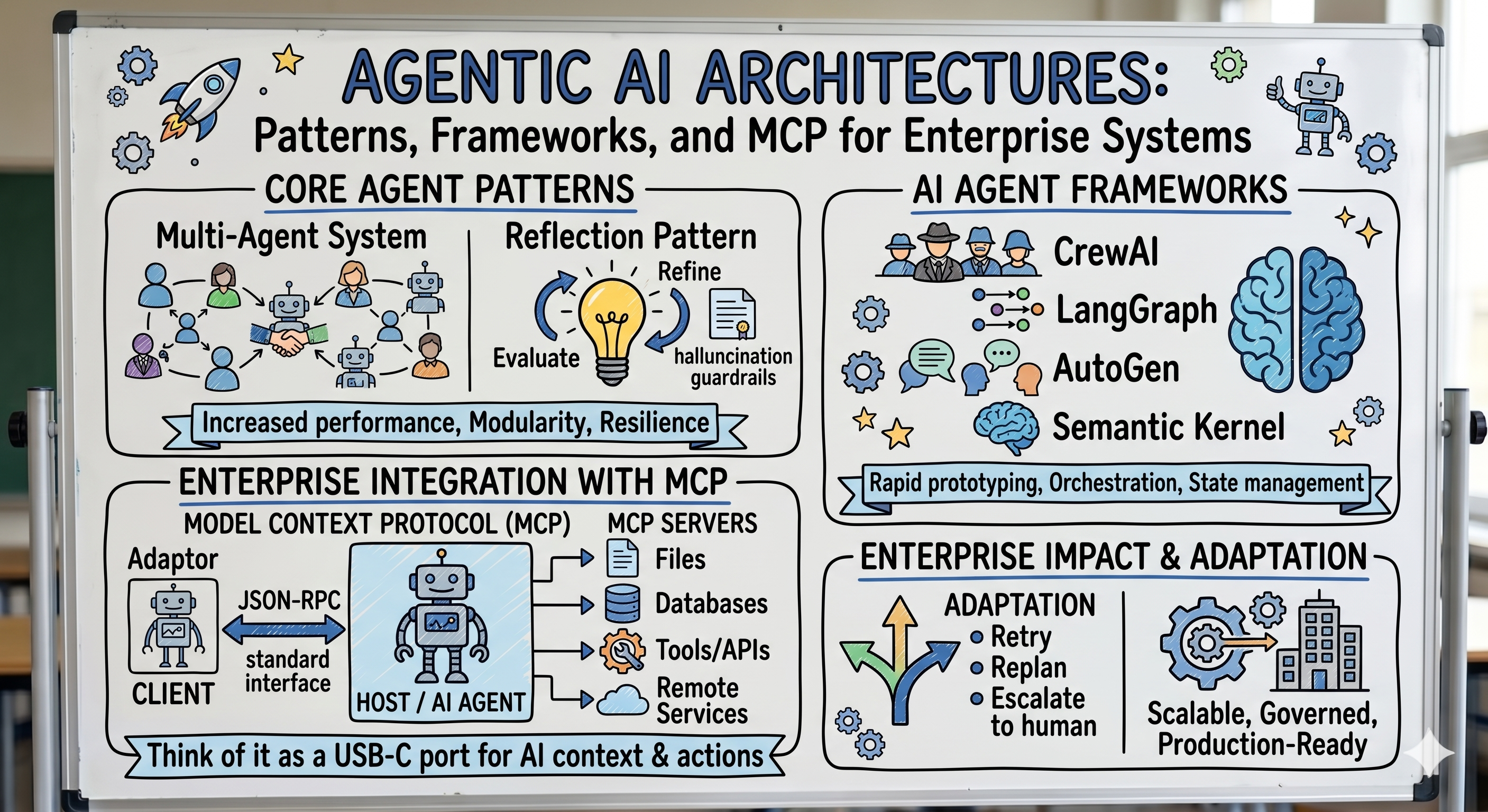
tutorial AI ส่วนใหญ่สอนแค่เรียก API แล้วรับ response กลับมา แบบนั้นยังไม่ใช่ agent agent คือระบบที่ รับรู้ (perceive) วางแผน (plan) ลงมือทำ (act) และ ปรับตัว (adapt) ได้เอง โดยหยิบ tool, memory และ agent ตัวอื่นมาช่วย งานที่ LLM call ครั้งเดียวทำไม่ไหว agent ทำได้
ปี 2026 ถ้าจะใส่ AI เข้าไปใน software ระดับ enterprise คำตอบหลักคือ agentic AI ไม่ใช่ chatbot ไม่ใช่ช่อง search ที่มี AI อยู่ข้างหลัง แต่เป็นระบบที่ทำงานเองได้ทั้งเส้น ค้นข้อมูล เขียน code ทดสอบ เปิด ticket แจ้งทีมใน Slack channel และแก้ตัวเองได้เมื่อมีอะไรพัง โดยไม่ต้องมีคนคอยคุมทุก step
โพสต์นี้รวมไว้ครบในที่เดียว ทั้ง design pattern ทุกตัว framework หลักทุกตัว Model Context Protocol ที่ค่อยๆ กลายเป็นตัวกลางของทั้ง ecosystem และวิธีต่อทั้งหมดนี้เข้ากับระบบ enterprise ที่รันจริงใน production
อ่านโพสต์นี้ยังไงดี:
- เพิ่งเริ่มกับ agent? อ่าน Part 1–2 ตามลำดับ pattern ทั้งแปดตัวเป็นฐานของทุกเรื่องที่ตามมา
- กำลังเลือก framework? ไปที่ Part 3 กับ 8 ได้เลย
- ต้องต่อเข้ากับระบบ enterprise? อ่าน Part 5–6 (MCP และ production architecture)
- ต้องมีอะไรก่อน: เขียน Python คล่อง ไม่จำเป็นต้องเคยทำ agent หรือใช้ LangChain มาก่อน
เรื่อง code ในโพสต์: ตัวอย่างย่อไว้ให้อ่านง่าย helper อย่าง
generate(),web_search()และ worker node เป็นแค่ stub ที่คุณต้อง implement เอง มีสองเรื่องที่ code จริงควรทำแต่ตัวอย่างสั้นๆ ข้ามไป ข้อแรก ให้เลือก text block จาก type (next(b.text for b in response.content if b.type == "text")) แทนการหยิบcontent[0]ตรงๆ เพราะ response อาจมี thinking block หรือ tool-use block ปนมาด้วย ข้อสอง อย่าeval()input ที่ model สร้างขึ้นนอก sandbox เด็ดขาด
Part 1: ระบบแบบไหนถึงเรียกว่า "Agentic"
คุณสมบัติสี่ข้อของ Agent
AI agent ตัวจริงต้องมีสี่อย่างนี้ LLM chain ธรรมดาไม่มีสักข้อ:
┌─────────────────────────────────────────────────────────────┐
│                                                             │
│  1. PERCEPTION    Reads its environment                     │
│                   (files, APIs, databases, user input)      │
│                                                             │
│  2. PLANNING      Decomposes goals into steps               │
│                   (ReACT, CoT, Tree of Thought)             │
│                                                             │
│  3. ACTION        Executes tools to change the world        │
│                   (writes files, calls APIs, runs code)     │
│                                                             │
│  4. ADAPTATION    Observes results and adjusts              │
│                   (retry, replan, escalate to human)        │
│                                                             │
└─────────────────────────────────────────────────────────────┘
ไล่ระดับ: Chain → Agent → Multi-Agent System
ไม่ใช่ทุก AI workflow ที่ต้องเป็น agent เต็มตัว ดูก่อนว่างานของคุณอยู่ระดับไหนในสามระดับนี้ แล้วค่อยเลือก architecture:
CHAIN (deterministic)
  Input → Step A → Step B → Step C → Output
  Example: PDF text → extract → summarise → translate
  Use when: fixed workflow, predictable inputs

SINGLE AGENT (adaptive loop)
  Input → Think → Act → Observe → Think → Act → ... → Output
  Example: "Research competitor pricing and write a report"
  Use when: open-ended task, requires tool use

MULTI-AGENT SYSTEM (collaborative)
  Orchestrator → [Agent A || Agent B || Agent C] → Synthesise → Output
  Example: "Audit our entire codebase for security issues"
  Use when: task too large/complex for one agent, parallelism needed
ทำไม Enterprise ถึงหันมาใช้ "Agentic" กันหมด
ปี 2026 มีสามเรื่องเกิดขึ้นพร้อมกัน agentic AI เลยพร้อมใช้งานใน enterprise:
- LLM เชื่อถือได้มากพอแล้ว — Claude Opus 4.x / Sonnet 4.6, GPT-5 และ Gemini 3 ทำตามคำสั่งซับซ้อนได้แม่น และทำงานยาวๆ หลาย step ต่อเนื่องได้ ถ้ามี grounded retrieval คอยหนุน hallucination ก็เกิดน้อยมาก
- Tool-calling กลายเป็นของมาตรฐาน — model หลักทุกตัวรองรับ function-calling แบบ structured ในตัว agent เลือก tool และเรียกใช้ได้แม่นยำ
- MCP ทำให้ integration เหลือมาตรฐานเดียว — พอมี Model Context Protocol (ดู Part 5) เรื่องต่อ agent เข้ากับระบบ enterprise ก็มีวิธีมาตรฐานให้ใช้แล้ว ไม่ต้องคิดใหม่ทุกครั้ง
Part 2: Agentic Design Pattern แปดตัวที่ต้องรู้
agentic system ใน production ทุกตัวประกอบขึ้นจาก pattern ชุดเล็กๆ ที่เจอซ้ำไปซ้ำมา เข้าใจแปดตัวนี้ให้แม่น แล้วคุณจะออกแบบ agentic architecture แบบไหนก็ได้
Pattern 1: ReACT (Reason + Act)
pattern ตั้งต้นของทุกอย่าง แต่ละรอบทำแค่นี้: คิดว่าจะทำอะไร ลงมือทำ ดูผล แล้ว วนใหม่
┌──────────────────────────────────────────────────────┐
│                   ReACT Loop                          │
│                                                      │
│  Question/Goal                                       │
│       ↓                                              │
│  ┌──────────┐   Thought: "I need to look this up"   │
│  │  REASON  │ ─────────────────────────────────────> │
│  └────┬─────┘                                        │
│       ↓                                              │
│  ┌──────────┐   Action: search("current BTC price") │
│  │   ACT    │ ─────────────────────────────────────> │
│  └────┬─────┘                                        │
│       ↓                                              │
│  ┌──────────┐   Observation: "$68,420"               │
│  │ OBSERVE  │ ─────────────────────────────────────> │
│  └────┬─────┘                                        │
│       ↓                                              │
│  Thought: "I have the data. Now I can answer."       │
│       ↓                                              │
│  Final Answer                                        │
└──────────────────────────────────────────────────────┘
from anthropic import Anthropic

client = Anthropic()
tools = [
    {
        "name": "web_search",
        "description": "Search the web for current information",
        "input_schema": {
            "type": "object",
            "properties": {"query": {"type": "string"}},
            "required": ["query"],
        },
    },
    {
        "name": "calculator",
        "description": "Evaluate a mathematical expression",
        "input_schema": {
            "type": "object",
            "properties": {"expression": {"type": "string"}},
            "required": ["expression"],
        },
    },
]

def run_tool(name: str, inputs: dict) -> str:
    if name == "web_search":
        return search_web(inputs["query"])      # real implementation
    if name == "calculator":
        # ⚠️ eval() on model output is a code-injection hole — demo only.
        # In production use a safe evaluator like simpleeval, or a sandbox.
        return str(eval(inputs["expression"]))

def react_agent(goal: str, max_iterations: int = 10) -> str:
    messages = [{"role": "user", "content": goal}]

    for _ in range(max_iterations):
        response = client.messages.create(
            model="claude-sonnet-4-6",
            max_tokens=4096,
            tools=tools,
            messages=messages,
        )

        # If no tool call, we have the final answer
        if response.stop_reason == "end_turn":
            return response.content[0].text

        # Execute tool calls and feed results back
        messages.append({"role": "assistant", "content": response.content})
        tool_results = []

        for block in response.content:
            if block.type == "tool_use":
                result = run_tool(block.name, block.input)
                tool_results.append({
                    "type": "tool_result",
                    "tool_use_id": block.id,
                    "content": result,
                })

        messages.append({"role": "user", "content": tool_results})

    return "Max iterations reached."
เหมาะกับ: งานค้นคว้าแบบปลายเปิด ปัญหาที่ต้องแก้หลาย step และงานที่ยังไม่รู้ล่วงหน้าว่าทางไปสู่คำตอบเป็นแบบไหน
ทุกวันนี้แทบไม่ต้องเขียน loop นี้เองแล้ว Anthropic Python SDK มี tool runner (beta) ที่จัดการ loop ทั้งหมดให้ แค่ใส่
@beta_toolบน function แล้วส่งเข้าclient.beta.messages.tool_runner(...)SDK จะสร้าง schema จาก type hint เรียก tool ส่งผลกลับให้ model และหยุดเองเมื่อ model ทำงานเสร็จ จะเขียน loop เองแบบข้างบนก็ต่อเมื่ออยากคุมรายละเอียด เช่น custom logging, approval gate หรือ conditional execution
Pattern 2: Plan-and-Execute
แยกการวางแผนออกจากการลงมือทำ agent ที่เป็น planner ร่างแผนออกมาเป็น step แล้วให้ agent ที่เป็น executor รันทีละ step ถ้าผลที่ได้ไม่เป็นไปตามคาด planner ก็วางแผนใหม่ได้
Goal → [PLANNER] → [Step 1, Step 2, Step 3, Step 4]
                         ↓        ↓        ↓        ↓
                    [EXEC-1] [EXEC-2] [EXEC-3] [EXEC-4]
                         ↓        ↓        ↓        ↓
                    Results → [PLANNER re-evaluates] → Final Answer
from dataclasses import dataclass

@dataclass
class Step:
    description: str
    tool: str
    completed: bool = False
    result: str = ""

def plan(goal: str) -> list[Step]:
    """Ask the LLM to decompose a goal into concrete steps."""
    response = client.messages.create(
        model="claude-sonnet-4-6",
        max_tokens=1024,
        system="""You are a planner. Given a goal, output a JSON array of steps.
Each step: {"description": "...", "tool": "web_search|calculator|code_exec|file_write"}""",
        messages=[{"role": "user", "content": f"Plan: {goal}"}],
    )
    import json
    steps_data = json.loads(response.content[0].text)
    return [Step(**s) for s in steps_data]

def execute(steps: list[Step]) -> list[Step]:
    """Execute each step and store the result."""
    for step in steps:
        step.result = run_tool(step.tool, {"query": step.description})
        step.completed = True
        print(f"  ✓ {step.description[:60]}")
    return steps

def synthesise(goal: str, steps: list[Step]) -> str:
    """Combine all results into a final answer."""
    context = "\n".join(f"Step: {s.description}\nResult: {s.result}" for s in steps)
    response = client.messages.create(
        model="claude-sonnet-4-6",
        max_tokens=2048,
        messages=[{"role": "user", "content": f"Goal: {goal}\n\nEvidence:\n{context}\n\nAnswer:"}],
    )
    return response.content[0].text

def plan_and_execute(goal: str) -> str:
    steps = plan(goal)
    steps = execute(steps)
    return synthesise(goal, steps)
เหมาะกับ: งานค้นคว้าที่ซับซ้อน workflow หลาย step ที่โครงสร้างคาดเดาได้ และงานที่อยากให้ผู้ใช้เห็นแผนก่อนเริ่มรัน
Pattern 3: Reflection (Self-Critique)
agent เขียน output ออกมา แล้ววิจารณ์งานตัวเอง จากนั้นแก้ให้ดีขึ้น วนแบบนี้จนคุณภาพผ่านเกณฑ์หรือครบจำนวนรอบที่ตั้งไว้
Task → [GENERATOR] → Draft
                         ↓
                    [CRITIC]  ← evaluates quality, flags issues
                         ↓
               Issues found? → YES → [GENERATOR] refines → loop
                         ↓
                         NO → Final Output
def reflection_agent(task: str, quality_threshold: float = 0.85,
                     max_rounds: int = 3) -> str:

    draft = generate(task)

    for round_num in range(max_rounds):
        # Critique the draft
        critique = client.messages.create(
            model="claude-sonnet-4-6",
            max_tokens=1024,
            system="""You are a quality evaluator. Score the response 0.0-1.0 and list issues.
Output JSON: {"score": 0.75, "issues": ["issue 1", "issue 2"], "suggestions": ["..."]}""",
            messages=[{
                "role": "user",
                "content": f"Task: {task}\n\nResponse to evaluate:\n{draft}"
            }],
        )

        import json
        evaluation = json.loads(critique.content[0].text)
        score = evaluation["score"]
        print(f"  Round {round_num + 1}: score={score:.2f}")

        if score >= quality_threshold:
            break

        # Refine based on critique
        issues = "\n".join(f"- {i}" for i in evaluation["issues"])
        draft = generate(
            f"Improve this response.\nTask: {task}\n\nCurrent response:\n{draft}\n\nIssues:\n{issues}"
        )

    return draft
เหมาะกับ: งานเขียน (report, code, email) งานที่วัดคุณภาพได้ และ content ที่ต้องผ่านเกณฑ์ที่กำหนดไว้
Pattern 4: Tool-Use Specialisation
agent ตัวเดียวที่มี tool หลากหลายให้เลือก และทุกตัวมีคำอธิบายชัดเจน หลักสำคัญคือ tool ต้องเอามาประกอบกันได้ และต้องมี description ที่แม่น เพราะ LLM อ่าน description เพื่อตัดสินว่าจะหยิบ tool ไหนมาใช้ตอนไหน
ENTERPRISE_TOOLS = [
    {
        "name": "query_crm",
        "description": "Query Salesforce CRM for customer/deal data. Use when you need customer info, deal status, account history, or contact details.",
        "input_schema": {
            "type": "object",
            "properties": {
                "soql": {"type": "string", "description": "SOQL query string"},
            },
            "required": ["soql"],
        },
    },
    {
        "name": "create_jira_ticket",
        "description": "Create a Jira issue. Use when a bug, task, or story needs to be tracked.",
        "input_schema": {
            "type": "object",
            "properties": {
                "project":     {"type": "string"},
                "issue_type":  {"type": "string", "enum": ["Bug", "Story", "Task"]},
                "summary":     {"type": "string"},
                "description": {"type": "string"},
                "priority":    {"type": "string", "enum": ["Low", "Medium", "High", "Critical"]},
            },
            "required": ["project", "issue_type", "summary"],
        },
    },
    {
        "name": "send_slack_message",
        "description": "Send a Slack message to a channel or user. Use to notify team members of actions, results, or alerts.",
        "input_schema": {
            "type": "object",
            "properties": {
                "channel": {"type": "string", "description": "Channel name (e.g. #engineering) or user ID"},
                "message": {"type": "string"},
            },
            "required": ["channel", "message"],
        },
    },
    {
        "name": "run_sql_query",
        "description": "Execute a read-only SQL query against the analytics database. Use for business metrics, usage data, or reporting.",
        "input_schema": {
            "type": "object",
            "properties": {
                "sql": {"type": "string"},
                "database": {"type": "string", "enum": ["analytics", "reporting", "warehouse"]},
            },
            "required": ["sql", "database"],
        },
    },
]
หลักสำคัญ: description ของ tool เป็นส่วนหนึ่งของความฉลาดของ agent ถ้าเขียนกว้างๆ อย่าง "query database" agent ก็ต้องเดาเอา แต่ถ้าเขียนชัดอย่าง "Execute a read-only SQL query... use for business metrics" agent จะรู้เลยว่าควรใช้ tool นี้ตอนไหน
Pattern 5: Multi-Agent Supervisor
agent ตัว Supervisor รับเป้าหมายมา แล้วแบ่ง subtask ส่งต่อให้ agent ตัว Worker ที่ถนัดแต่ละด้าน worker ทำเสร็จก็ส่งผลกลับมาให้ Supervisor รวบรวมเป็นคำตอบสุดท้าย
User Goal
    ↓
[SUPERVISOR]
    ├── "Research task" ──────→ [RESEARCH AGENT]   → web search, papers
    ├── "Data analysis" ──────→ [ANALYST AGENT]    → SQL, statistics
    ├── "Write report" ───────→ [WRITER AGENT]     → markdown, formatting
    └── "Review output" ──────→ [CRITIC AGENT]     → quality check
                                        ↓
                             [SUPERVISOR] synthesises → Final Output
from langgraph.graph import StateGraph, END
from typing import TypedDict, Annotated
import operator

class AgentState(TypedDict):
    goal:        str
    messages:    Annotated[list, operator.add]
    next_agent:  str
    final_answer: str

def supervisor_node(state: AgentState) -> AgentState:
    """Decide which worker agent to call next, or END."""
    response = client.messages.create(
        model="claude-sonnet-4-6",
        max_tokens=256,
        system="""You are a supervisor. Given the goal and progress so far,
decide which agent to call next: RESEARCH, ANALYST, WRITER, or FINISH.
Output only the agent name.""",
        messages=[
            {"role": "user", "content":
             f"Goal: {state['goal']}\nProgress: {state['messages'][-3:]}"}
        ],
    )
    next_agent = response.content[0].text.strip()
    return {**state, "next_agent": next_agent}

def build_supervisor_graph() -> StateGraph:
    graph = StateGraph(AgentState)

    graph.add_node("supervisor", supervisor_node)
    graph.add_node("research",   research_agent_node)
    graph.add_node("analyst",    analyst_agent_node)
    graph.add_node("writer",     writer_agent_node)

    graph.set_entry_point("supervisor")

    graph.add_conditional_edges(
        "supervisor",
        lambda s: s["next_agent"].lower(),
        {
            "research": "research",
            "analyst":  "analyst",
            "writer":   "writer",
            "finish":   END,
        },
    )
    # All workers return to supervisor after completing
    for worker in ["research", "analyst", "writer"]:
        graph.add_edge(worker, "supervisor")

    return graph.compile()
Pattern 6: Parallel Fan-Out / Fan-In
ส่ง agent หลายตัวออกไปพร้อมกัน แต่ละตัวเก็บข้อมูลจากคนละแหล่ง แล้วค่อยเอาผลมารวมกัน เร็วกว่ารันทีละตัวแบบ sequential หลายเท่า
                     ┌─ [Agent: SEC filings]   ─┐
                     ├─ [Agent: News articles]  ─┤
Goal → [DISPATCHER] ─┼─ [Agent: Analyst reports]─┼─ [MERGER] → Answer
                     ├─ [Agent: Social sentiment]─┤
                     └─ [Agent: Financial data]  ─┘
         (all run simultaneously)
import asyncio
from anthropic import AsyncAnthropic

async_client = AsyncAnthropic()

async def research_agent(topic: str, source: str) -> dict:
    """One parallel worker — researches from a specific source."""
    response = await async_client.messages.create(
        model="claude-sonnet-4-6",
        max_tokens=1024,
        messages=[{
            "role": "user",
            "content": f"Research '{topic}' using {source}. Return key findings as JSON."
        }],
    )
    return {"source": source, "findings": response.content[0].text}

async def parallel_research(topic: str) -> str:
    """Fan-out: all sources queried simultaneously."""
    sources = [
        "SEC filings and official financial reports",
        "Recent news articles (last 30 days)",
        "Analyst research reports",
        "Social media sentiment",
        "Historical price and volume data",
    ]

    # All agents run concurrently — total time = slowest agent, not sum of all
    results = await asyncio.gather(*[
        research_agent(topic, source) for source in sources
    ])

    # Fan-in: merge all findings
    combined = "\n\n".join(
        f"## {r['source']}\n{r['findings']}" for r in results
    )
    synthesis = await async_client.messages.create(
        model="claude-sonnet-4-6",
        max_tokens=2048,
        messages=[{
            "role": "user",
            "content": f"Synthesise these research findings on '{topic}':\n\n{combined}"
        }],
    )
    return synthesis.content[0].text
ผลด้าน performance: agent 5 ตัว ตัวละ 3 วินาที ถ้ารันต่อกันแบบ sequential ใช้ 15 วินาที ถ้ารันแบบ parallel ใช้ราว 3 วินาที เร็วขึ้น 5 เท่า
Pattern 7: Human-in-the-Loop (HITL)
agent หยุดรอที่ checkpoint ที่กำหนดไว้ ต้องให้คน approve ก่อนถึงจะไปต่อ จำเป็นมากกับ action ที่พลาดแล้วเสียหายหนัก เช่น ส่ง email, ทำธุรกรรมการเงิน หรือ deploy code
Agent working autonomously
         ↓
  [CHECKPOINT: High-risk action detected]
         ↓
  Pause → Notify human → Wait for approval
         ↓
  APPROVED → Continue          REJECTED → Replan
from typing import TypedDict
from langgraph.checkpoint.memory import MemorySaver
from langgraph.graph import StateGraph
from langgraph.types import interrupt, Command   # interrupt lives in langgraph.types

class WorkflowState(TypedDict):
    task:            str
    draft_action:    str
    human_approved:  bool
    result:          str

def plan_action(state: WorkflowState) -> WorkflowState:
    """Agent plans what action to take."""
    # ... generates draft_action
    return {**state, "draft_action": "Send email to 50,000 customers about price change"}

def human_review(state: WorkflowState) -> WorkflowState:
    """Pause for a human — interrupt() suspends the graph at this exact point.
    The value passed to Command(resume=...) becomes interrupt()'s return value."""
    approved: bool = interrupt(
        {"question": "Approve this action?", "action": state["draft_action"]}
    )
    return {**state, "human_approved": approved}

def execute_or_replan(state: WorkflowState) -> WorkflowState:
    if state["human_approved"]:
        result = execute_action(state["draft_action"])
        return {**state, "result": result}
    else:
        return {**state, "draft_action": "", "result": "Action rejected — replanning"}

# First run — executes until interrupt(), then suspends and checkpoints:
config = {"configurable": {"thread_id": "task-001"}}
app.invoke({"task": "Announce the price change"}, config=config)

# Later (even after a restart) — resume with the human's decision:
app.invoke(Command(resume=True), config=config)    # or Command(resume=False)
กฎสำหรับ enterprise: action ไหนของ agent ที่ ย้อนกลับไม่ได้ หรือ กระทบคนภายนอก ต้องผ่าน HITL checkpoint ก่อนเสมอ
Pattern 8: Memory-Augmented Agent
agent ที่แบ่ง memory เป็นหลายชั้นชัดเจน เลยจำ context ข้าม session ได้ เรียนรู้จาก interaction ที่ผ่านมา และดึงข้อมูลจาก knowledge graph ส่วนตัวมาใช้ได้
User Message
      ↓
[MEMORY RETRIEVAL]
  ├── Short-term:  current session context (last N turns)
  ├── Working:     task-specific scratchpad (current task state)
  └── Long-term:   semantic search over past interactions + learned facts
      ↓
[AGENT] ← enriched context
      ↓
[MEMORY WRITE] → updates relevant memory tiers
      ↓
Response
import json
from datetime import datetime, timezone
from anthropic import Anthropic

client = Anthropic()

class AgentMemory:
    def __init__(self, vector_store, user_id: str):
        self.vector_store = vector_store
        self.user_id = user_id
        self.short_term: list[dict] = []     # last 20 messages
        self.working: dict = {}              # scratchpad for current task

    def retrieve(self, query: str, top_k: int = 5) -> str:
        """Pull relevant long-term memories by semantic similarity."""
        results = self.vector_store.search(
            query=query, filter={"user_id": self.user_id}, top_k=top_k
        )
        if not results:
            return ""
        return "\n".join(f"- {r['content']}" for r in results)

    def store(self, interaction: str) -> None:
        """Summarise and store important facts to long-term memory."""
        response = client.messages.create(
            model="claude-haiku-4-5",   # cheap model for summarisation
            max_tokens=256,
            system="Extract key facts worth remembering from this interaction. Output as JSON array of strings.",
            messages=[{"role": "user", "content": interaction}],
        )
        facts = json.loads(response.content[0].text)
        for fact in facts:
            self.vector_store.upsert({
                "content": fact,
                "user_id": self.user_id,
                "timestamp": datetime.now(timezone.utc).isoformat(),
            })

    def get_context(self, current_query: str) -> str:
        long_term = self.retrieve(current_query)
        recent = self.short_term[-6:]   # last 3 turns
        return f"""
Relevant past context:
{long_term}

Recent conversation:
{json.dumps(recent, indent=2)}
"""

def memory_agent(query: str, memory: AgentMemory) -> str:
    context = memory.get_context(query)
    response = client.messages.create(
        model="claude-sonnet-4-6",
        max_tokens=2048,
        system=f"You are a helpful assistant with memory.\n\n{context}",
        messages=[{"role": "user", "content": query}],
    )
    answer = response.content[0].text
    memory.short_term.append({"role": "user", "content": query})
    memory.short_term.append({"role": "assistant", "content": answer})
    memory.store(f"Q: {query}\nA: {answer}")   # async in production
    return answer
Part 3: Agent Framework หลักในปี 2026
LangGraph — Orchestration แบบ Stateful บน Graph
LangGraph มอง agent workflow เป็น directed graph node คือ LLM call หรือ tool ส่วน edge กำหนดว่าจะไปทางไหนต่อตามเงื่อนไข state เก็บต่อเนื่องไว้ทุก step เลย pause/resume แตก branch หรือวน cycle ได้
from langgraph.graph import StateGraph, END
from typing import TypedDict, Literal

class ResearchState(TypedDict):
    query:        str
    search_results: list[str]
    analysis:     str
    report:       str
    quality_ok:   bool

def search_node(state: ResearchState) -> ResearchState:
    results = [web_search(state["query"])]
    return {**state, "search_results": results}

def analyse_node(state: ResearchState) -> ResearchState:
    combined = "\n".join(state["search_results"])
    analysis = llm_call(f"Analyse: {combined}")
    return {**state, "analysis": analysis}

def write_node(state: ResearchState) -> ResearchState:
    report = llm_call(f"Write a report based on: {state['analysis']}")
    return {**state, "report": report}

def review_node(state: ResearchState) -> ResearchState:
    score = evaluate_quality(state["report"])
    return {**state, "quality_ok": score >= 0.8}

def route_after_review(state: ResearchState) -> Literal["write", "__end__"]:
    return "__end__" if state["quality_ok"] else "write"

# Build the graph
graph = StateGraph(ResearchState)
graph.add_node("search",  search_node)
graph.add_node("analyse", analyse_node)
graph.add_node("write",   write_node)
graph.add_node("review",  review_node)

graph.set_entry_point("search")
graph.add_edge("search",  "analyse")
graph.add_edge("analyse", "write")
graph.add_edge("write",   "review")
graph.add_conditional_edges("review", route_after_review,
                             {"write": "write", "__end__": END})

app = graph.compile(checkpointer=MemorySaver())
LangGraph เก่งเรื่อง: workflow แบบ stateful ที่ซับซ้อน, human-in-the-loop, cyclic graph (retry loop) และ process ที่รันนานและต้องรอดจาก failure ให้ได้
AutoGen — Multi-Agent Conversation (ตอนนี้เข้า maintenance mode แล้ว)
AutoGen (Microsoft) มอง agent เป็น conversational actor ที่คุยกันผ่าน message ใน group chat จะมี manager คอยเลือกว่าใครพูดต่อ
สถานะปี 2026: AutoGen เข้า maintenance mode อย่างเป็นทางการแล้ว ไม่มี feature ใหม่ และ community รับไปดูแลต่อ Microsoft แนะนำให้ย้ายไปใช้ Microsoft Agent Framework ซึ่งต่อยอดแนวคิด multi-agent orchestration จาก AutoGen มี API ที่ stable รองรับ model หลาย provider และทำงานร่วมกับ A2A/MCP ได้ pattern ข้างล่างยังควรเรียนไว้ (conversational actor + group chat manager เอาไปใช้ที่อื่นได้ตรงๆ) แต่ project ใหม่ให้เริ่มบน Agent Framework
import autogen

config_list = [{"model": "claude-sonnet-4-6", "api_key": "...", "api_type": "anthropic"}]
llm_config = {"config_list": config_list, "temperature": 0}

# Define specialist agents
engineer = autogen.AssistantAgent(
    name="Engineer",
    system_message="You write Python code to solve tasks. Always include tests.",
    llm_config=llm_config,
)
reviewer = autogen.AssistantAgent(
    name="CodeReviewer",
    system_message="You review code for bugs, security issues, and best practices. Be specific.",
    llm_config=llm_config,
)
product_manager = autogen.AssistantAgent(
    name="ProductManager",
    system_message="You verify that the solution meets the requirements and is production-ready.",
    llm_config=llm_config,
)
user_proxy = autogen.UserProxyAgent(
    name="UserProxy",
    human_input_mode="TERMINATE",          # only ask human at the end
    max_consecutive_auto_reply=10,
    code_execution_config={"work_dir": "/tmp/autogen"},
    is_termination_msg=lambda x: "APPROVED" in x.get("content", ""),
)

# Group chat — manager decides who speaks next
group_chat = autogen.GroupChat(
    agents=[user_proxy, engineer, reviewer, product_manager],
    messages=[],
    max_round=20,
)
manager = autogen.GroupChatManager(groupchat=group_chat, llm_config=llm_config)

# Start the conversation
user_proxy.initiate_chat(
    manager,
    message="Build a FastAPI endpoint that validates email addresses using regex and returns whether they're valid.",
)
pattern นี้เก่งเรื่อง: งาน software engineering, code review workflow, งานที่ต้องปรึกษาผู้เชี่ยวชาญหลายด้าน และงานที่ได้ประโยชน์จากการให้ agent ถกเถียงและวิจารณ์กันเอง ถ้าเริ่มสร้างใหม่ ให้ทำบน Microsoft Agent Framework แทน AutoGen ตัวเดิม
CrewAI — ทีม Agent ที่แบ่งงานตาม Role
CrewAI คิดแบบ สมาชิกใน crew แต่ละตัวมี role, goal และ backstory ของตัวเอง เหมือนแจกงานให้ทีมที่เป็นคนจริงๆ
from crewai import Agent, Task, Crew, Process
from crewai_tools import SerperDevTool, FileWriterTool

search_tool = SerperDevTool()
file_tool   = FileWriterTool()

# Define the crew
analyst = Agent(
    role="Senior Market Research Analyst",
    goal="Uncover cutting-edge developments and market opportunities",
    backstory="""You are an expert analyst with 15 years of experience in
    tech market research. You synthesise complex data into clear insights.""",
    tools=[search_tool],
    verbose=True,
)
writer = Agent(
    role="Tech Content Strategist",
    goal="Craft compelling, factually accurate market reports",
    backstory="""You are a seasoned writer who transforms technical analysis
    into engaging reports that executive audiences can act on.""",
    tools=[file_tool],
    verbose=True,
)

# Define tasks
research_task = Task(
    description="Research the current state of {topic}. Focus on: market size, key players, recent developments, growth drivers, and risks.",
    expected_output="A comprehensive research brief with key findings, data points, and source citations.",
    agent=analyst,
)
writing_task = Task(
    description="Using the research brief, write a 1,500-word executive market report on {topic}.",
    expected_output="A professional market report with executive summary, key findings, competitive landscape, and recommendations.",
    agent=writer,
    output_file="market_report.md",
)

# Assemble and run the crew
crew = Crew(
    agents=[analyst, writer],
    tasks=[research_task, writing_task],
    process=Process.sequential,
    verbose=True,
)
result = crew.kickoff(inputs={"topic": "Agentic AI platforms for enterprise"})
CrewAI เก่งเรื่อง: content generation pipeline, research workflow และงานที่แบ่งตาม role แบบทีมคนได้ลงตัว
Semantic Kernel — Enterprise SDK สำหรับ .NET/Python
Semantic Kernel ของ Microsoft ออกแบบมาให้ต่อกับระบบ enterprise โดยเฉพาะ มี strong typing มี plugin (ชุดของ tool) และรองรับระบบ enterprise อย่าง Azure, Microsoft 365 และ Copilot ได้เต็มที่
import asyncio
from semantic_kernel import Kernel
from semantic_kernel.connectors.ai.anthropic import AnthropicChatCompletion
from semantic_kernel.functions import kernel_function, KernelArguments

kernel = Kernel()
kernel.add_service(AnthropicChatCompletion(
    ai_model_id="claude-sonnet-4-6",
    api_key="...",
))

# Define a plugin (collection of tools)
class SalesforcePlugin:
    @kernel_function(description="Get customer details by ID")
    async def get_customer(self, customer_id: str) -> str:
        return await salesforce_client.get_contact(customer_id)

    @kernel_function(description="List open deals for a customer")
    async def get_deals(self, customer_id: str) -> str:
        return await salesforce_client.get_opportunities(customer_id)

kernel.add_plugin(SalesforcePlugin(), plugin_name="Salesforce")

# The agent can now call Salesforce naturally in any prompt
result = await kernel.invoke_prompt(
    "Get the details for customer C-12345 and list their open deals. "
    "Summarise in 3 bullet points.",
    KernelArguments(),
)
Semantic Kernel เก่งเรื่อง: ต่อกับ Microsoft stack ระดับ enterprise, Azure OpenAI, plugin architecture ที่มีโครงสร้างชัด และ environment ที่เป็น .NET (หมายเหตุ: ความสามารถด้าน agent ของ Semantic Kernel ก็กำลังย้ายไปรวมใน Microsoft Agent Framework เหมือนกัน SK ยัง support อยู่ แต่ถ้าอยากรู้ว่าระยะยาว Microsoft จะพา agent ไปทางไหน ให้ตาม project นั้นไว้)
Part 4: เจาะลึก LangGraph — State Machine ระดับ Enterprise
LangGraph ควรได้ดูละเอียดกว่าตัวอื่น เพราะ enterprise agentic system ที่รันใน production ปี 2026 ส่วนใหญ่สร้างบน framework นี้ แนวคิดหลักคือมอง agent เป็น state machine ที่มี persistence
Persistent State และ Checkpointing
from langgraph.checkpoint.postgres import PostgresSaver
from langgraph.graph import StateGraph

# Production: persist state to PostgreSQL
# → agent survives server restarts, long tasks, human review pauses
conn_string = "postgresql://user:pass@db:5432/agents"
checkpointer = PostgresSaver.from_conn_string(conn_string)
checkpointer.setup()   # creates checkpoint tables

app = graph.compile(checkpointer=checkpointer)

# Run with a thread_id — same thread_id resumes where it left off
config = {"configurable": {"thread_id": "task-abc-123"}}

# First run
result1 = app.invoke({"goal": "Analyse Q1 sales data"}, config=config)

# Resume later (even after server restart)
result2 = app.invoke({"human_feedback": "Focus on APAC region"}, config=config)
Subgraph — Agent Module ที่ประกอบกันได้
# Build reusable agent modules as subgraphs
def build_research_subgraph() -> StateGraph:
    sg = StateGraph(ResearchState)
    sg.add_node("search", search_node)
    sg.add_node("extract", extract_node)
    sg.set_entry_point("search")
    sg.add_edge("search", "extract")
    sg.set_finish_point("extract")
    return sg.compile()

def build_report_subgraph() -> StateGraph:
    sg = StateGraph(ReportState)
    # ... similar structure
    return sg.compile()

# Compose them into a larger graph
main_graph = StateGraph(MainState)
main_graph.add_node("research", build_research_subgraph())
main_graph.add_node("report",   build_report_subgraph())
main_graph.add_edge("research", "report")
Streaming ความคืบหน้าของ Agent
# Stream each step's output to the user in real time
async for event in app.astream_events(
    {"goal": "Research competitor pricing"},
    config={"configurable": {"thread_id": "t-001"}},
    version="v2",
):
    kind = event["event"]
    if kind == "on_chat_model_stream":
        chunk = event["data"]["chunk"].content
        print(chunk, end="", flush=True)   # real-time token stream
    elif kind == "on_tool_start":
        print(f"\n🔧 Using tool: {event['name']}")
    elif kind == "on_tool_end":
        print(f"✓ Tool complete: {event['name']}")
Part 5: Model Context Protocol (MCP) — Integration Layer กลางที่ใช้ได้กับทุกตัว
MCP คืออะไร และทำไมต้องสนใจ
Model Context Protocol เป็น open standard ที่ Anthropic เริ่มพัฒนา ตอนนี้ OpenAI, Google, Microsoft และ AI lab ใหญ่เกือบทุกเจ้ารองรับแล้ว MCP กำหนดวิธีมาตรฐานเดียวให้ AI agent ต่อเข้ากับ tool และแหล่งข้อมูลภายนอก
ก่อนมี MCP: agent ทุกตัวต้องเขียน integration code แยกให้แหล่งข้อมูลแต่ละแหล่ง Slack integration ที่ทำไว้ให้ LangChain เอาไปใช้กับ AutoGen ไม่ได้ Postgres tool ที่เขียนให้ CrewAI ก็ต้องเขียนใหม่ถ้าจะใช้กับ LangGraph
หลังมี MCP: MCP server ตัวเดียว ใช้ได้กับทุก agent และทุก framework ที่รองรับ MCP
BEFORE MCP:                          AFTER MCP:

Agent A ──custom──→ Salesforce       Agent A ──┐
Agent A ──custom──→ Jira             Agent B ──┼──→ [MCP Client] → [MCP Server] → Salesforce
Agent A ──custom──→ Postgres         Agent C ──┤                → [MCP Server] → Jira
                                     Any LLM ──┘                → [MCP Server] → Postgres
Agent B ──custom──→ Salesforce
(rewrite everything)
MCP Architecture
┌────────────────────────────────────────────────────┐
│                   MCP Client                        │
│  (Claude Desktop, LangChain, LangGraph, AutoGen)    │
└──────────────────┬─────────────────────────────────┘
                   │  JSON-RPC 2.0 over stdio (local)
                   │  or Streamable HTTP (remote)
┌──────────────────▼─────────────────────────────────┐
│                   MCP Server                        │
│                                                     │
│  Exposes:                                           │
│  ├── Tools     (callable functions)                 │
│  ├── Resources (readable data: files, DB tables)    │
│  └── Prompts   (reusable prompt templates)          │
└──────────────────┬─────────────────────────────────┘
                   │
┌──────────────────▼─────────────────────────────────┐
│            Actual Data Source / Service              │
│    (PostgreSQL, Salesforce, Jira, Slack, GitHub)    │
└────────────────────────────────────────────────────┘
สร้าง MCP Server เองตั้งแต่ศูนย์
Python SDK ทางการมี FastMCP เป็น API ระดับสูง ตัวนี้สร้าง tool schema จาก function signature และ docstring ให้เอง Postgres server ที่ใช้งานได้ครบเลยยาวแค่ ~40 บรรทัด:
# mcp_server_postgres.py    (pip install "mcp[cli]" asyncpg)
import json
import os

import asyncpg
from mcp.server.fastmcp import FastMCP

mcp = FastMCP("postgres-mcp-server")
DATABASE_URL = os.environ["DATABASE_URL"]


@mcp.tool()
async def query(sql: str) -> str:
    """Execute a read-only SQL query against the analytics database (SELECT only)."""
    if any(kw in sql.upper() for kw in ["INSERT", "UPDATE", "DELETE", "DROP", "ALTER"]):
        return "Error: Only SELECT queries are allowed."
    conn = await asyncpg.connect(DATABASE_URL)
    try:
        rows = await conn.fetch(sql)
        return json.dumps([dict(r) for r in rows], default=str, indent=2)
    finally:
        await conn.close()


@mcp.tool()
async def list_tables() -> str:
    """List all available tables in the database."""
    conn = await asyncpg.connect(DATABASE_URL)
    try:
        rows = await conn.fetch(
            "SELECT table_name FROM information_schema.tables WHERE table_schema = 'public'"
        )
        return json.dumps([r["table_name"] for r in rows])
    finally:
        await conn.close()


@mcp.tool()
async def describe_table(table_name: str) -> str:
    """Get the column names and types for a specific table."""
    conn = await asyncpg.connect(DATABASE_URL)
    try:
        rows = await conn.fetch(
            """SELECT column_name, data_type FROM information_schema.columns
               WHERE table_name = $1 AND table_schema = 'public'""",
            table_name,
        )
        return json.dumps([dict(r) for r in rows], indent=2)
    finally:
        await conn.close()


if __name__ == "__main__":
    mcp.run()   # stdio transport by default
อย่าใช้ keyword deny-list เป็นด่านเดียว
"UPDATE" in sql.upper()ไป match column ชื่อupdated_atด้วย แต่กลับจับเทคนิคอย่างSELECT ... INTOไม่ได้ ทางแก้จริงคือ defense in depth: ให้ connect ด้วย read-only database role (GRANT SELECTอย่างเดียว หรือตั้งdefault_transaction_read_only = on) query ไหนหลุดรอดมาก็แก้ข้อมูลไม่ได้อยู่ดี deny-list เหลือหน้าที่แค่ตอบ error ให้เร็วและอ่านเข้าใจง่าย ไม่ใช่ security boundary
ต่อ MCP Server เข้ากับ Agent
มีสองทางที่ใช้ได้จริง เลือกตามว่า server รันอยู่ที่ไหน
ทางที่ 1 — remote server: ให้ API ต่อให้ Claude API มี MCP connector ในตัว แค่ส่ง mcp_servers ไปกับ request ฝั่ง Anthropic จะจัดการ discovery และ tool call ให้หมด ฝั่ง client ไม่ต้องเขียนอะไรเพิ่มเลย:
import anthropic

client = anthropic.Anthropic()

response = client.beta.messages.create(
    model="claude-sonnet-4-6",
    max_tokens=4096,
    mcp_servers=[{
        "type": "url",
        "url": "https://mcp.example.com/postgres",   # Streamable HTTP endpoint
        "name": "analytics-db",
    }],
    messages=[{
        "role": "user",
        "content": "How many orders were placed last month, broken down by product category?",
    }],
    betas=["mcp-client-2025-04-04"],
)
ทางที่ 2 — local stdio server: ใช้ MCP helper ของ SDK คู่กับ tool runner ถ้า server รันบนเครื่องคุณเอง (อย่าง Postgres server ข้างบน) ให้ใช้ client mcp ทางการ spawn server ขึ้นมา แล้วแปลง tool ทั้งหมดด้วย anthropic.lib.tools.mcp (pip install "anthropic[mcp]"):
from anthropic import AsyncAnthropic
from anthropic.lib.tools.mcp import async_mcp_tool
from mcp import ClientSession
from mcp.client.stdio import stdio_client, StdioServerParameters

client = AsyncAnthropic()

async with stdio_client(
    StdioServerParameters(command="python", args=["mcp_server_postgres.py"])
) as (read, write):
    async with ClientSession(read, write) as mcp_session:
        await mcp_session.initialize()
        tools_result = await mcp_session.list_tools()   # discovers all tools

        # The tool runner handles the full agentic loop — MCP tools
        # behave exactly like any other tool.
        runner = client.beta.messages.tool_runner(
            model="claude-sonnet-4-6",
            max_tokens=4096,
            tools=[async_mcp_tool(t, mcp_session) for t in tools_result.tools],
            messages=[{
                "role": "user",
                "content": "How many orders were placed last month, broken down by product category?",
            }],
        )
        async for message in runner:
            print(message)
MCP Ecosystem ในปี 2026
ตอนนี้ MCP ecosystem มี server สำเร็จรูปให้เลือกเป็นร้อยตัว:
OFFICIAL REFERENCE MCP SERVERS (modelcontextprotocol/servers):
├── filesystem    → read/write local files and directories
├── fetch         → HTTP requests to any URL
├── memory        → persistent knowledge-graph memory store
├── sequentialthinking → extended reasoning scratchpad
└── git           → read, search, and manipulate git repositories

COMMUNITY MCP SERVERS:
├── github        → repos, PRs, issues, code search
├── slack         → send messages, read channels
├── jira          → create/update issues, search projects
├── salesforce    → query CRM, update records
├── postgres      → query databases
├── stripe        → payment data
├── google-drive  → read/write Google Docs and Sheets
├── notion        → read/write Notion pages and databases
└── kubernetes    → cluster inspection, pod management
Part 6: Architecture ของ Multi-Agent System ระดับ Enterprise
Reference Architecture สำหรับ Enterprise
                        ┌─────────────────────────────────────────┐
                        │            API Gateway / Auth            │
                        │   OAuth2, JWT, Rate Limiting, RBAC      │
                        └───────────────┬─────────────────────────┘
                                        │
                        ┌───────────────▼─────────────────────────┐
                        │          Orchestration Layer             │
                        │   LangGraph / Durable Workflows          │
                        │   State: PostgreSQL Checkpoints           │
                        └───┬───────────────────────┬─────────────┘
                            │                       │
           ┌────────────────▼────┐   ┌─────────────▼────────────────┐
           │   Agent Registry    │   │    Task Queue (Redis/Kafka)   │
           │  (agent discovery,  │   │  (async, durable, retryable)  │
           │   health checks)    │   └───────────────┬──────────────┘
           └────────────────────┘                   │
                                    ┌───────────────▼──────────────────────┐
                                    │          Worker Agents                │
                                    │                                       │
                                    │  [Research] [Analyst] [Writer]        │
                                    │  [Code Gen] [QA]     [Notifier]       │
                                    └───────────────┬──────────────────────┘
                                                    │
                            ┌───────────────────────▼───────────────┐
                            │          MCP Server Layer              │
                            │  [Postgres] [Salesforce] [Jira]        │
                            │  [Slack]    [GitHub]     [S3]          │
                            └───────────────────────────────────────┘
                                                    │
                            ┌───────────────────────▼───────────────┐
                            │         Observability Layer            │
                            │  Traces: OpenTelemetry + Jaeger        │
                            │  Metrics: Prometheus + Grafana         │
                            │  LLM Evals: opik / Arize              │
                            └───────────────────────────────────────┘
รัน Agent ให้ Durable และทนต่อ Failure
agent ที่รันนานๆ พังแน่นอน network timeout, LLM API error หรือ process crash ยังไงก็ต้องเจอ ระบบ production เลยต้องมี durable execution คือ resume ต่อจากจุดที่ค้างไว้ได้
from langgraph.checkpoint.postgres import PostgresSaver
import tenacity

@tenacity.retry(
    wait=tenacity.wait_exponential(min=1, max=60),
    stop=tenacity.stop_after_attempt(5),
    retry=tenacity.retry_if_exception_type((APIError, ConnectionError)),
    before_sleep=lambda rs: print(f"Retry {rs.attempt_number}/5..."),
)
async def resilient_llm_call(messages: list, **kwargs):
    return await async_client.messages.create(
        model="claude-sonnet-4-6",
        messages=messages,
        **kwargs,
    )

# Every agent step is checkpointed — crash and restart resumes from last step
async def enterprise_agent_run(task_id: str, goal: str) -> str:
    config = {"configurable": {"thread_id": task_id}}
    checkpointer = PostgresSaver.from_conn_string(DB_URL)

    # If this task_id has been run before, resume from checkpoint
    existing = checkpointer.get(config)
    if existing:
        print(f"Resuming task {task_id} from step {existing['channel_values'].get('step', 0)}")

    app = build_agent_graph().compile(checkpointer=checkpointer)
    result = await app.ainvoke({"goal": goal}, config=config)
    return result["final_answer"]
Observability สำหรับ Multi-Agent System
multi-agent system ถ้าไม่มี tracing ก็ debug ไม่ได้เลย ต้อง trace ให้ครบทุก agent call ทุก tool invocation และทุก state transition
from opentelemetry import trace
from opentelemetry.sdk.trace import TracerProvider
from opentelemetry.sdk.trace.export import BatchSpanProcessor
from opentelemetry.exporter.otlp.proto.grpc.trace_exporter import OTLPSpanExporter
from opentelemetry.instrumentation.anthropic import AnthropicInstrumentor

# Set up distributed tracing
provider = TracerProvider()
provider.add_span_processor(
    BatchSpanProcessor(OTLPSpanExporter(endpoint="http://jaeger:4317"))
)
trace.set_tracer_provider(provider)

# Auto-instrument all Anthropic calls
AnthropicInstrumentor().instrument()

tracer = trace.get_tracer("enterprise-agent")

async def traced_agent_step(step_name: str, state: dict) -> dict:
    with tracer.start_as_current_span(f"agent.{step_name}") as span:
        span.set_attribute("agent.goal",      state.get("goal", ""))
        span.set_attribute("agent.step",      step_name)
        span.set_attribute("agent.thread_id", state.get("thread_id", ""))

        try:
            result = await execute_step(step_name, state)
            span.set_attribute("agent.success", True)
            span.set_attribute("agent.tokens_used", result.get("tokens", 0))
            return result
        except Exception as e:
            span.record_exception(e)
            span.set_attribute("agent.success", False)
            raise
คุมค่าใช้จ่าย
agent กินเงินได้เยอะ ถ้าไม่ตั้งเพดานไว้ agent ที่วนไม่หยุดแค่ตัวเดียวก็เผาค่า API ไปได้หลายพันดอลลาร์
class CostGuard:
    """Hard limits on agent API spend per task and per day."""

    def __init__(self, max_task_cost_usd: float = 1.0,
                 max_daily_cost_usd: float = 50.0):
        self.max_task = max_task_cost_usd
        self.max_daily = max_daily_cost_usd
        self.task_cost = 0.0
        self.daily_cost = 0.0

    # Claude Sonnet 4.6 pricing (2026 reference — always check current pricing)
    COST_PER_1K = {"input": 0.003, "output": 0.015}

    def record(self, input_tokens: int, output_tokens: int) -> None:
        cost = (input_tokens  / 1000 * self.COST_PER_1K["input"] +
                output_tokens / 1000 * self.COST_PER_1K["output"])
        self.task_cost  += cost
        self.daily_cost += cost

        if self.task_cost > self.max_task:
            raise RuntimeError(
                f"Task cost limit exceeded: ${self.task_cost:.4f} > ${self.max_task}"
            )
        if self.daily_cost > self.max_daily:
            raise RuntimeError(
                f"Daily cost limit exceeded: ${self.daily_cost:.2f} > ${self.max_daily}"
            )

# Usage
guard = CostGuard(max_task_cost_usd=0.50)
response = await resilient_llm_call(messages=messages)
guard.record(
    input_tokens=response.usage.input_tokens,
    output_tokens=response.usage.output_tokens,
)
Part 7: Use Case จริงใน Enterprise
Use Case 1: Code Review Agent แบบอัตโนมัติ
async def code_review_agent(pr_url: str) -> dict:
    """
    Fetches a GitHub PR, reviews the diff across security/quality/tests,
    posts inline comments, and creates a Jira ticket for critical issues.
    """
    app = build_supervisor_graph()
    result = await app.ainvoke({
        "goal": f"Review PR {pr_url}",
        "tools": ["github_get_pr_diff", "create_jira_ticket",
                  "post_github_review_comment", "send_slack_notification"],
        "workers": {
            "security": "Find SQL injection, XSS, hardcoded secrets, OWASP Top 10",
            "quality":  "Find code smells, duplication, naming issues, SOLID violations",
            "tests":    "Check test coverage, missing test cases, edge cases",
        },
    })
    # Agent will: fetch diff → fan-out to 3 reviewers → merge findings →
    #             post GitHub review → create Jira for criticals → Slack summary
    return result
Use Case 2: Customer Intelligence Agent
async def customer_360_agent(customer_id: str) -> str:
    """
    Pulls data from CRM, support tickets, usage analytics, and billing,
    then generates a comprehensive customer health brief.
    """
    # Parallel fetch from all systems via MCP servers
    data = await asyncio.gather(
        mcp_call("salesforce", "get_account",     {"id": customer_id}),
        mcp_call("zendesk",    "get_tickets",      {"account_id": customer_id}),
        mcp_call("analytics",  "get_usage_trend",  {"account_id": customer_id}),
        mcp_call("stripe",     "get_billing_status", {"customer_id": customer_id}),
    )
    crm, tickets, usage, billing = data

    response = await async_client.messages.create(
        model="claude-sonnet-4-6",
        max_tokens=2048,
        messages=[{
            "role": "user",
            "content": f"""Generate a customer health brief for account {customer_id}.

CRM Data: {crm}
Support Tickets: {tickets}
Usage Trends: {usage}
Billing Status: {billing}

Include: health score (0-100), churn risk, expansion opportunity, recommended action.""",
        }],
    )
    return response.content[0].text
Use Case 3: Incident Response Agent
async def incident_response_agent(alert: dict) -> None:
    """
    On PagerDuty alert: diagnoses the issue, attempts auto-remediation,
    escalates if unable to resolve, and writes a timeline for the post-mortem.
    """
    app = build_incident_graph()   # LangGraph with HITL for risky actions
    await app.ainvoke({
        "alert":   alert,
        "actions": [
            "query_prometheus_metrics",
            "get_recent_deployments",
            "get_error_logs",
            "restart_pod",           # HITL checkpoint before executing
            "rollback_deployment",   # HITL checkpoint before executing
            "page_on_call_engineer", # final escalation
            "create_post_mortem_doc",
        ],
    })
Part 8: เลือก Stack ยังไงดี — คู่มือตัดสินใจ
"I need a complex stateful workflow with HITL, retries, and persistence."
  → LangGraph (+ PostgresSaver for durability)

"I have a software engineering task — coding, review, testing."
  → Microsoft Agent Framework (AutoGen's successor — multi-agent conversation)

"I need a role-based team: researcher, writer, reviewer."
  → CrewAI (clean role abstractions, fast to build)

"I'm in a .NET/Azure environment or the Microsoft ecosystem."
  → Semantic Kernel / Microsoft Agent Framework

"I want to connect to enterprise tools without custom integration code."
  → MCP servers (compatible with all frameworks above)

"I need a no-code/low-code automation that includes AI agents."
  → n8n (self-hosted) or Make.com (managed)

"I'm starting from scratch and want maximum flexibility."
  → LangGraph + Claude + MCP servers
| LangGraph | AutoGen | CrewAI | Sem. Kernel | |
|---|---|---|---|---|
| สถานะ (2026) | Active | Maintenance mode (→ MS Agent Framework) | Active | Active (กำลังรวมเข้า MS Agent Framework) |
| เรียนรู้ยากแค่ไหน | ปานกลาง | ง่าย | ง่าย | ปานกลาง |
| State persistence | ยอดเยี่ยม | จำกัด | จำกัด | ดี |
| รองรับ HITL | Native | ต้องทำเอง | ต้องทำเอง | ดี |
| รองรับ MCP | ใช่ | ใช่ | ใช่ | ใช่ |
| พร้อมใช้ใน enterprise | ใช่ | บางส่วน | บางส่วน | ใช่ |
| ภาษาที่เหมาะที่สุด | Python | Python | Python | Python/.NET |
| รูปแบบ graph | แบบไหนก็ได้ | แบบบทสนทนา | แบบ sequential | แบบ plugin |
สรุป
Agentic AI คือ architecture หลักของระบบ AI ใน enterprise ปี 2026 การขยับจาก LLM call ครั้งเดียวมาเป็นระบบ multi-agent ที่ทำงานเองและใช้ tool ได้ไม่ใช่แค่เปลี่ยนหน้าตา แต่เปิดทางให้ทำงานอีกประเภทหนึ่งไปเลย งานแบบที่ prompt หรือ chain ไหนก็ทำไม่ได้
pattern ทั้งแปดตัว คือตัวต่อพื้นฐาน: ReACT ให้เหตุผลและปรับตัวตามสถานการณ์, Plan-and-Execute แตกงานเป็น step อย่างมีโครงสร้าง, Reflection เกลา output ตัวเองจนดีขึ้น, Tool-Use ต่อ agent เข้ากับโลกภายนอก, Supervisor ประสานงาน multi-agent, Parallel Fan-Out เร่งความเร็ว, Human-in-the-Loop กันพลาดกับ action ที่เสี่ยงสูง และ Memory เก็บ context ที่สะสมเพิ่มขึ้นทุก session
framework แต่ละตัวถนัดคนละทาง: LangGraph สำหรับ workflow แบบ stateful ระดับ production ที่ต้องมี persistence และ HITL, Microsoft Agent Framework (ตัวต่อจาก AutoGen) สำหรับงาน multi-agent ด้าน code และ engineering, CrewAI สำหรับจำลองทีมที่แบ่งตาม role และ Semantic Kernel สำหรับ enterprise ที่ใช้ Microsoft เป็นหลัก
MCP คือ infrastructure layer ที่ทำให้ทุกอย่างต่อกันได้ MCP กำหนดมาตรฐานว่า agent จะค้นหาและเรียก tool ภายนอกยังไง ปัญหา integration แบบ N×M เลยหมดไป Postgres MCP server ตัวเดียวใช้ได้กับทุก framework ส่วน Salesforce MCP server แค่ deploy ครั้งเดียว agent ทุกตัวในองค์กรก็เข้าถึงข้อมูล CRM ได้
production ระดับ enterprise ต้องมีมากกว่า logic ของ agent: durable state ที่มี checkpointing, distributed tracing ด้วย OpenTelemetry, cost guard กันค่าใช้จ่ายบานปลาย และ HITL checkpoint ก่อน action ที่ย้อนกลับไม่ได้หรือคนภายนอกมองเห็น
ทางไปต่อชัดเจน: เริ่มจาก agent ตัวเดียว tool ตัวเดียว workflow เดียว พิสูจน์ให้เห็นก่อนว่าคุ้ม แล้วค่อยขยาย เพิ่ม agent เพิ่ม tool ต่อ MCP integration ให้มากขึ้น จนระบบ AI ขององค์กรรับ workflow ซับซ้อนที่วิ่งข้ามหลายระบบได้ งานแบบนี้เมื่อก่อนต้องใช้คนทั้งทีม
ไปอ่านจากต้นทาง
| หัวข้อ | แหล่งข้อมูลต้นทาง |
|---|---|
| หลักการออกแบบ agent | Building Effective Agents (Anthropic) |
| Claude tool use และ tool runner | Tool use docs |
| MCP specification และ SDK | modelcontextprotocol.io · Python SDK |
| Reference MCP server | modelcontextprotocol/servers |
| LangGraph (interrupt, checkpoint, subgraph) | LangGraph docs |
| Microsoft Agent Framework | microsoft/agent-framework |
| CrewAI | docs.crewai.com |
มีคำถามหรืออยากคุยต่อ? ติดต่อผมได้ทาง LinkedIn, X หรือส่ง email มาได้เลย
Discussion
Have thoughts on this post? Share them below — questions, corrections, or your own experience are all welcome.