Run Kong so that a database outage can't take your APIs down, every config change goes through a merge request, and one gateway serves both public and internal traffic without mixing them. That's hybrid mode plus GitOps on Kubernetes. This post builds it on NKP (Nutanix Kubernetes Platform), with a companion project you can run on a laptop first.
You have 8 H100s. You have 30 inference pods that need one GPU each. The naive answer — buy 22 more H100s — is a quarter-million-dollar mistake. The right answer is GPU sharing, and there are four of them now: time-slicing, MIG, MPS, and DRA. Pick wrong and you get OOM kills, throughput collapse, or training jobs that silently corrupt each other. Pick right and you run 30 pods on 8 GPUs with measurable isolation guarantees.
This post walks each option with the actual config, the actual tradeoffs, and the decision tree that tells you which one to use for which LLM workload.
"Will this model fit on my GPU?" has one honest answer: do the arithmetic. It's three numbers added together, and you can pull every input from a model's config.json in about two minutes. This post turns a sizing spreadsheet into a method you can run by hand.
You can build a production RAG platform on your own hardware for the price of two years of API bills, and it fits in half a rack. The trick is sizing the GPUs to the models instead of buying the biggest card on the truck. This is the full design for a 100-user, highly available, hybrid-plus-graph RAG stack, with every GPU choice backed by the VRAM math.
Every RAG team hits the same wall six months in. They started with PostgreSQL and pgvector because it was the path of least resistance, the embeddings worked, the retrieval was fine, and nobody had to learn a new system. Then the vector count crossed some invisible threshold — usually around 10M–50M, depending on dimensionality — and recall started sliding, query latency started climbing, and the migration conversation began. The problem: migrating from pgvector to a dedicated vector database while you have live embeddings in production is brutal, and most teams either over-engineer (spinning up a Weaviate cluster for 10K vectors) or under-engineer (running pgvector into the ground at 50M).
This is the decision tree I wish someone had handed me. It's tuned for Kubernetes, June 2026, and every number is from a primary source.
LLM workloads are not "regular workloads that happen to need more RAM." They are memory-bandwidth-bound during decode, compute-bound during prefill, and topology-bound the moment a model can't fit on one GPU. The hardware spec sheet, the VM config, the container runtime, the Kubernetes device plugin, and the multi-GPU pattern you pick are all the same decision at different layers. Get one wrong and the others stop mattering.
This is a reference for the whole stack — from the HBM3e bandwidth of a Blackwell GPU to the nvidia.com/gpu resource advertised by a DaemonSet to the tensor-parallel group size that decides whether your 70B model serves or stalls. Every number is verified against a primary source, dated 2026-06-16.
Your agent traces are beautiful and they still won't save you at 2 AM. You can see every LLM call, every token, every tool invocation in Langfuse — and you still can't prove what the agent decided, why, or whether it was allowed to. Observability tells you what happened; it doesn't prove it happened the way it was supposed to.
A single Qwen3-Coder-30B-A3B instance on Kubernetes (vLLM 0.23.0, one H100 80GB, $6.88/GPU-hour on AWS) produces code at "results comparable to Claude Sonnet" on agentic coding benchmarks, at roughly one-quarter to one-sixth the all-in cost of the hosted Anthropic API at 100-engineer scale.1 Those numbers are real, and so are the trade-offs. The post rests on one bet: at scale the model is the cheap line on the invoice, and what decides whether you ship is everything around it. That means autoscaling, observability, the security review, the tool-calling schema, and network egress.
I wrote this as a reference, not a sales pitch. It covers what Claude Code costs in production, what the vLLM-on-Kubernetes stack looks like in mid-2026, what you give up when you cut the API cord, and the six things that break first.
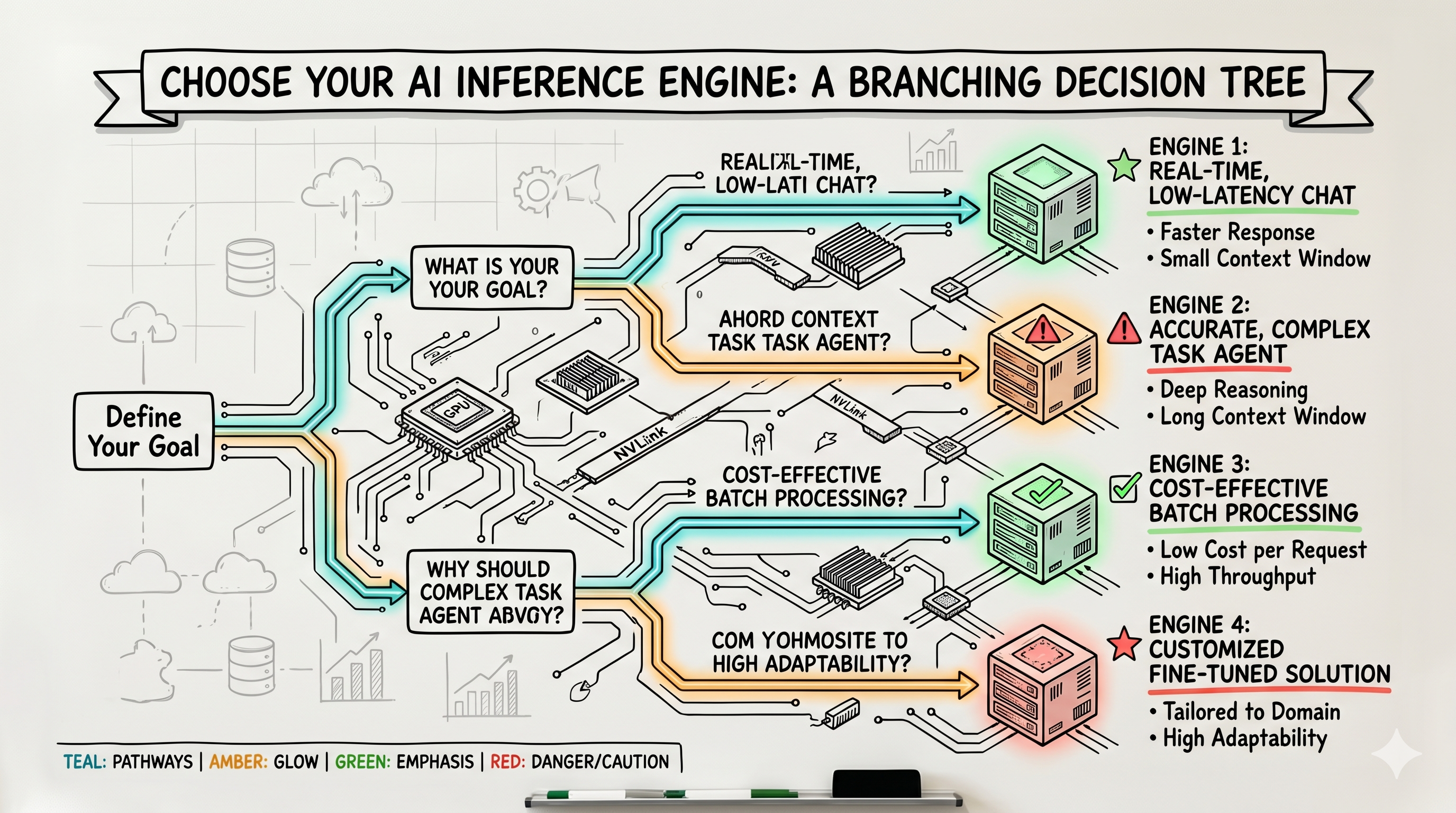
You can helm install vllm in an afternoon. You cannot tell me your p99 TTFT at 70% GPU utilization — and that's the gap this post is about. The "deploy vLLM on Kubernetes" tutorial is saturated. The decision tree underneath it isn't written anywhere, so most clusters are still pinned to whatever they stood up 12 months ago.
The engine layer moved while you weren't looking: Tiny-vLLM (May 29), KVarN KV-cache quantization (June 4), Kvcached for elastic KV cache, Expanse reclaiming idle GPU, and vLLM's wide expert-parallel path pushing ~2.2k tok/s on H200s. (All five are bleeding-edge — verify the names, dates, and numbers before you publish or pin them.) Meanwhile your Helm chart hasn't changed since last summer.
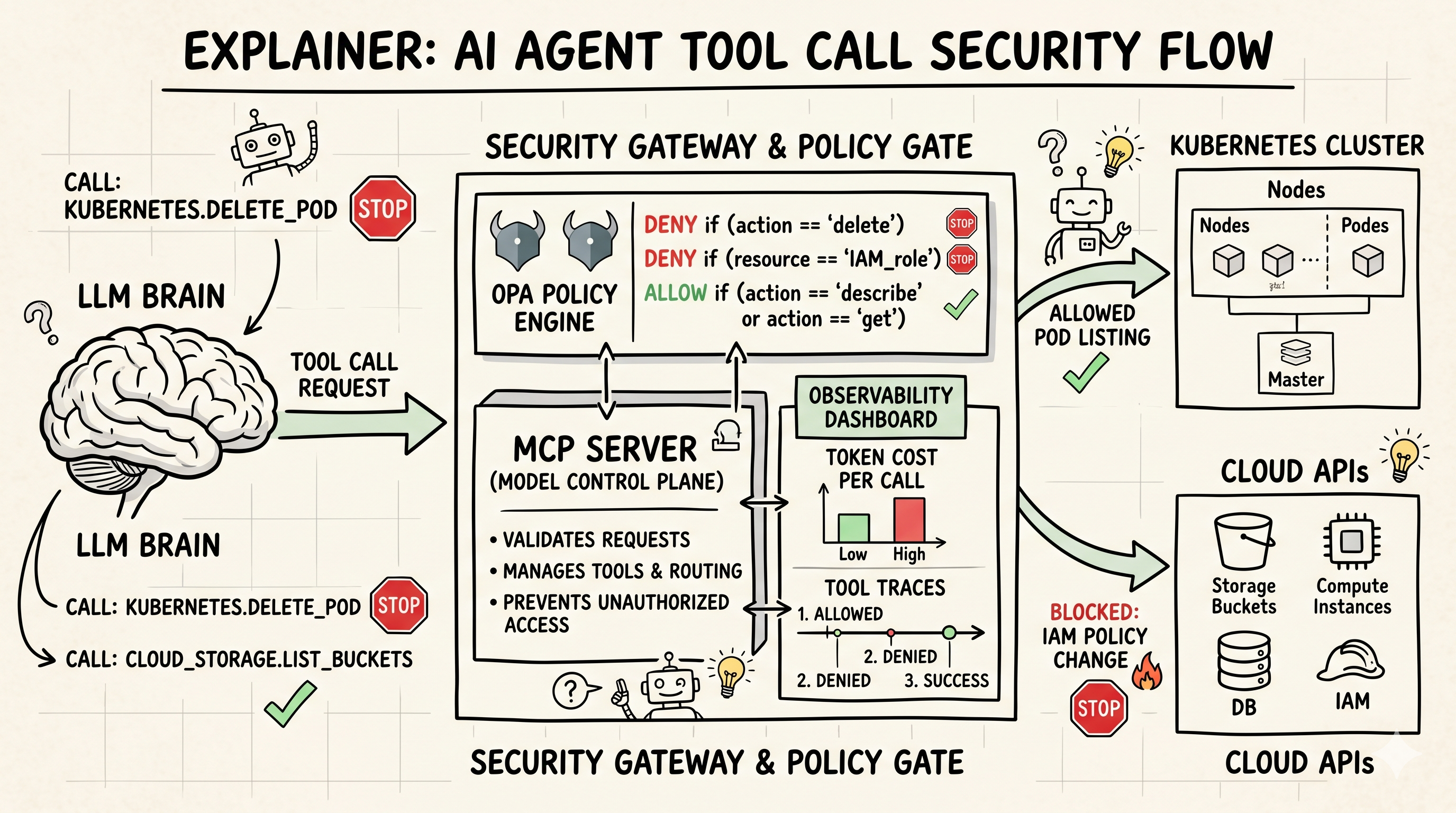
If your "AI agent" is just an LLM with a requests library and a service account, you don't have an agent — you have a future incident. Every team that has shipped agents to production learned the same lesson: the LLM is the easy 10%. The hard part is everything around it.
I'm going to walk through the stack I now consider non-negotiable: MCP for tools, a gateway for policy and routing, and OpenTelemetry for observability. I'll show configs, not concepts.