Code to Production 02: Ways of Working, from Issue to Merge
A coding agent writes eShop's issue #3 change. A person writes the issue, reads 12 lines, presses Merge and checks the result in dev. That works because the rules are written in the repositories and the limits are enforced by GitLab, not by anyone's memory. This post is the whole working agreement: six repositories, one tracker, short branches, signed commits, and the steps an agent never gets to do.
Code to Production: the series
One repository per service, and one that holds the system
eShop is six GitLab projects under one namespace on GitLab CE 19.5. Five hold code. The sixth, eshop-infra, holds no application code at all: it's the system repository, the home for everything that belongs to no single service.
| Repository | What it holds | In a release |
|---|---|---|
eshop-infra | Manifests, shared gates, release scripts, docs, ADRs, the issue tracker | It is the release |
eshop-api | One .NET 10 solution, two images: eshop-api and eshop-sync-master | Yes, both |
eshop-web | The React web app, served by Caddy | Yes |
eshop-node-api | The image service | Yes |
thirdparty-mock | Test equipment: mocks of SMS, ID Verification, Credit Check | Yes |
eshop-loadgen | Test equipment: the Locust load generator, dev only | No |
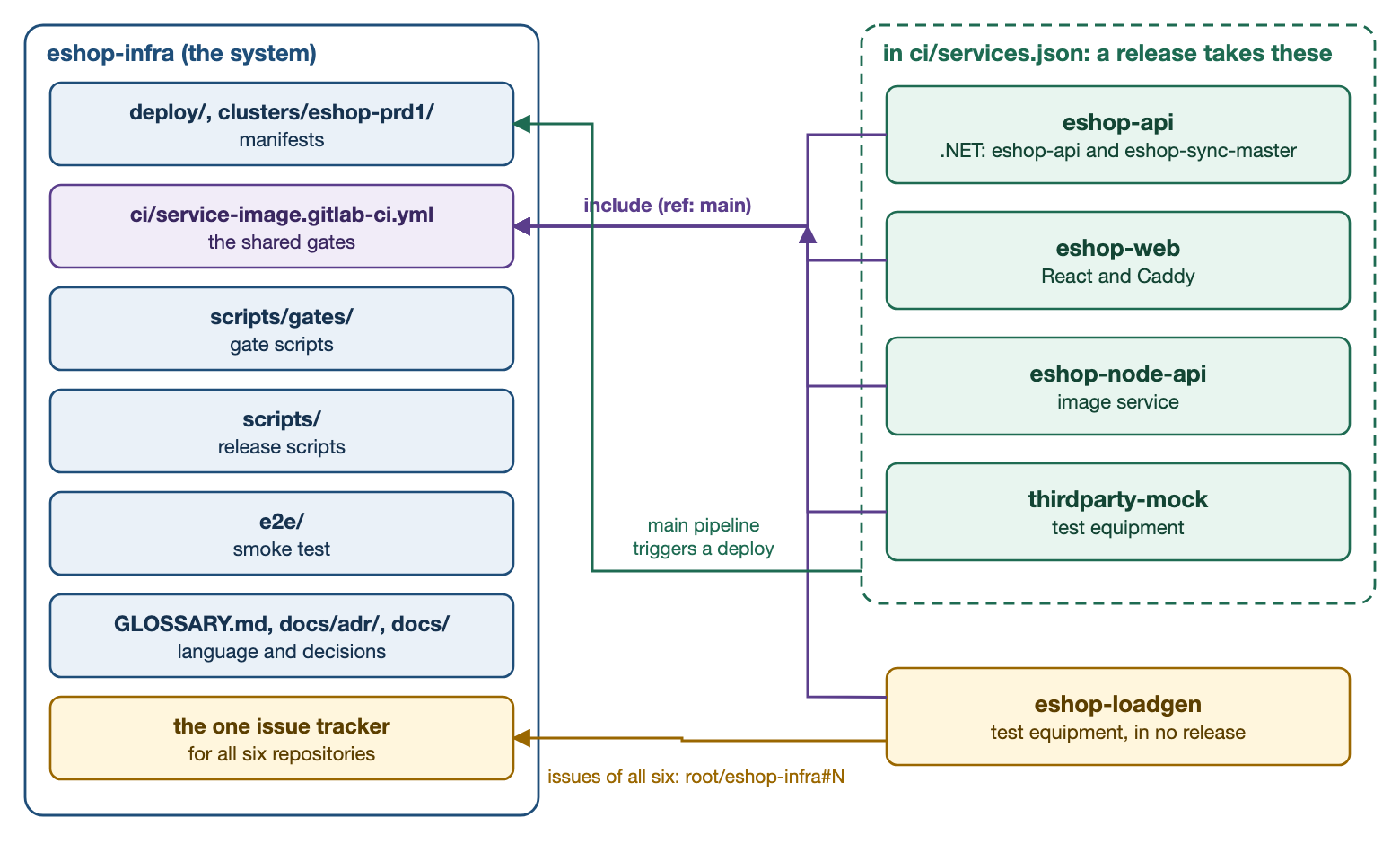
Three arrows carry the design: every service includes the shared gates at ref: main, every main pipeline triggers a deploy in eshop-infra, and every issue lives in root/eshop-infra.
A service repository carries a short .gitlab-ci.yml: its own lint job plus one include.
include:
  - project: root/eshop-infra
    ref: main
    file: ci/service-image.gitlab-ci.yml
    inputs:
      images: "eshop-web|.|Dockerfile"
The gates live once. A service repository contains none of the gate code, so a gate change in eshop-infra applies to every service at its next pipeline. Post 03 covers what those gates do.
Two things live in eshop-infra that aren't files: the one issue tracker, and the version number. A version X.Y.Z exists only there, as a tag. A service repository has no v* tags and no issues.
Why split at all? ADR 0009, "One repository per service; release candidates promote the images dev tested". The split gives each service its own pipeline and history, and eShop still ships as one system: a release candidate copies, by digest, the images dev last ran successfully. Post 05 follows that.
The rule that replaces the atomic commit
Split repositories lose the one commit that changes two services together. eShop replaces it with one sentence, written in every service's CLAUDE.md and in eshop-infra/docs/git-workflow.md:
Every merge must work with the other services' main.
It's checked, not just written. When a service's main pipeline builds an image, it starts a temporary copy of the system: the new image beside the other services' newest main images.
So a cross-service change ships expand-then-contract, as three or more merge requests that each work alone:
- Expand. The provider accepts both the old shape and the new one. Merge it.
- Move the consumers. Each consumer switches to the new shape in its own merge request.
- Contract. The provider drops the old shape.
Two merge requests that only work together are never written.
What the split costs
The ADR is plain about the trade:
- A service merge request gets lint and gates but no smoke test until the change reaches dev. A change that breaks the whole journey is found after the merge.
- A service repository can't be read alone. Its issues, glossary and ADRs are in
eshop-infra, so the clones sit side by side and docs point at../eshop-infra. - Gates are included at
ref: main, not at a pinned version. A mistake in a gate script reaches every service at its next pipeline.
Pitfall: a new service project has an order
A new project has to be on the job token allowlists both ways, or every gate job fails while cloning eshop-infra. And its first main image has to be in Harbor before eshop-infra names it, or the deploy of the whole environment fails. So the steps are written in order in docs/gitlab-ci.md, "A new service project".
Short branches, a protected main, and a person merges
eShop runs trunk-based: one integration branch, short branches named after their issue, and tags for releases. eshop-infra/docs/git-workflow.md is the authority.
| Branch | Purpose | Lifetime |
|---|---|---|
main | The only place new work lands. Deployed to dev. Protected | Permanent |
release/N.x | One per major series (for example release/0.x). Fixes only. Protected | While the series is supported |
issue/<n>-<name> | One task, merged into main by merge request | Deleted after merge |
promote/*, sign-off/* | Created by the pipeline for promotions and sign-off | Removed on merge |
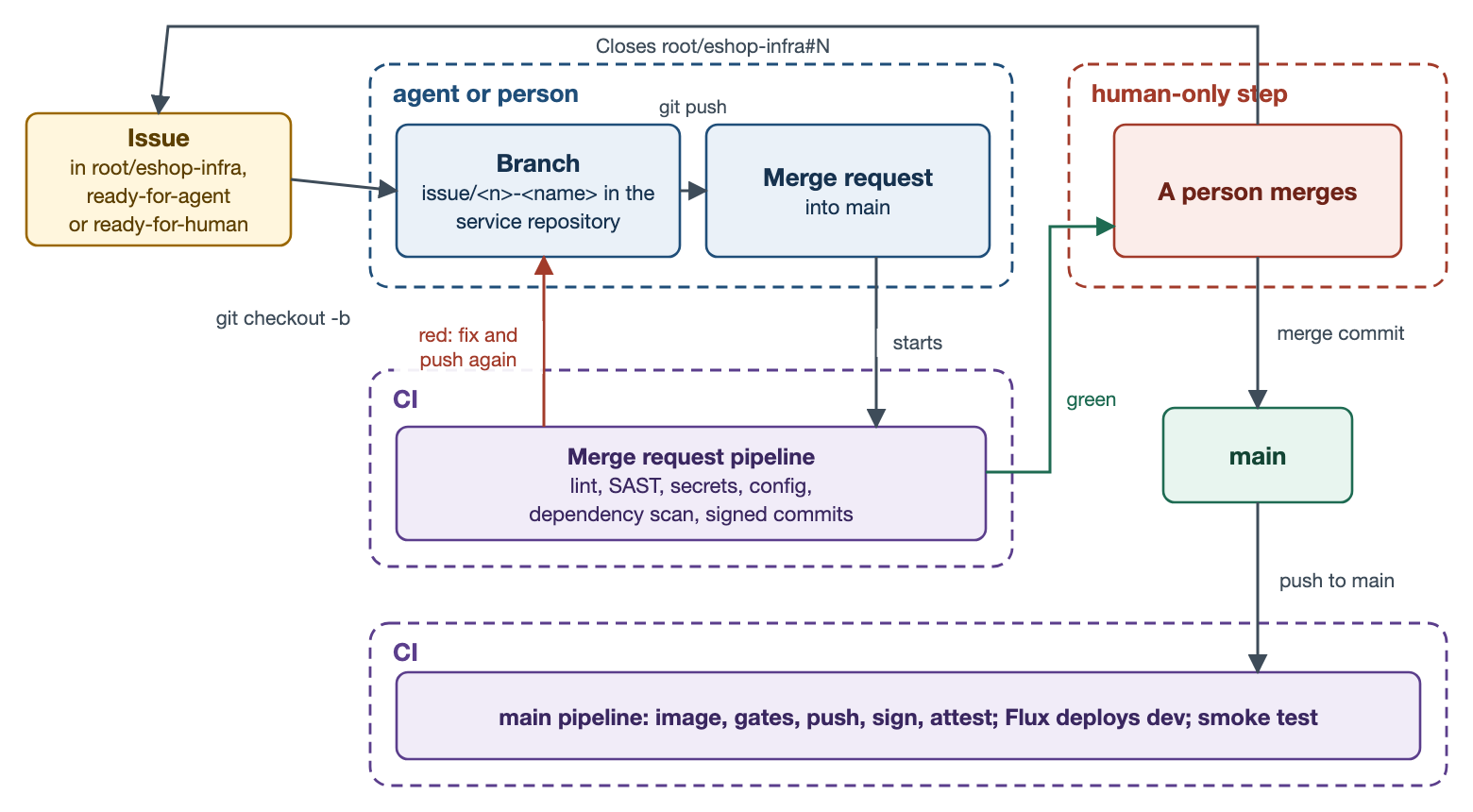
The blue frame is the agent's (or a person's) territory. The red frame is not: only a person merges, and a red pipeline sends the change back to the branch.
main and release/* are protected in all six projects, and one more setting does the heavy lifting: only_allow_merge_if_pipeline_succeeds. The Merge button stays disabled while the pipeline is red.
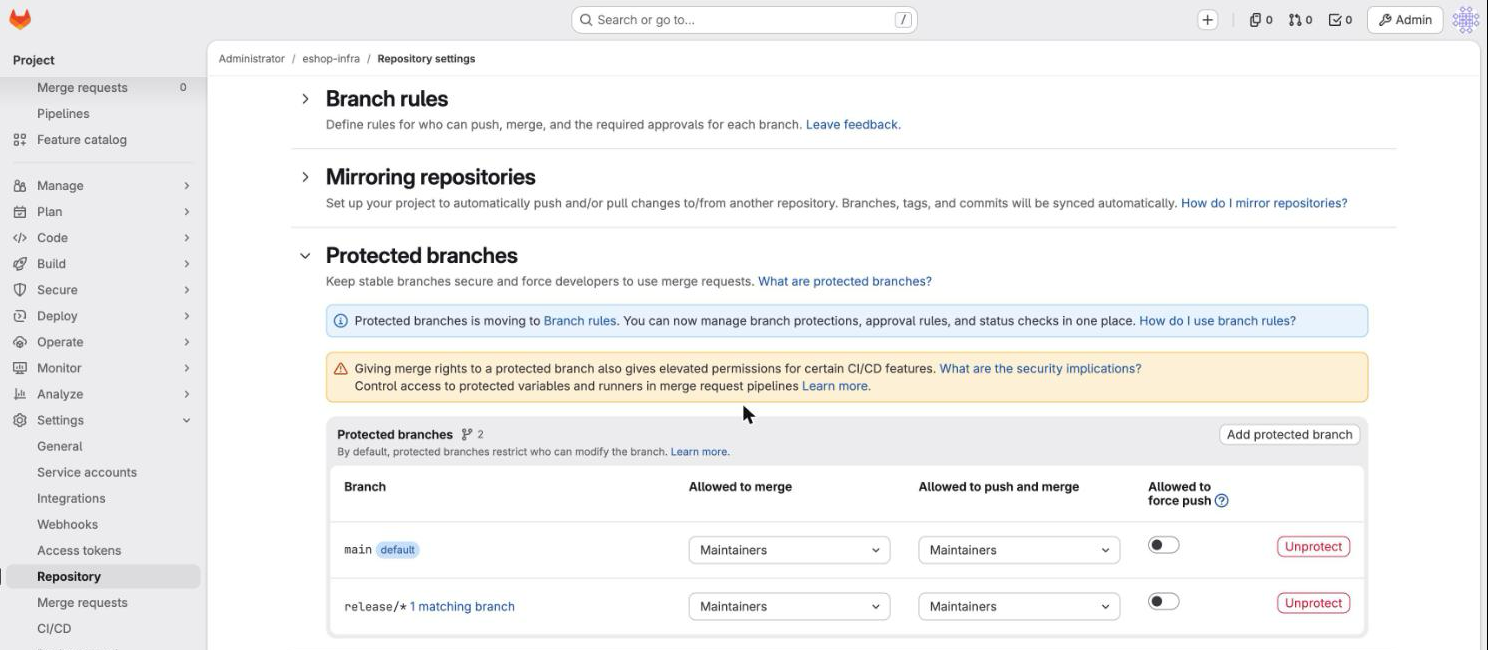
Two rows, main and release/*. Maintainers only, force push off.
Protection does a second job that's easy to miss. Only pipelines of protected branches see the protected variables: the registry login, the cosign key, PROMOTION_TOKEN and the cluster kubeconfig. A merge request pipeline runs on an unprotected branch, so code in a merge request can't push or sign an image or read the cluster.
Issue #3, from a written issue to a closed one
Here's the worked example: "Product page: the browser tab names the Product". Every command and screen below comes from that one change.
1. The issue says what will be true and how to check it
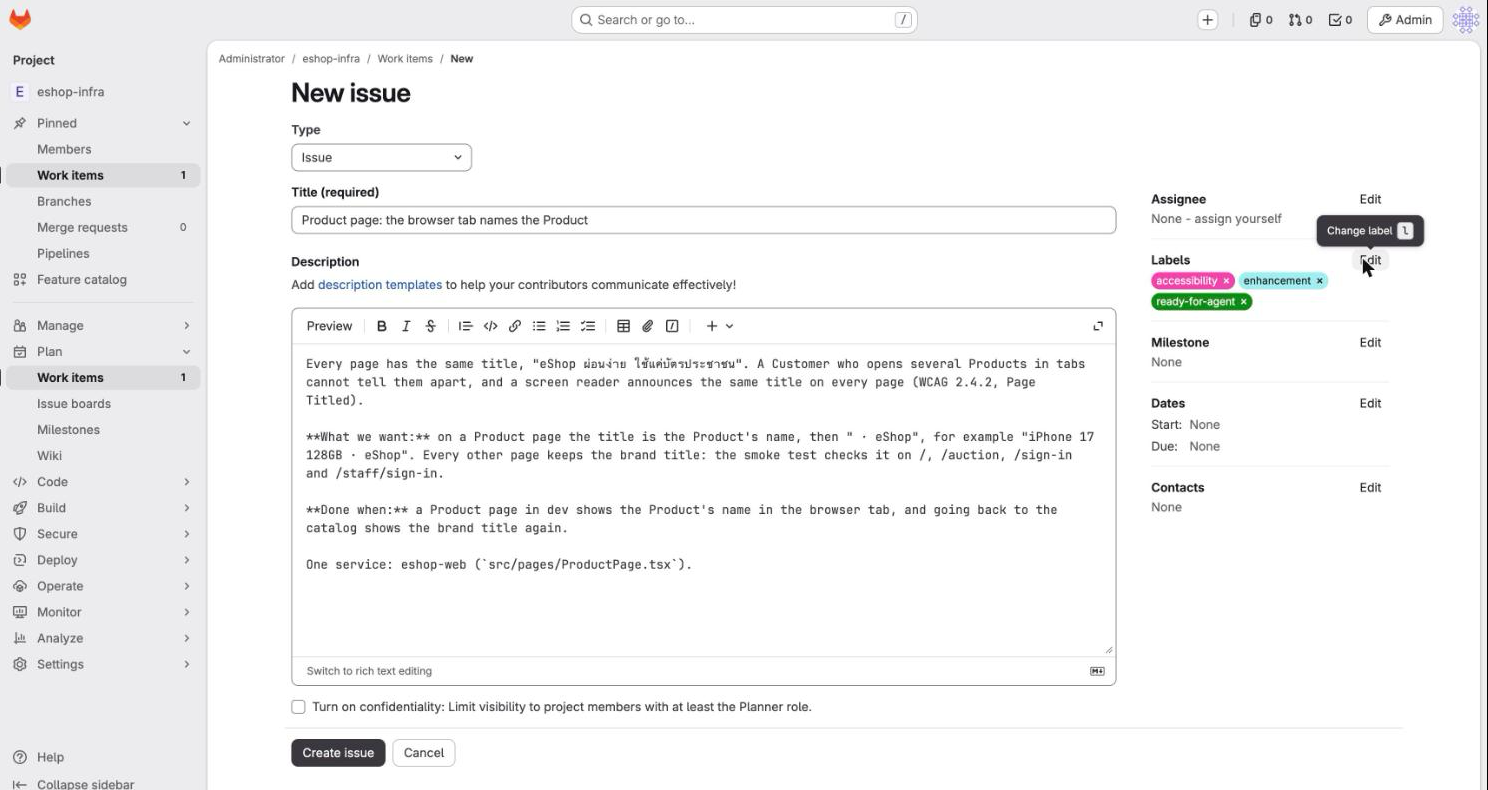
Three parts in the description: the problem, "What we want", "Done when". The ready-for-agent label on the right is what lets an agent start.
Every page has the same title, "eShop ผ่อนง่าย ใช้แค่บัตรประชาชน". A Customer who opens several
Products in tabs cannot tell them apart, and a screen reader announces the same title on every
page (WCAG 2.4.2, Page Titled).

**What we want:** on a Product page the title is the Product's name, then " · eShop", for
example "iPhone 17 128GB · eShop". Every other page keeps the brand title: the smoke test
checks it on /, /auction, /sign-in and /staff/sign-in.

**Done when:** a Product page in dev shows the Product's name in the browser tab, and going
back to the catalog shows the brand title again.

One service: eshop-web (`src/pages/ProductPage.tsx`).
The problem is told from the Customer's side and names the rule it breaks1. "What we want" is behaviour with one example, plus what must not change. "Done when" can be checked by anyone with a browser.
One trap on the issue page: GitLab's Create merge request button. It creates the branch in the issue's own project, eshop-infra, while the code is in eshop-web. Don't use it for a service change.
2. Branch from origin/main, not from your local main
Switched to a new branch 'issue/3-product-page-title'
branch 'issue/3-product-page-title' set up to track 'origin/main'.
3. Run the same checks the pipeline's lint job runs
The change is one useEffect in src/pages/ProductPage.tsx: 12 lines added, none removed. Each service's CLAUDE.md lists its commands, and they're the ones CI runs.
> eshop-web@0.0.0 lint
> oxlint --deny-warnings

transforming...
✓ 66 modules transformed.
# ...
dist/assets/index-C0lXR2hL.js   408.61 kB │ gzip: 118.81 kB

✓ built in 441ms
Silence after the oxlint header is the pass: --deny-warnings turns any warning into a failure.
4. Commit by naming the file
git status --short
git commit src/pages/ProductPage.tsx -m "Product page: the browser tab names the Product (root/eshop-infra#3)"
git push -u origin issue/3-product-page-title
f03175d Product page: the browser tab names the Product (root/eshop-infra#3)
remote:
remote: To create a merge request for issue/3-product-page-title, visit:
remote:   https://<GITLAB>/root/eshop-web/-/merge_requests/new?merge_request%5Bsource_branch%5D=issue%2F3-product-page-title
remote:
 * [new branch]      issue/3-product-page-title -> issue/3-product-page-title
Two conventions in that one commit line. The subject says what is now true, not what you did. And the issue is referenced by its full path, root/eshop-infra#3, because a bare #3 in eshop-web points at an issue that doesn't exist.
git commit <file> is the safe form. The table shows why.
| Command | What goes into the commit |
|---|---|
git commit <file> ... | Exactly the files you name, as they are now |
git add <file> then git commit | What you staged, plus anything staged before |
git commit -a | Every change to every tracked file, including deletions you didn't notice |
Pitfall: git commit -a commits deletions you didn't notice
A working folder can lose tracked files without anyone seeing it, for example the symbolic links in .claude/skills/ that make agent skills visible. git commit -a then puts those deletions into a commit that was meant to change one line. The pipeline stays green, because no gate tests for a file that's gone.
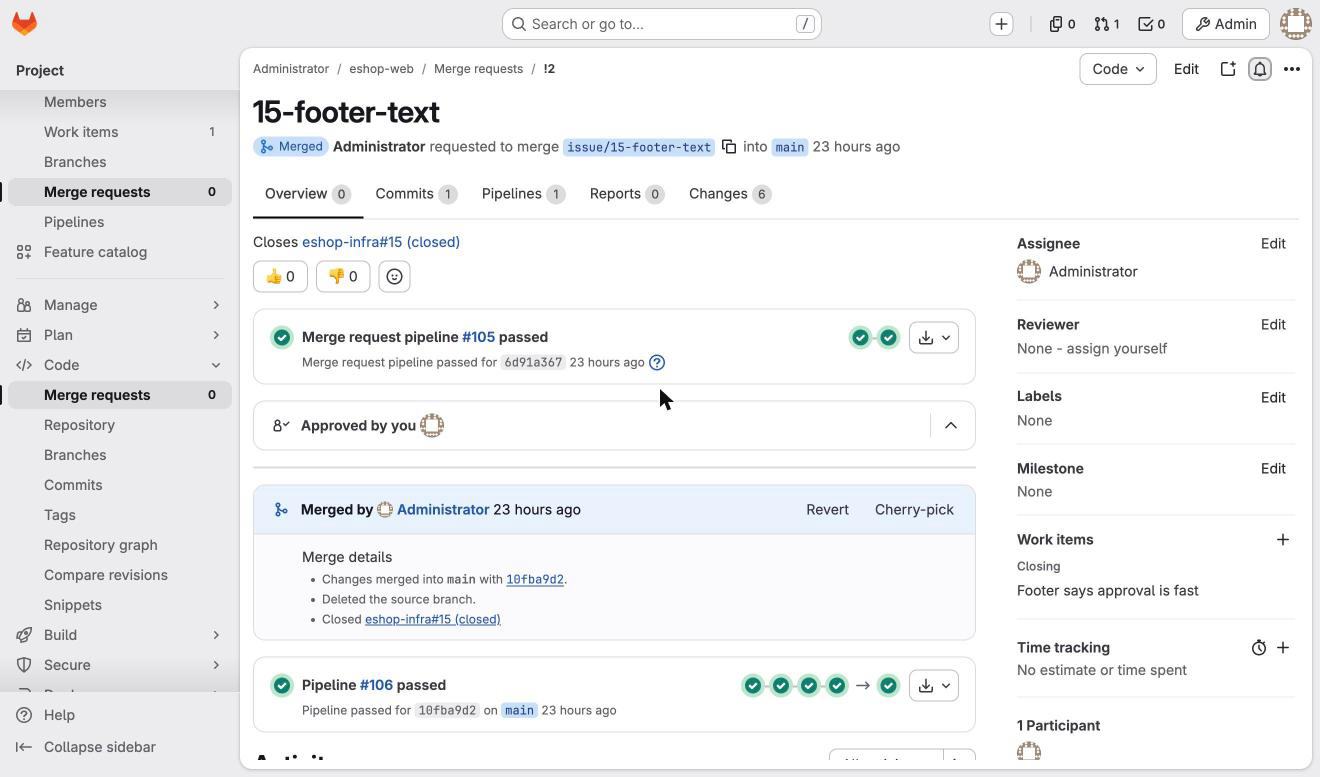
What the pitfall looks like: a one-line footer change whose Changes tab reads 6, with a green pipeline.
The rule: read git status --short before you commit, and name the files in the commit. As a reviewer, read the file count before the diff.
5. The merge request closes the issue and says what wasn't checked
A pushed branch alone starts no pipeline in a service project. The pipeline starts with the merge request. Its description for issue #3:
Closes root/eshop-infra#3

The Product page sets the browser tab's title to the Product's name and " · eShop" once the
Product has loaded (e.g. "iPhone 17 128GB · eShop"), and puts the previous title back when the
page is left. Every other page keeps the brand title, which the smoke test checks on /,
/auction, /sign-in and /staff/sign-in.

**Checked:** `npm run lint` and `npm run build` pass locally. Not checked by a test: the smoke
test does not look at the Product page's title; check it in dev after the merge.
The first line is GitLab's closing pattern with a cross-project reference2, so the merge closes an issue in another project. When one issue needs several merge requests, the ones that don't finish it say Part of root/eshop-infra#N.
The last sentence is the one to copy. A description that names what was not checked tells the reviewer where to look and tells the team what to verify after the merge.
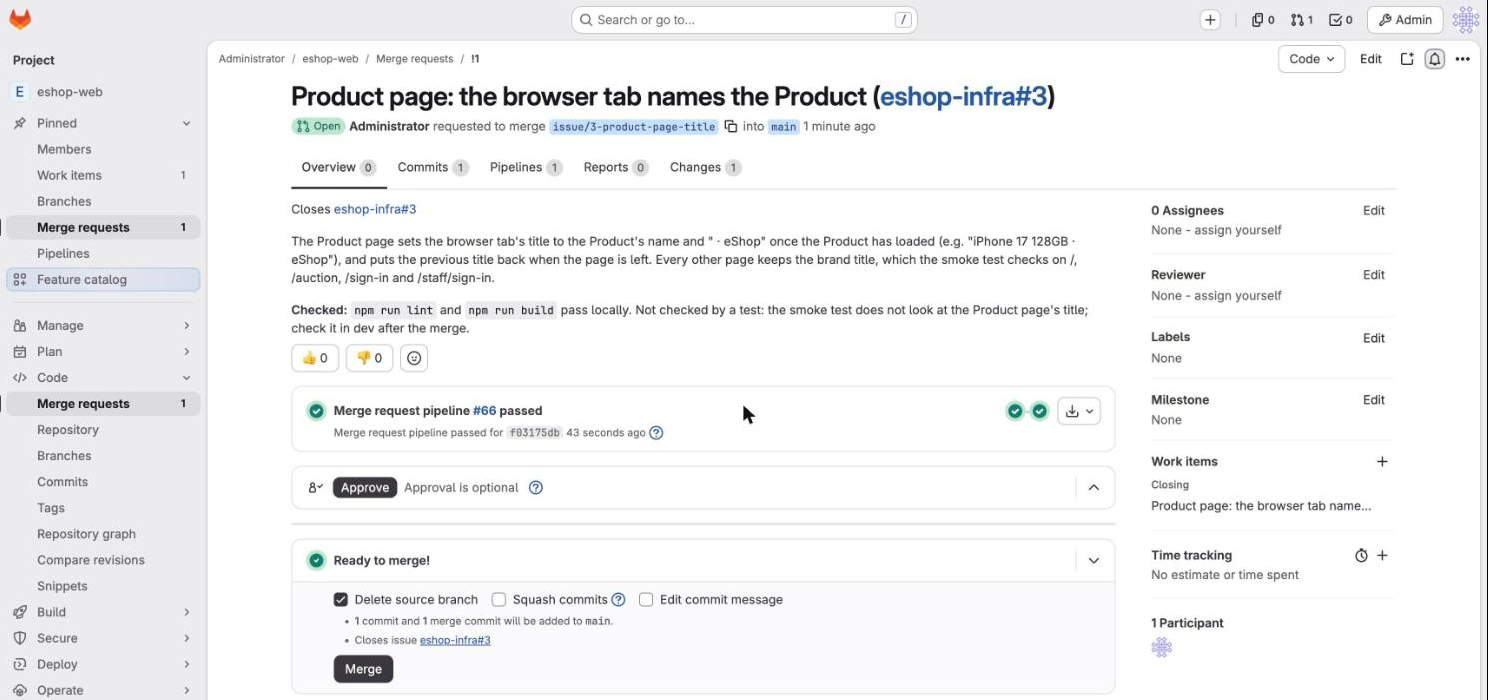
Three places to read: "Closes eshop-infra#3" under the tabs, "Merge request pipeline #66 passed", and "Approval is optional" (more on that in the caveats).
A merge request pipeline runs lint and five gates: sast, deps, secrets, config and commits. It builds no image; that happens only on main.
6. The reviewer reads four things, in order
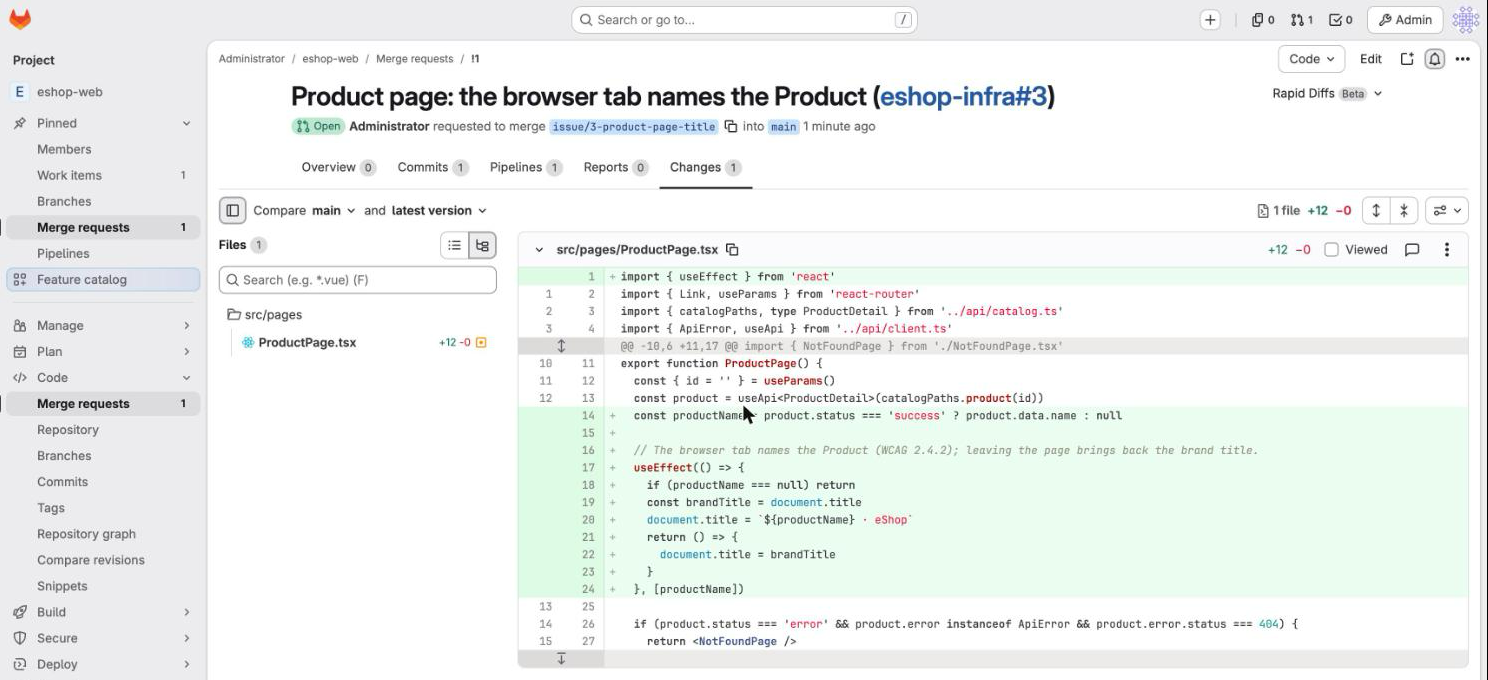
"1 file +12 −0", top right. The issue promised one file, and that's the first thing to confirm.
- The count. Does the Changes tab list the number of files the issue promised?
- The pipeline. Green, and for the latest commit (
f03175dbhere), with Verified beside each commit. - The issue. Does the change do what "Done when" asks, and nothing else?
- The "not checked" list. Someone named checks each item after the merge.
7. A person merges, and the issue closes itself
eShop merges with a merge commit, so the branch's own commits survive and one commit records the merge request:
*   85e239a Merge branch 'issue/3-product-page-title' into 'main'
|\
| * f03175d Product page: the browser tab names the Product (root/eshop-infra#3)
|/
* 954abbe ... (main before the merge)
The merge is a push to main, so eshop-web's main pipeline (#68) builds, gates and signs the image in 7 minutes 4 seconds, then triggers deploy-dev in eshop-infra, which finishes with the smoke test ("22 passed") in 3 minutes 5 seconds.
The change is done when dev is green and the "not checked" item is checked, not when Merge is pressed. For issue #3 that means opening a Product page in dev: the tab reads "iPhone 17 128GB · eShop", and the catalog reads the brand title again.
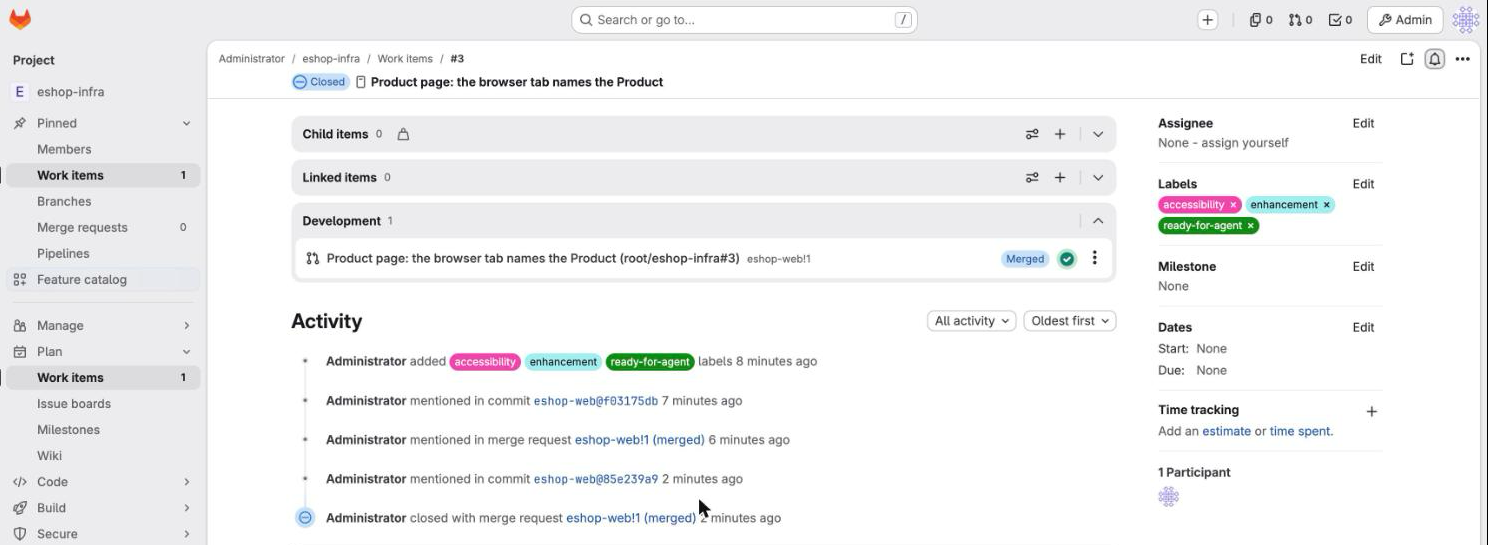
Nobody closes this by hand. Read the Activity list top to bottom: labels, commit f03175d, merge request eshop-web!1, merge commit 85e239a, closed.
Because the commit, the merge request and the merge commit all name root/eshop-infra#3, the tracker is the index of what changed and why.
Every commit carries an SSH signature, checked in the merge request
An author line is a name and an email anyone can type into git config. A signature ties the commit to a key its author holds. Every commit a merge request adds must be signed, in all six projects.
Setup is four commands, once per person and machine3:
ssh-keygen -t ed25519 -f ~/.ssh/eshop-signing -C "<your GitLab email>"
git config --global gpg.format ssh
git config --global user.signingkey ~/.ssh/eshop-signing.pub
git config --global commit.gpgsign true
Then add the .pub file in GitLab under Preferences > SSH Keys with usage type Signing. After that, git commit signs by itself.
The commits job runs eshop-infra/scripts/gates/commits.sh, which reads each commit the merge request adds and looks for a gpgsig header. Both CI files set ESHOP_COMMITS_GATE: enforce, so an unsigned commit fails the job with commits gate: FAILED: N unsigned commit(s), and the log prints the repair:
What GitLab CE can't enforce
The gate lives in a CI job because that's what Community Edition allows. Be clear about what's left open:
| Control | What you get on GitLab CE | What closes or covers the gap |
|---|---|---|
| Unsigned commits | Refused in the merge request by the commits job, not at push | "Reject unsigned commits" push rule, Premium and Ultimate4 |
| Whose signature | The gate checks a signature exists, not whose: a pipeline has no list of trusted keys | The reviewer reads GitLab's Verified badge |
| Bots (Renovate, CI's project token) | Not checked: a bot has no key | A signing key per bot |
| The merge commit | Not signed | An instance signing key set by an administrator |
CODEOWNERS | A record only, no approval required | Code Owners approval, Premium and Ultimate5 |
The bot exemption goes by who started the pipeline, which GitLab states, not by the author line, which anyone can type. A person who pushes to a bot's branch starts their own pipeline, and that one is checked.
eshop-infra/CODEOWNERS still earns its place. It names who answers for the paths that decide what ships:
*                                   @root

# What decides whether a change may ship: the gates, their accepted findings, the pipelines.
/scripts/gates/                     @root
/scripts/gates/*-accepted.txt       @root
# ...
/clusters/eshop-prd1/platform/      @root
It tells a reviewer whose eyes a change needs, and it's ready for a tier that enforces it.
One tracker for six repositories, and five states
All issues are GitLab issues of root/eshop-infra. The service projects have none. eShop is released as one system, and the person reporting a problem usually can't know which repository the fix belongs in.
Every triaged issue carries exactly one category label and one state label.
| Label | Kind | Meaning |
|---|---|---|
bug | Category | Something is broken |
enhancement | Category | A new feature or an improvement |
needs-triage | State | The maintainer needs to evaluate it |
needs-info | State | Waiting for the reporter to answer specific questions |
ready-for-agent | State | Fully specified: an agent can do it without a person present |
ready-for-human | State | Specified, but a person must implement it |
wontfix | State | Will not be done |
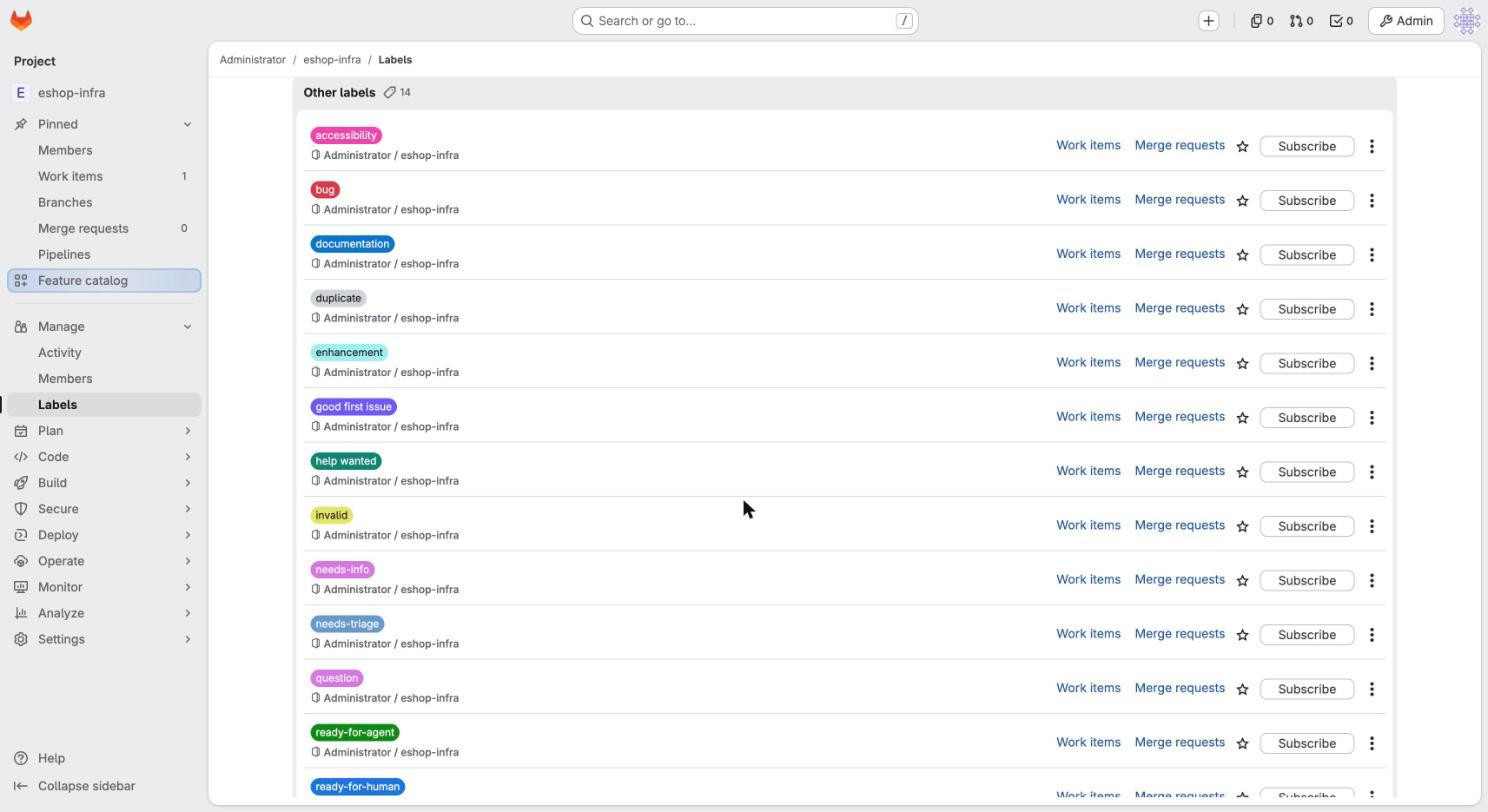
14 labels. The workflow runs on seven of them; accessibility and documentation are topic labels.
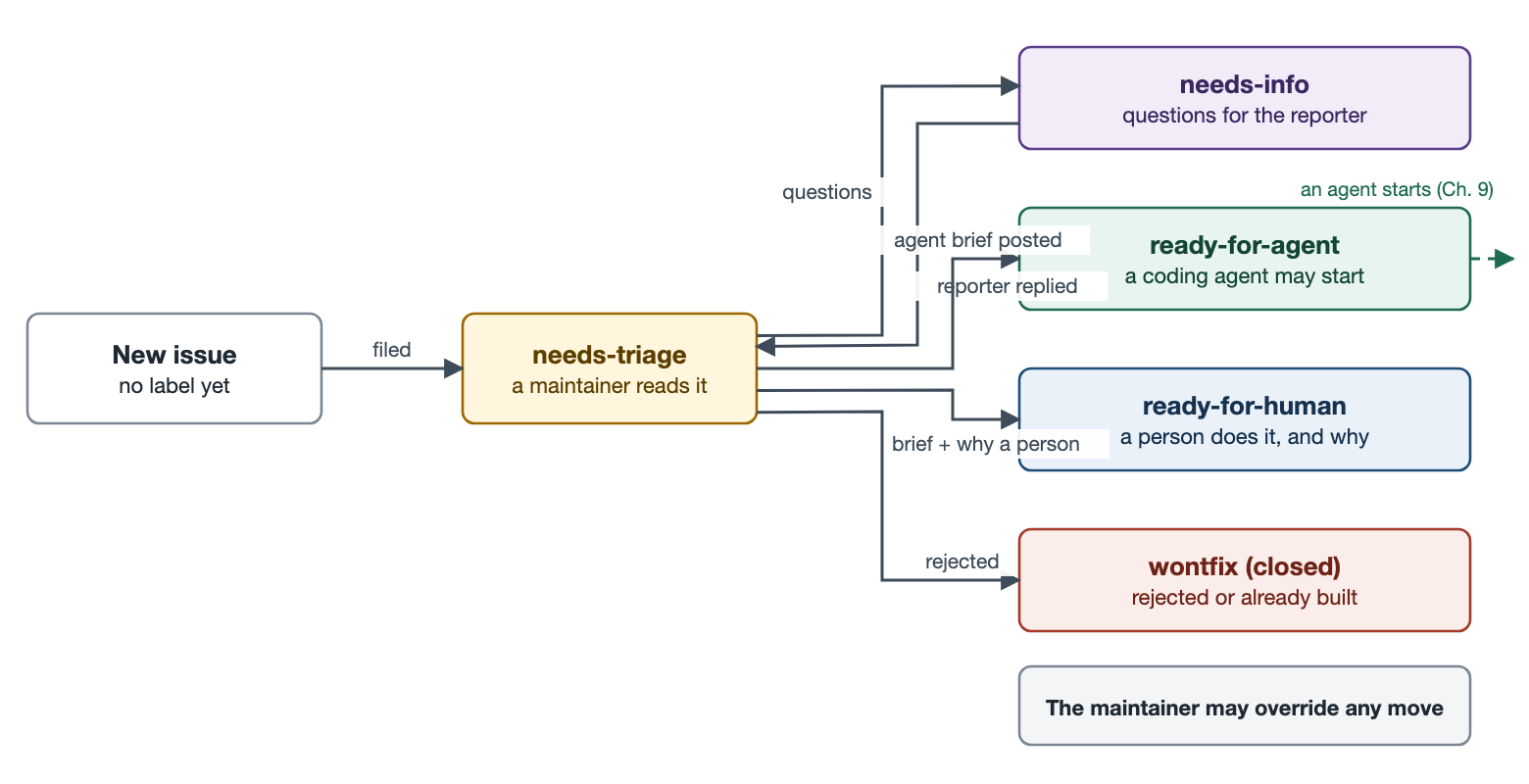
Everything passes through needs-triage, and only ready-for-agent has an arrow leaving the diagram: that label is what starts an agent.
The state label is a control, not decoration. A team of people who share context can let whoever picks up an issue decide whether it's ready. Agents don't ask whether something is ready. They start.
When triage moves an issue to ready-for-agent, it posts an agent brief from .agents/skills/triage/AGENT-BRIEF.md:
**Category:** bug / enhancement
**Summary:** one-line description of what needs to happen

**Current behavior:** ...
**Desired behavior:** ...
**Key interfaces:** ...
**Acceptance criteria:**
- [ ] Specific, testable criterion 1
...
**Out of scope:** ...
Four rules make a brief survive a few days in the queue:
- Durable, not precise. Describe interfaces and behaviour. File paths and line numbers go stale.
- Behaviour, not procedure. Say what the system should do, not which statement to add where.
- Testable acceptance criteria. "It should work correctly" isn't one.
- Explicit scope. Name the adjacent things that must not be touched.
Issue #3 breaks the first rule by naming a file path. For an issue picked up right away, that costs nothing.
A ready-for-human issue gets the same brief plus the reason it can't be delegated: a judgment call, access an agent doesn't have, a design decision, or manual testing.
Rejections are files, so the argument happens once
A rejected enhancement gets a Markdown file in eshop-infra/.out-of-scope/, one per concept, not per issue. Triage reads that folder first, so a repeat request gets the earlier decision.
| File | The decision |
|---|---|
email-alerts.md | Alertmanager emails nobody; the script to turn email on exists and is a person's step |
purging-load-generator-data.md | No delete path for load generator data; dev's database is disposable |
scheduled-smoke-test-of-qa-and-prod.md | No scheduled smoke test of QA and prod: the smoke test writes data |
Files beat closed issues because they travel with the repository. A tracker lives in GitLab's database, so a new GitLab starts without any closed issue or its comments. The .out-of-scope/ files arrive with git push.
Pitfall: labels live only in GitLab's database
A new GitLab has none of the tracker's labels, and without ready-for-agent nothing can be handed to an agent. So the 14 labels are kept as a file, a table of names and colours in docs/agents/triage-labels.md, and the rebuild document has a step that creates them through the API and a check that counts them.
Conventions files hold what the code doesn't show
Each one opens with the same sentence: "What the code does not tell you at a glance."
| File | What's in it |
|---|---|
eshop-infra/docs/agents/conventions.md | Local environment traps, deploy checklists, how NetworkPolicies must be written, human-only steps |
eshop-api/docs/conventions.md | Steps to add an endpoint (test first), time only from the injected TimeProvider, accepting a SAST false positive |
eshop-web/docs/conventions.md | Breakpoints, shared components, "Fetch only through src/api/client.ts" |
eshop-infra/GLOSSARY.md | Business words only, each with an "Avoid" list (Customer, not "user" or "client") |
eshop-infra/docs/adr/ | 17 ADRs |
Why only 17 ADRs? One gets written only when the decision is hard to reverse, surprising without context, and the result of a real trade-off. Miss any one and there's no ADR.
Agents get written instructions and enforced limits
Three things make a coding agent safe to hand work to: what it should always know is written in the repository, repeatable procedures are written once, and limits are enforced by something other than its good intentions.
CLAUDE.md: seven files, 150 to 300 words each
     259 eshop-api/CLAUDE.md
     151 eshop-infra/CLAUDE.md
     272 eshop-loadgen/CLAUDE.md
     218 eshop-node-api/CLAUDE.md
     195 eshop-web/CLAUDE.md
     227 thirdparty-mock/CLAUDE.md
     302 CLAUDE.md
One per repository and one for the workspace folder above them. They're tables of contents, not manuals. They don't describe the code, which the agent can read. They hold what the code can't show. eshop-web's rules:
- Issues are in GitLab's `root/eshop-infra` (https://<GITLAB>): reference them as
  `root/eshop-infra#N` in commits and merge requests
  (`../eshop-infra/docs/agents/issue-tracker.md`).
- Every merge must work with the other services' `main` (the temporary copy checks it): a
  change across services ships expand-then-contract, never as two PRs that only work together.
- Before a step touching secrets, repo settings or a PR merge, read "Human-only steps" in
  `../eshop-infra/docs/agents/conventions.md`.
Skills: procedures written once
eshop-infra/.agents/skills/ holds 38 skills from a public collection, each pinned by content hash in skills-lock.json. Treat a skill update like a code change and read the diff: it's other people's text running with the agent's permissions.
What eShop adds is three small mapping files in docs/agents/: where "the issue tracker" is, what the labels are called, where the glossary and ADRs live. The flow uses these:
| Step | Skill | Who decides |
|---|---|---|
| Interview the person about the plan | grilling, domain-modeling | The person makes every decision; the agent finds facts |
| Write the issue | to-spec, or triage for someone else's request | A person sets ready-for-agent |
Implement on issue/<n>-<name> | implement, tdd, code-review | The agent, alone |
| Describe the merge request | pr | The agent prepares it |
| Merge | none | A person |
The label and the merge are the two handovers. Between them the agent works alone, which is why the brief and the pipeline both have to be good.
Human-only steps, and a hook that enforces one of them
The conventions file opens its list with: "Agents are denied these; ask the user, giving the exact command." The second half matters. The agent doesn't stop silently or find another way. It hands over the command.
| Only a person may | Why |
|---|---|
| Use the cluster-admin kubeconfig, decrypt or print credentials | Cluster admin can destroy a shared cluster; a printed credential lands in transcripts |
| Create or renew CI/CD variables and tokens | Whoever sets them controls the supply chain |
| Create, encrypt, edit or decrypt SOPS files | They hold secrets |
| Cut a release candidate, sign off a release | A release is a decision by a named person |
Merge any merge request, run deploy-qa or deploy-prod | Merging is the approval |
| Change project or instance settings | Those settings are the guard rails themselves |
The SOPS rule is also enforced mechanically, with a Claude Code PreToolUse hook6 registered in eshop-infra/.claude/settings.json:
"hooks": {
  "PreToolUse": [
    {
      "matcher": "Write|Edit|MultiEdit|NotebookEdit|Bash",
      "hooks": [
        { "type": "command",
          "command": "\"$CLAUDE_PROJECT_DIR\"/.claude/hooks/guard-sops.sh" }
      ]
    }
  ]
}
Before every write, edit and shell command, guard-sops.sh gets the planned call as JSON. It blocks a write to any path ending in .sops.yaml, and any shell command that would run sops on one or write, copy, move or delete it. Reading the ciphertext stays allowed, and so does a commit message that merely mentions such a file.
When it blocks, it exits with status 2 and tells the agent: "Give the user the exact commands to run instead."
The hook has a test beside it, because a regex that decides what counts as a command is exactly the code that's wrong without anyone noticing:
ok   blocks Write of a SOPS file
ok   blocks Edit of a SOPS file
ok   blocks a heredoc into a SOPS file
ok   blocks sops --encrypt
ok   blocks sops -d (decrypting credentials)
# ...
ok   allows reading the ciphertext
ok   allows git diff of a SOPS file
# ...
ok   allows a PR body that mentions a SOPS file
all passed
Seventeen ok lines. The hook stops accidents; it isn't a security boundary against a determined bypass. The real protection is that the agent never holds a decryption key.
Who did what in issue #3
| Step | Who | Trace |
|---|---|---|
Write the issue, label it ready-for-agent | Person | Issue #3 |
| Branch, change, lint and build, commit, push | Agent | Commit f03175d, with Co-Authored-By |
| Merge request title and description | Agent | eshop-web!1, pipeline #66 |
| Review and merge | Person | Merge commit 85e239a |
| Build, sign, deploy, smoke test | CI | Pipelines #68 and #69 |
| Check the "not checked" item in dev | Person | The tab reads "iPhone 17 128GB · eShop" |
One thing GitLab can't show: whether the agent or the person clicked Create merge request. Both show as Administrator. Decide that for your team and write it down.
What's lab-only, and what production would change
- Protected doesn't mean reviewed by two people. GitLab CE shows approval as optional, and in this lab the person who opens a merge request can also merge it.
- A Maintainer can still push to
maindirectly. That nobody does is a convention, and such a push skips thecommitsjob, which runs only in merge requests. - The agent works with the maintainer's own access. Its limits are held by the conventions, the allow list, the hook and the maintainer's attention, not by GitLab.
- The projects are public on the lab GitLab.
| In the lab | In production |
|---|---|
| Approval optional | At least one approval from someone other than the author |
| Agent uses the maintainer's account | Agent gets its own account with the Developer role: it can push branches and open merge requests, not merge into a protected branch |
Gates included at ref: main | Pinned to a reviewed tag of eshop-infra |
| Signatures checked in the merge request | GitLab refuses unsigned pushes; each bot has a signing key |
CODEOWNERS as a record | Code Owners approval required |
Summary
A working agreement you can adopt this week:
- One system repository for manifests, gates, release scripts, docs and ADRs. No application code in it.
- One issue tracker, in the system repository. Reference issues by full path from services.
- Write the rule "every merge must work with the other services'
main" in every repository, and check it in CI. - Ship cross-service changes expand-then-contract. Never two merge requests that only work together.
- Protect
mainandrelease/*, turn off force push, and require a passing pipeline to merge. - Name branches
issue/<n>-<name>, and branch fromorigin/main. - Commit with
git commit <file>. Bangit commit -afrom your muscle memory. - End every merge request description with what was not checked.
- Review in order: file count, pipeline, the issue's "Done when", the "not checked" list.
- Sign commits with SSH keys, and fail the merge request on an unsigned commit.
- Exactly one category label and one state label per issue. Only a person sets
ready-for-agent. - Record rejected enhancements as files in
.out-of-scope/, and keep the tracker's labels as a file too. - Keep each
CLAUDE.mdunder 300 words and point to conventions files. - Write the human-only list down, enforce what you can with a hook, and test the hook.
- A person merges. Always.
Next: Post 03: CI gates before review: the lint, SAST, secret, configuration, dependency and signature gates that run on a merge request, and why each one is a script you can run locally.
-
W3C, Understanding Success Criterion 2.4.2: Page Titled: "Web pages have titles that describe topic or purpose." ↩
-
GitLab Docs, Managing issues: closing patterns in merge request descriptions, including cross-project references such as
group/project#123. ↩ -
GitLab Docs, Sign commits and tags with SSH keys:
gpg.format ssh, the Signing usage type, and the Verified and Unverified labels. ↩ -
GitLab Docs, Push rules: tier Premium and Ultimate; includes the "Reject unsigned commits" rule. ↩
-
GitLab Docs, Code Owners: tier Premium and Ultimate. ↩
-
Claude Code Docs, Hooks reference: a
PreToolUsehook that exits with code 2 blocks the tool call and returns its stderr to the agent. ↩
Discussion
Have thoughts on this post? Share them below — questions, corrections, or your own experience are all welcome.