Hybrid RAG in Production: A Full n8n + Airflow Implementation
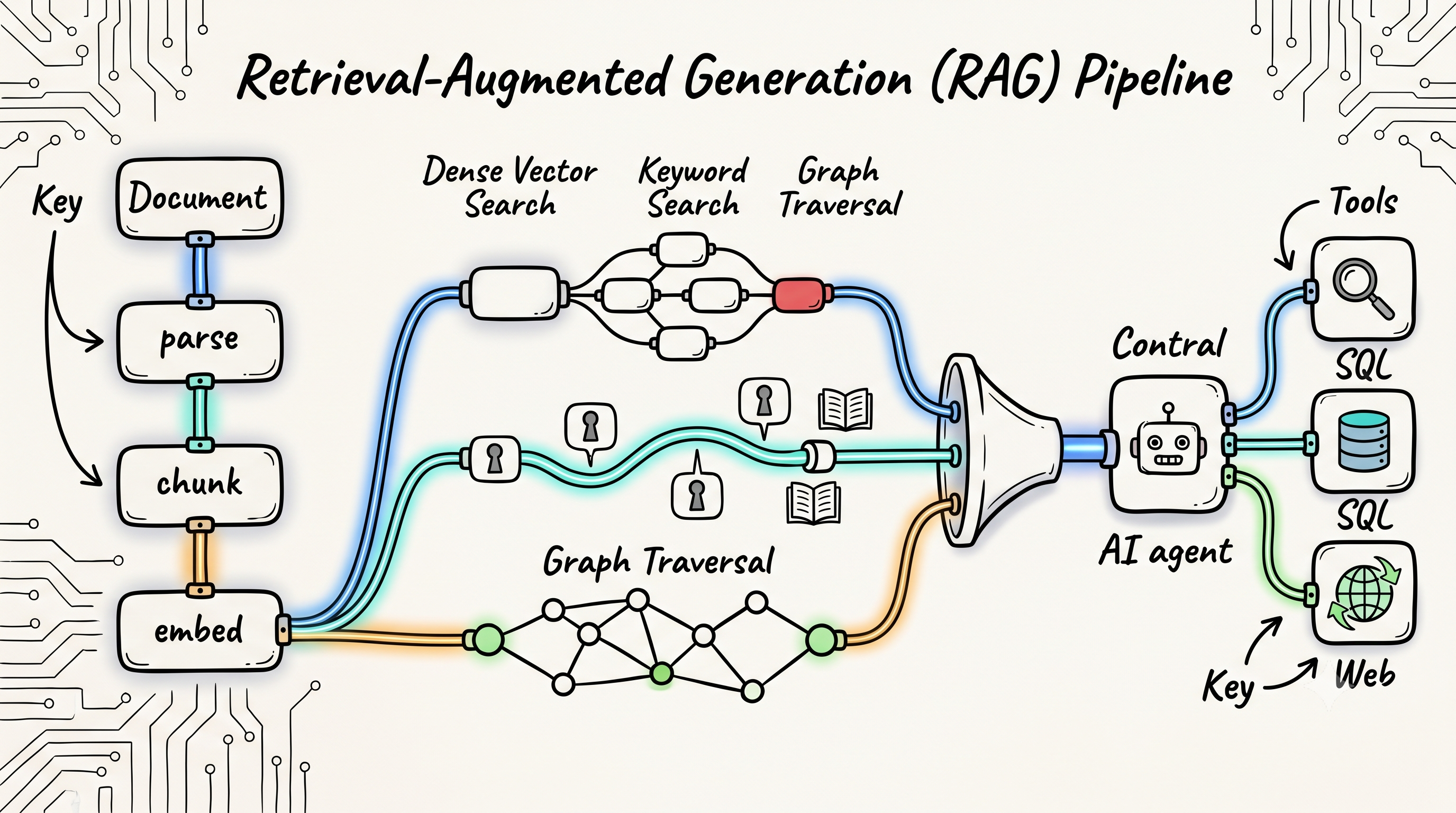
You've got the concepts — chunking, hybrid search, reranking, GraphRAG. This is the wiring diagram. A complete hybrid RAG system you can import and run: ingestion on Apache Airflow, the query pipeline on n8n, retrieval fused across dense, BM25, GraphRAG, and live web.
This is the companion build to Agentic Retrieval: The Complete Guide. Every technique there, ported into nodes and DAG tasks you can click, run, and adapt — with a local-first swap for every cloud component.
Why n8n
n8n is a fair-code workflow automation platform with native LangChain integration. Its AI cluster nodes — Vector Store, Embeddings, Text Splitter, Reranker, AI Agent — are production-grade wrappers around the same primitives you'd wire up in Python, but configurable through a visual canvas. Every component is swappable without a code deploy.
For hybrid RAG specifically, n8n gives you:
- Visual ingestion pipelines triggered by file uploads, webhooks, or cloud storage changes
- Parallel retrieval branches that merge before generation
- HTTP Request nodes with credential injection — one node type covers Qdrant, OpenAI embeddings, Cohere rerank, and Tavily
- Chat memory across sessions without building a state store (via the AI Agent node)
One honesty note up front: n8n's native Embeddings and Reranker nodes are sub-nodes — they only attach to Vector Store nodes, not to a custom retrieval chain like ours. Since we're merging multiple retrieval sources with our own RRF code, we call OpenAI and Cohere through HTTP Request nodes instead. Same APIs, full control.
Stack for this implementation:
| Layer | Cloud choice | Local alternative |
|---|---|---|
| Vector store | Qdrant Cloud (≥ 1.15.2) | Qdrant self-hosted (docker run qdrant/qdrant) |
| Dense embeddings | OpenAI text-embedding-3-small | Ollama nomic-embed-text |
| Sparse / BM25 | Qdrant server-side BM25 inference | Same — built into Qdrant ≥ 1.15.2, runs local |
| Merge strategy | RRF via Code node | Same |
| Reranker | Cohere Rerank 3.5 | HTTP Request → local FlashRank API |
| Generation | Claude Sonnet 4.6 | Ollama llama3.1:8b |
To run fully locally, swap three things: point the embeddings HTTP Request at Ollama's /api/embed instead of OpenAI, point the rerank HTTP Request at a local FlashRank server instead of Cohere, and replace Anthropic Chat Model with Ollama Chat Model.
Ollama setup for the local path: 1. Install Ollama locally: curl -fsSL https://ollama.com/install.sh | sh 2. Pull models: ollama pull nomic-embed-text && ollama pull llama3.1:8b 3. Embeddings: POST http://localhost:11434/api/embed with body {"model": "nomic-embed-text", "input": "your query"} 4. In n8n credentials, add an Ollama credential with base URL http://localhost:11434 5. Drop Ollama Chat Model node → set model to llama3.1:8b
One catch: nomic-embed-text outputs 768 dimensions, not 512. If you go local, create the Qdrant collection with "size": 768 and re-ingest — query and ingestion embeddings must come from the same model.
Workflow 1: Ingestion Pipeline (Apache Airflow)
n8n is the right tool for the query-side workflow — it sits on the hot path, handling live chat requests. Airflow is the right tool for ingestion — it's a scheduled, batch-oriented orchestrator built for reliability, retries, parallel processing, and audit trails. When a document pipeline needs to handle thousands of files, deduplicate re-ingested content, run parallel embedding batches, and give you a run history you can query, Airflow wins.
| Concern | n8n | Airflow |
|---|---|---|
| Trigger model | Event / webhook | Schedule + REST API + sensors |
| Parallel workloads | Limited | Dynamic task mapping (native) |
| Retry logic | Basic | Exponential backoff, per-task |
| Run history / audit | Minimal | Full DAG run + task log history |
| Scale | Hundreds of docs | Millions of docs |
| Re-ingestion safety | Manual | Idempotent via content hashing (this DAG) |
Stack for ingestion:
| Layer | Choice |
|---|---|
| Orchestrator | Apache Airflow 3.2 |
| Document parsing | unstructured |
| Chunking | langchain-text-splitters |
| Metadata enrichment | claude-haiku-4-5-20251001 via Anthropic SDK |
| Embeddings | OpenAI text-embedding-3-small (batch API) |
| Vector store | Qdrant ≥ 1.15.2 via qdrant-client ≥ 1.15 |
| Trigger | Airflow REST API (from upstream systems) or S3 sensor |
DAG Architecture
┌──────────────────────────────────────────────────────────────────────────┐
│  DAG: rag_document_ingestion                                             │
│                                                                          │
│  [fetch_document] ─── download + SHA-256 hash for deduplication         │
│        │                                                                 │
│        ▼                                                                 │
│  [parse_document] ─── unstructured → typed elements (Title/Table/Text)  │
│        │                                                                 │
│        ▼                                                                 │
│  [extract_metadata] ─── LLM enrichment: type, topics, date, language    │
│        │                                                                 │
│        ▼                                                                 │
│  [chunk_document] ─── RecursiveCharacterTextSplitter 512/64             │
│        │                                                                 │
│        ▼                                                                 │
│  [split_into_batches] ─── partition chunks into groups of 200           │
│        │                                                                 │
│        ▼  dynamic task mapping (.expand)                                │
│  [embed_chunks_batch] × N ──── parallel OpenAI batch embedding          │
│  [embed_chunks_batch] × N ──── (one task per batch, runs in parallel)   │
│  [embed_chunks_batch] × N ────                                           │
│        │                                                                 │
│        ▼                                                                 │
│  [flatten_batches] ─── recombine embedded results                       │
│        │                                                                 │
│        ▼                                                                 │
│  [upsert_to_qdrant] ─── bulk upsert dense + payload to Qdrant           │
└──────────────────────────────────────────────────────────────────────────┘
Installation
pip install \
  "apache-airflow==3.2.0" \
  "unstructured[pdf,docx]" \
  langchain-text-splitters \
  "qdrant-client>=1.15" \
  openai \
  anthropic \
  httpx
qdrant-client>=1.15 matters — that's the version that knows how to send text for Qdrant's server-side BM25 conversion.
Environment Variables
The DAG reads its secrets from plain environment variables. Set them where your Airflow workers run (e.g. in the deployment's env, or .env for airflow standalone):
export OPENAI_API_KEY="sk-..."
export ANTHROPIC_API_KEY="sk-ant-..."
export QDRANT_URL="http://localhost:6333"
export QDRANT_API_KEY="your-key"
Full DAG
# dags/rag_document_ingestion.py
from __future__ import annotations

import hashlib
import os
import uuid
from datetime import timedelta
from pathlib import Path

import pendulum
from airflow.decorators import dag, task

EMBEDDING_MODEL   = "text-embedding-3-small"
EMBEDDING_DIM     = 512
CHUNK_SIZE        = 512
CHUNK_OVERLAP     = 64
BATCH_SIZE        = 200   # chunks per embedding task (OpenAI max: 2048)
QDRANT_COLLECTION = "docs"


@dag(
    dag_id="rag_document_ingestion",
    schedule=None,           # triggered via REST API; swap for "@daily" for batch
    start_date=pendulum.datetime(2026, 1, 1, tz="UTC"),
    catchup=False,
    max_active_runs=5,       # allow 5 documents to ingest in parallel
    default_args={
        "retries": 2,
        "retry_delay": timedelta(minutes=2),
        "retry_exponential_backoff": True,
    },
    tags=["rag", "ingestion"],
    doc_md="""
    Ingests a single document into the RAG vector store.
    Trigger via REST API: POST /api/v2/dags/rag_document_ingestion/dagRuns
    Body: {"logical_date": null,
           "conf": {"url": "https://...", "metadata": {"doc_type": "...", "department": "..."}}}
    """,
)
def rag_document_ingestion():

    @task
    def fetch_document() -> dict:
        """Download document; SHA-256 hash makes re-ingestion idempotent."""
        import httpx
        from airflow.sdk import get_current_context

        # Jinja-templated kwargs render to *strings* in TaskFlow — a templated
        # dict arrives as "{'doc_type': ...}" and breaks. Read conf directly.
        conf = get_current_context()["dag_run"].conf or {}
        url = conf["url"]
        metadata = conf.get("metadata", {})

        response = httpx.get(url, timeout=60, follow_redirects=True)
        response.raise_for_status()

        content_hash = hashlib.sha256(response.content).hexdigest()
        tmp_path = f"/tmp/airflow_rag/{content_hash}"
        Path(tmp_path).parent.mkdir(parents=True, exist_ok=True)
        Path(tmp_path).write_bytes(response.content)

        return {
            "path": tmp_path,
            "url": url,
            "filename": url.rstrip("/").split("/")[-1],
            "content_hash": content_hash,
            **metadata,
        }

    @task
    def parse_document(doc_info: dict) -> dict:
        """
        Parse PDF/DOCX/HTML into typed elements via unstructured.
        Preserves element type (Title, NarrativeText, Table, ListItem)
        and page number for downstream metadata.
        """
        from unstructured.partition.auto import partition

        elements = partition(filename=doc_info["path"])
        sections = [
            {
                "text": el.text,
                "element_type": type(el).__name__,
                "page": getattr(el.metadata, "page_number", None),
            }
            for el in elements
            if el.text.strip()
        ]
        return {**doc_info, "sections": sections, "total_elements": len(sections)}

    @task
    def extract_metadata(doc_info: dict) -> dict:
        """
        LLM-based metadata enrichment: document type, main topics, date, language.
        Uses the first ~2000 chars — cheap with Haiku, runs once per document.

        Local alternative: set METADATA_LLM_PROVIDER=ollama in your Airflow env
        to use llama3.2:3b instead of Claude Haiku — zero API cost, works offline.
        """
        import json, os

        sample = " ".join(s["text"] for s in doc_info["sections"][:10])[:2000]
        prompt = (
            "Extract metadata as JSON. Fields: title (string), "
            "document_type (string), date (ISO string or null), "
            "main_topics (list of strings, max 5), language (2-letter code).\n\n"
            f"Text:\n{sample}\n\nReturn only valid JSON."
        )

        provider = os.environ.get("METADATA_LLM_PROVIDER", "anthropic")

        if provider == "ollama":
            # ollama pull llama3.2:3b  (274 MB, runs on CPU)
            import ollama
            response = ollama.chat(
                model=os.environ.get("METADATA_OLLAMA_MODEL", "llama3.2:3b"),
                messages=[{"role": "user", "content": prompt}],
                format="json",
            )
            enriched = json.loads(response["message"]["content"])
        else:
            from anthropic import Anthropic
            client = Anthropic(api_key=os.environ["ANTHROPIC_API_KEY"])
            response = client.messages.create(
                model="claude-haiku-4-5-20251001",
                max_tokens=256,
                messages=[{"role": "user", "content": prompt}],
            )
            enriched = json.loads(response.content[0].text)

        return {**doc_info, "enriched": enriched}

    @task
    def chunk_document(doc_info: dict) -> list[dict]:
        """
        Recursive character splitting with stable chunk IDs.
        Chunk ID = UUIDv5(content_hash + index) — deterministic, so upserts are
        idempotent. (Qdrant point IDs must be UUIDs or unsigned ints — a raw
        SHA-256 hex string gets rejected.)
        """
        from langchain_text_splitters import RecursiveCharacterTextSplitter

        splitter = RecursiveCharacterTextSplitter(
            chunk_size=CHUNK_SIZE,
            chunk_overlap=CHUNK_OVERLAP,
            separators=["\n\n", "\n", ". ", " ", ""],
        )

        full_text = "\n\n".join(s["text"] for s in doc_info["sections"])
        raw_chunks = splitter.split_text(full_text)
        enriched   = doc_info.get("enriched", {})

        chunks = []
        for idx, text in enumerate(raw_chunks):
            chunk_id = str(uuid.uuid5(
                uuid.NAMESPACE_URL,
                f"{doc_info['content_hash']}_{idx}",
            ))

            chunks.append({
                "chunk_id":    chunk_id,
                "text":        text,
                "chunk_index": idx,
                "chunk_total": len(raw_chunks),
                "source":      doc_info["filename"],
                "content_hash": doc_info["content_hash"],
                # enriched metadata lands on every chunk for filter-at-query-time
                "doc_type":    enriched.get("document_type", doc_info.get("doc_type", "unknown")),
                "title":       enriched.get("title", ""),
                "topics":      enriched.get("main_topics", []),
                "language":    enriched.get("language", "en"),
                "doc_date":    enriched.get("date"),
                "department":  doc_info.get("department", ""),
            })

        return chunks

    @task
    def split_into_batches(chunks: list[dict]) -> list[list[dict]]:
        """Partition chunk list into BATCH_SIZE groups for dynamic task mapping."""
        return [
            chunks[i : i + BATCH_SIZE]
            for i in range(0, len(chunks), BATCH_SIZE)
        ]

    @task
    def embed_chunks_batch(chunks: list[dict]) -> list[dict]:
        """
        Embed one batch of chunks via OpenAI batch embeddings API.
        Dynamic task mapping runs one instance of this task per batch — in parallel.
        """
        from openai import OpenAI

        client = OpenAI()
        texts  = [c["text"] for c in chunks]

        response = client.embeddings.create(
            model=EMBEDDING_MODEL,
            input=texts,
            dimensions=EMBEDDING_DIM,
        )
        return [
            {**chunk, "embedding": response.data[i].embedding}
            for i, chunk in enumerate(chunks)
        ]

    @task
    def flatten_batches(batches: list[list[dict]]) -> list[dict]:
        """Recombine per-batch results into a single flat list."""
        return [chunk for batch in batches for chunk in batch]

    @task
    def upsert_to_qdrant(chunks: list[dict]) -> dict:
        """
        Bulk upsert embedded chunks to Qdrant. Upsert is idempotent by chunk_id.
        The "bm25" vector is a Document object — Qdrant >= 1.15.2 converts the
        raw text to a BM25 sparse vector server-side. No sparse model to run.
        """
        from qdrant_client import QdrantClient
        from qdrant_client.models import Document, PointStruct

        client = QdrantClient(
            url=os.environ["QDRANT_URL"],
            api_key=os.environ["QDRANT_API_KEY"],
        )

        points = [
            PointStruct(
                id=chunk["chunk_id"],
                vector={
                    "dense": chunk["embedding"],
                    "bm25": Document(text=chunk["text"], model="Qdrant/bm25"),
                },
                payload={
                    "content":      chunk["text"],
                    "chunk_index":  chunk["chunk_index"],
                    "chunk_total":  chunk["chunk_total"],
                    "source":       chunk["source"],
                    "content_hash": chunk["content_hash"],
                    "doc_type":     chunk["doc_type"],
                    "title":        chunk["title"],
                    "topics":       chunk["topics"],
                    "language":     chunk["language"],
                    "doc_date":     chunk["doc_date"],
                    "department":   chunk["department"],
                },
            )
            for chunk in chunks
        ]

        # Upsert in batches of 100 to stay within Qdrant's default payload limit
        batch_size = 100
        for i in range(0, len(points), batch_size):
            client.upsert(
                collection_name=QDRANT_COLLECTION,
                points=points[i : i + batch_size],
                wait=True,
            )

        return {"indexed_chunks": len(points), "collection": QDRANT_COLLECTION}

    # ── wire the tasks ──────────────────────────────────────────────────────

    doc_info  = fetch_document()
    parsed    = parse_document(doc_info)
    enriched  = extract_metadata(parsed)
    chunks    = chunk_document(enriched)
    batches   = split_into_batches(chunks)

    # .expand() creates one embed_chunks_batch task per batch — they run in parallel
    embedded_batches = embed_chunks_batch.expand(chunks=batches)

    flat   = flatten_batches(embedded_batches)
    upsert_to_qdrant(flat)


rag_document_ingestion()
Key Design Decisions
Idempotent re-ingestion via content hash. fetch_document computes a SHA-256 of the raw file bytes. The same file ingested twice produces the same hash, and chunk IDs are UUIDv5s derived from hash + index — so upsert to Qdrant is fully idempotent. Re-running never creates duplicates; it just rewrites the same points. To skip the duplicate work entirely (re-parsing, re-embedding), add a task that queries Qdrant for the content_hash and raises AirflowSkipException on a hit.
Parallel embedding with dynamic task mapping. split_into_batches returns a list[list[dict]]. When you call .expand(chunks=batches), Airflow spawns one embed_chunks_batch task instance per batch, all running in parallel. A 5,000-chunk document with 25 batches of 200 embeds everything concurrently instead of serially. Tune BATCH_SIZE and Airflow's parallelism setting together.
Without dynamic mapping:   5000 chunks × serial → ~250s
With dynamic mapping:      25 batches × parallel → ~10s
LLM metadata enrichment is cheap. extract_metadata calls claude-haiku-4-5-20251001 once per document (not per chunk), costs fractions of a cent, and attaches rich metadata to every chunk. This enables filter-at-query-time: doc_type == "financial_report" AND doc_date >= "2026-01-01".
XCom for small data, files for large. This DAG passes chunk lists through Airflow's XCom, which lives in the metadata database. A 512-character chunk plus its metadata is roughly 1KB, so a 100-page PDF (~400 chunks) is ~400KB of text — fine. The embedded chunks are the heavy part: 512 float dimensions serialize to ~5KB of JSON per chunk, so the same document costs ~2MB after embedding, and a 5,000-chunk document ~25MB. That still works, but it's pushing it. For corpora with very large documents (books, full legislation), write chunks to S3/GCS and pass only the object path via XCom — or configure an object storage XCom backend so Airflow does it for you.
Triggering the DAG
Via REST API (push model — an upstream system fires this when a new file lands). Airflow 3 moved the API to /api/v2 and replaced basic auth with JWT tokens — grab a token first:
# 1. Get a JWT (Airflow 3 — basic auth on the API is gone)
TOKEN=$(curl -s -X POST http://airflow:8080/auth/token \
  -H "Content-Type: application/json" \
  -d '{"username": "airflow", "password": "airflow"}' | jq -r .access_token)

# 2. Trigger the DAG (logical_date is required in the v2 API; null = "now")
curl -X POST http://airflow:8080/api/v2/dags/rag_document_ingestion/dagRuns \
  -H "Content-Type: application/json" \
  -H "Authorization: Bearer $TOKEN" \
  -d '{
    "logical_date": null,
    "conf": {
      "url": "https://example.com/reports/q1-2026.pdf",
      "metadata": {
        "doc_type": "financial_report",
        "department": "Finance"
      }
    }
  }'
Via S3 sensor (pull model — Airflow watches a bucket):
from airflow.providers.amazon.aws.sensors.s3 import S3KeySensor

wait_for_file = S3KeySensor(
    task_id="wait_for_new_document",
    bucket_name="my-docs-bucket",
    bucket_key="incoming/*.pdf",
    wildcard_match=True,
    aws_conn_id="aws_default",
    poke_interval=30,   # check every 30s
    timeout=3600,
)
wait_for_file >> fetch_document()
Via schedule (batch model — nightly re-index of a crawled source):
No separate BM25 index step. BM25 lives in the collection's
bm25sparse vector, populated at upsert time by Qdrant's server-side inference (≥ 1.15.2). There's nothing to build after ingestion — see Qdrant Collection Setup for the one-time collection config.
Workflow 2: Query Pipeline (Hybrid Retrieval + Reranking)
This is the chat-facing workflow. It runs two parallel retrievals — dense vector search and BM25 sparse search — merges them with RRF, reranks with Cohere, and passes the top-5 chunks to Claude.
┌────────────────────────────────────────────────────────────────────────┐
│  QUERY WORKFLOW                                                        │
│                                                                        │
│  [Chat Trigger]                                                        │
│       │                                                                │
│       ▼                                                                │
│  [HTTP Request: Embed Query]                                           │
│  POST api.openai.com/v1/embeddings                                     │
│       │                                                                │
│       ├─────────────────────────┐                                      │
│       ▼                         ▼                                      │
│  [HTTP Request]           [HTTP Request]                               │
│  dense ANN search         BM25 sparse search                           │
│  top-50 from Qdrant       top-50 from Qdrant                           │
│       │                         │                                      │
│       └────────────┬────────────┘                                      │
│                    ▼                                                   │
│             [Merge: append]                                            │
│             wait for both branches                                     │
│                    │                                                   │
│                    ▼                                                   │
│             [Code Node]                                                │
│             RRF merge → top-20                                         │
│                    │                                                   │
│                    ▼                                                   │
│             [HTTP Request: Cohere Rerank]                              │
│             rerank-v3.5 → top-5                                        │
│                    │                                                   │
│                    ▼                                                   │
│             [Code Node: Build Context]                                 │
│                    │                                                   │
│                    ▼                                                   │
│             [AI Agent] ◄── [Claude Sonnet 4.6]                         │
│             answer w/     [Window Buffer Memory]                       │
│             context              (sub-nodes)                           │
│                    │                                                   │
│                    ▼                                                   │
│             [Respond to Chat]                                          │
└────────────────────────────────────────────────────────────────────────┘
Node configurations
HTTP Request — Embed Query
Calls OpenAI directly. (n8n's Embeddings OpenAI node is a sub-node — it only plugs into Vector Store nodes, so it can't feed our custom retrieval chain.)
| Parameter | Value |
|---|---|
| Method | POST |
| URL | https://api.openai.com/v1/embeddings |
| Header | Authorization: Bearer {{ $env.OPENAI_API_KEY }} |
| Body (JSON) | See below |
The embedding comes back at $json.data[0].embedding. Same model and dimension as ingestion — this is non-negotiable: mismatched dimensions produce garbage results.
HTTP Request — Dense ANN search
Calls Qdrant's Query API with the query embedding:
| Parameter | Value |
|---|---|
| Method | POST |
| URL | http://qdrant:6333/collections/docs/points/query |
| Body (JSON) | See below |
No prefetch/fusion wrapper needed — we fuse the result lists ourselves in the Code node, where we control the weights.
HTTP Request — BM25 sparse search
Qdrant ≥ 1.15.2 converts query text to a BM25 sparse vector server-side — you just send the raw text and name the model:
{
  "query": {
    "text": "{{ $('Chat Trigger').first().json.chatInput }}",
    "model": "Qdrant/bm25"
  },
  "using": "bm25",
  "limit": 50,
  "with_payload": true
}
This queries the
bm25sparse vector the ingestion DAG wrote at upsert time. The collection must declare it with"modifier": "idf"— see Qdrant Collection Setup.
Merge — Gather Results
A plain Merge node (mode Append, 2 inputs) sits between the two search branches and the RRF code. This isn't decoration — it's how fan-in works in n8n. A Code node has exactly one input port, so you can't wire two branches into "input 1 and input 2" of it; and if you wire both branches into the same port, the Code node fires once per branch instead of once with everything. The Merge node waits for both branches, then triggers downstream exactly once.
| Parameter | Value |
|---|---|
| Mode | Append |
| Number of Inputs | 2 |
Code Node — RRF merge
Merges dense and sparse result lists. Each is an array of Qdrant ScoredPoint objects under result.points — pulled by node reference, since the Merge node's appended items are just the raw HTTP responses.
const denseResults  = $('Dense ANN Search').first().json.result.points  || [];
const sparseResults = $('BM25 Sparse Search').first().json.result.points || [];

const k = 60;
const scores = {};
const payloads = {};

function scoreList(results) {
  results.forEach((point, rank) => {
    const id = String(point.id);
    scores[id] = (scores[id] || 0) + 1 / (k + rank + 1);
    payloads[id] = point.payload;  // store payload for later
  });
}

scoreList(denseResults);
scoreList(sparseResults);

// Sort by combined RRF score, take top 20
const ranked = Object.entries(scores)
  .sort(([, a], [, b]) => b - a)
  .slice(0, 20)
  .map(([id, score]) => ({
    id,
    score,
    content: payloads[id]?.content,
    metadata: payloads[id],
  }));

return ranked.map(r => ({ json: r }));
HTTP Request — Cohere Rerank
n8n's native Reranker (Cohere) node is also a sub-node that only attaches to Vector Store nodes, so we call Cohere's rerank API directly:
| Parameter | Value |
|---|---|
| Method | POST |
| URL | https://api.cohere.com/v2/rerank |
| Header | Authorization: Bearer {{ $env.COHERE_API_KEY }} |
| Body (JSON) | See below |
{
  "model": "rerank-v3.5",
  "query": "={{ $('Chat Trigger').first().json.chatInput }}",
  "documents": "={{ $input.all().map(i => i.json.content) }}",
  "top_n": 5
}
Code Node — Build Context
Cohere returns results: [{index, relevance_score}] — indices into the documents you sent. Map them back to the merged chunks and build the context block:
const reranked = $input.first().json.results;          // Cohere's top-5
const merged   = $('RRF Merge').all().map(i => i.json); // the 20 we sent

const context = reranked
  .map(r => {
    const doc = merged[r.index];
    return `[${doc.metadata?.source || 'unknown'}]\n${doc.content}`;
  })
  .join('\n\n---\n\n');

return [{ json: { context, chatInput: $('Chat Trigger').first().json.chatInput } }];
AI Agent
The final stage is an AI Agent node — unlike Basic LLM Chain, it accepts a memory sub-node, which is how we get per-session chat history.
| Parameter | Value |
|---|---|
| Prompt | ={{ $json.chatInput }} |
| System Message | See below |
You are a helpful assistant. Answer the user's question using only the
provided context. If the answer is not in the context, say so clearly.
Cite the source document when available.

Context:
{{ $json.context }}
Attach two sub-nodes:
- Anthropic Chat Model → model
claude-sonnet-4-6 - Window Buffer Memory → Session Key
{{ $('Chat Trigger').first().json.sessionId }}, Context Window 10 messages
Each user session gets its own conversation history.
Putting It Together: Full Workflow JSON
Below is an importable n8n workflow JSON for the query pipeline. Copy it, open n8n → Workflows → Import from JSON.
{
  "name": "Hybrid RAG Query — Qdrant + Cohere Rerank",
  "nodes": [
    {
      "id": "chat-trigger",
      "name": "Chat Trigger",
      "type": "@n8n/n8n-nodes-langchain.chatTrigger",
      "typeVersion": 1,
      "position": [200, 300],
      "parameters": {
        "options": {}
      }
    },
    {
      "id": "embed-query",
      "name": "Embed Query",
      "type": "n8n-nodes-base.httpRequest",
      "typeVersion": 4,
      "position": [400, 300],
      "parameters": {
        "method": "POST",
        "url": "https://api.openai.com/v1/embeddings",
        "sendHeaders": true,
        "headerParameters": {
          "parameters": [{ "name": "Authorization", "value": "=Bearer {{ $env.OPENAI_API_KEY }}" }]
        },
        "sendBody": true,
        "contentType": "json",
        "body": "={\"model\": \"text-embedding-3-small\", \"input\": {{ JSON.stringify($json.chatInput) }}, \"dimensions\": 512}"
      }
    },
    {
      "id": "dense-search",
      "name": "Dense ANN Search",
      "type": "n8n-nodes-base.httpRequest",
      "typeVersion": 4,
      "position": [600, 200],
      "parameters": {
        "method": "POST",
        "url": "={{ $env.QDRANT_URL }}/collections/docs/points/query",
        "sendHeaders": true,
        "headerParameters": {
          "parameters": [{ "name": "api-key", "value": "={{ $env.QDRANT_API_KEY }}" }]
        },
        "sendBody": true,
        "contentType": "json",
        "body": "={\"query\": {{ JSON.stringify($json.data[0].embedding) }}, \"using\": \"dense\", \"limit\": 50, \"with_payload\": true}"
      }
    },
    {
      "id": "bm25-search",
      "name": "BM25 Sparse Search",
      "type": "n8n-nodes-base.httpRequest",
      "typeVersion": 4,
      "position": [600, 400],
      "parameters": {
        "method": "POST",
        "url": "={{ $env.QDRANT_URL }}/collections/docs/points/query",
        "sendHeaders": true,
        "headerParameters": {
          "parameters": [{ "name": "api-key", "value": "={{ $env.QDRANT_API_KEY }}" }]
        },
        "sendBody": true,
        "contentType": "json",
        "body": "={\"query\": {\"text\": {{ JSON.stringify($('Chat Trigger').first().json.chatInput) }}, \"model\": \"Qdrant/bm25\"}, \"using\": \"bm25\", \"limit\": 50, \"with_payload\": true}"
      }
    },
    {
      "id": "gather-results",
      "name": "Gather Results",
      "type": "n8n-nodes-base.merge",
      "typeVersion": 3,
      "position": [800, 300],
      "parameters": {
        "mode": "append",
        "numberInputs": 2
      }
    },
    {
      "id": "rrf-merge",
      "name": "RRF Merge",
      "type": "n8n-nodes-base.code",
      "typeVersion": 2,
      "position": [960, 300],
      "parameters": {
        "mode": "runOnceForAllItems",
        "jsCode": "const dense = $('Dense ANN Search').first().json.result.points || [];\nconst sparse = $('BM25 Sparse Search').first().json.result.points || [];\nconst k = 60, scores = {}, payloads = {};\n[dense, sparse].forEach(list => list.forEach((p, rank) => {\n  const id = String(p.id);\n  scores[id] = (scores[id] || 0) + 1 / (k + rank + 1);\n  payloads[id] = p.payload;\n}));\nreturn Object.entries(scores)\n  .sort(([,a],[,b]) => b-a).slice(0,20)\n  .map(([id, score]) => ({ json: { id, score, content: payloads[id]?.content, metadata: payloads[id] } }));"
      }
    },
    {
      "id": "cohere-rerank",
      "name": "Cohere Rerank",
      "type": "n8n-nodes-base.httpRequest",
      "typeVersion": 4,
      "position": [1140, 300],
      "parameters": {
        "method": "POST",
        "url": "https://api.cohere.com/v2/rerank",
        "sendHeaders": true,
        "headerParameters": {
          "parameters": [{ "name": "Authorization", "value": "=Bearer {{ $env.COHERE_API_KEY }}" }]
        },
        "sendBody": true,
        "contentType": "json",
        "body": "={\"model\": \"rerank-v3.5\", \"query\": {{ JSON.stringify($('Chat Trigger').first().json.chatInput) }}, \"documents\": {{ JSON.stringify($input.all().map(i => i.json.content)) }}, \"top_n\": 5}"
      }
    },
    {
      "id": "build-context",
      "name": "Build Context",
      "type": "n8n-nodes-base.code",
      "typeVersion": 2,
      "position": [1320, 300],
      "parameters": {
        "mode": "runOnceForAllItems",
        "jsCode": "const reranked = $input.first().json.results;\nconst merged = $('RRF Merge').all().map(i => i.json);\nconst context = reranked.map(r => {\n  const doc = merged[r.index];\n  return `[${doc.metadata?.source || 'unknown'}]\\n${doc.content}`;\n}).join('\\n\\n---\\n\\n');\nreturn [{ json: { context, chatInput: $('Chat Trigger').first().json.chatInput } }];"
      }
    },
    {
      "id": "ai-agent",
      "name": "AI Agent",
      "type": "@n8n/n8n-nodes-langchain.agent",
      "typeVersion": 2,
      "position": [1500, 300],
      "parameters": {
        "promptType": "define",
        "text": "={{ $json.chatInput }}",
        "options": {
          "systemMessage": "=Answer using only the context below. If the answer is not in the context, say so. Cite sources.\n\nContext:\n{{ $json.context }}"
        }
      }
    },
    {
      "id": "claude-model",
      "name": "Claude Sonnet 4.6",
      "type": "@n8n/n8n-nodes-langchain.lmChatAnthropic",
      "typeVersion": 1,
      "position": [1500, 450],
      "parameters": {
        "model": "claude-sonnet-4-6",
        "options": { "maxTokens": 1024 }
      },
      "credentials": { "anthropicApi": { "id": "anthropic-creds", "name": "Anthropic" } }
    },
    {
      "id": "memory",
      "name": "Window Buffer Memory",
      "type": "@n8n/n8n-nodes-langchain.memoryBufferWindow",
      "typeVersion": 1,
      "position": [1500, 520],
      "parameters": {
        "sessionKey": "={{ $('Chat Trigger').first().json.sessionId }}",
        "contextWindowLength": 10
      }
    }
  ],
  "connections": {
    "Chat Trigger": {
      "main": [[ { "node": "Embed Query", "type": "main", "index": 0 } ]]
    },
    "Embed Query": {
      "main": [[
        { "node": "Dense ANN Search", "type": "main", "index": 0 },
        { "node": "BM25 Sparse Search", "type": "main", "index": 0 }
      ]]
    },
    "Dense ANN Search": {
      "main": [[ { "node": "Gather Results", "type": "main", "index": 0 } ]]
    },
    "BM25 Sparse Search": {
      "main": [[ { "node": "Gather Results", "type": "main", "index": 1 } ]]
    },
    "Gather Results": {
      "main": [[ { "node": "RRF Merge", "type": "main", "index": 0 } ]]
    },
    "RRF Merge": {
      "main": [[ { "node": "Cohere Rerank", "type": "main", "index": 0 } ]]
    },
    "Cohere Rerank": {
      "main": [[ { "node": "Build Context", "type": "main", "index": 0 } ]]
    },
    "Build Context": {
      "main": [[ { "node": "AI Agent", "type": "main", "index": 0 } ]]
    },
    "Claude Sonnet 4.6": {
      "ai_languageModel": [[ { "node": "AI Agent", "type": "ai_languageModel", "index": 0 } ]]
    },
    "Window Buffer Memory": {
      "ai_memory": [[ { "node": "AI Agent", "type": "ai_memory", "index": 0 } ]]
    }
  }
}
Required Credentials
One n8n credential and four environment variables. The Anthropic Chat Model sub-node needs a credential in n8n → Settings → Credentials:
| Service | Credential Type | Required Fields |
|---|---|---|
| Anthropic | Anthropic API | API Key |
Everything else goes through HTTP Request nodes that read environment variables — set these on your n8n instance (and allow them with N8N_BLOCK_ENV_ACCESS_IN_NODE=false on self-hosted):
QDRANT_URL=http://localhost:6333     # or your Qdrant Cloud URL
QDRANT_API_KEY=your-key-here
OPENAI_API_KEY=sk-...
COHERE_API_KEY=your-key-here
Qdrant Collection Setup
Before ingesting, create the collection with a dense vector and a BM25 sparse vector. The "modifier": "idf" is mandatory — Qdrant's BM25 embeddings deliberately leave the IDF term out so the server can compute it collection-wide:
curl -X PUT http://localhost:6333/collections/docs \
  -H "Content-Type: application/json" \
  -H "api-key: $QDRANT_API_KEY" \
  -d '{
    "vectors": {
      "dense": {
        "size": 512,
        "distance": "Cosine"
      }
    },
    "sparse_vectors": {
      "bm25": {
        "modifier": "idf"
      }
    },
    "hnsw_config": {
      "m": 16,
      "ef_construct": 100
    }
  }'
This needs Qdrant ≥ 1.15.2 — that's when server-side BM25 text inference landed. Older versions force you to compute sparse vectors client-side with fastembed.
Adding Metadata Filtering
Qdrant's Query API takes payload filters alongside the vector query. Add a filter to the dense search body to scope retrieval to a specific document type:
{
  "query": "{{ embedding }}",
  "using": "dense",
  "limit": 50,
  "with_payload": true,
  "filter": {
    "must": [
      { "key": "doc_type", "match": { "value": "financial_report" } },
      { "key": "doc_date", "datetime_range": { "gte": "2026-01-01T00:00:00Z" } }
    ]
  }
}
The datetime_range condition needs a datetime payload index on doc_date (PUT /collections/docs/index with "field_schema": "datetime") — without it, Qdrant falls back to a full scan. Pass the filter values from a Set node upstream, populated by user-provided parameters or the output of a self-querying LLM step.
Trigger Variants
Ingestion runs on Airflow in this build, but n8n makes a great front door: a small n8n workflow catches the event, then fires the Airflow DAG via the REST call above. Any of these triggers work without touching the pipeline:
| Trigger | Use Case |
|---|---|
| Google Drive Trigger | Auto-index when files are added to a folder |
| Webhook | Push documents from external systems via API |
| Schedule Trigger | Nightly re-index of a crawled content source |
| Notion Trigger | Index Notion pages as they're created/updated |
| Email Trigger (IMAP) | Index incoming email attachments |
Adding GraphRAG as a Third Retrieval Path
Dense + BM25 handles factual questions well. GraphRAG handles thematic questions that no single chunk can answer — "What are the main regulatory risks in these documents?" or "How do the entities in this corpus relate to each other?" Those questions need synthesized, cross-document knowledge. That's what GraphRAG's community summaries provide.
The updated stack adds two things:
| New Layer | Choice |
|---|---|
| Graph extraction | Microsoft GraphRAG CLI |
| Community summaries store | Qdrant — graphrag_communities collection |
| Query router | LLM classifier (Code + Anthropic node) |
The architecture becomes three parallel retrieval branches, merged by RRF, reranked by Cohere:
┌──────────────────────────────────────────────────────────────────────────────────┐
│  QUERY WORKFLOW (with GraphRAG + Web Search)                                     │
│                                                                                  │
│  [Chat Trigger]                                                                  │
│       │                                                                          │
│       ▼                                                                          │
│  [Query Router]  ── classifies: factual / relational / thematic / live          │
│       │                                                                          │
│       ├──────────────────┬──────────────────┬──────────────────┐               │
│       ▼                  ▼                  ▼                  ▼               │
│  [Embed Query     [HTTP Request]     [HTTP Request]     [HTTP Request]          │
│   (HTTP→OpenAI)]  BM25 sparse        GraphRAG           Tavily web              │
│       │           top-50             community          search top-5            │
│       ▼           Qdrant:docs        top-10                    │               │
│  [HTTP Request]        │             graphrag_communities       │               │
│  dense ANN search      │                    │             [Code Node]           │
│  top-50 Qdrant:docs    │                    │             Normalise             │
│       │                │                    │             web results           │
│       └────────┬───────┘────────────────────┘──────────────────┘               │
│                ▼                                                                 │
│         [Merge: append] ─── wait for all branches                                │
│                ▼                                                                 │
│         [Code Node]                                                              │
│         RRF merge (4 sources) → top-20                                          │
│                ▼                                                                 │
│         [Cohere Rerank (HTTP)]                                                   │
│         rerank → top-5                                                           │
│                │                                                                 │
│                ▼                                                                 │
│         [Build Context (Code)]                                                   │
│                │                  [Claude Sonnet 4.6] + [Window Buffer Memory]   │
│                ▼                                  │ (sub-nodes)                  │
│                                [AI Agent] ◄───────┘                              │
│                                       │                                          │
│                                       ▼                                          │
│                                [Respond to Chat]                                 │
└──────────────────────────────────────────────────────────────────────────────────┘
Step 0 — Build the Knowledge Graph (one-time, outside n8n)
Run the Microsoft GraphRAG indexing pipeline against your document corpus. This extracts entities and relationships, runs Leiden community detection, and generates community summaries.
pip install graphrag

# Point it at your document directory
graphrag init --root ./graphrag_project

# Edit graphrag_project/settings.yaml — set your LLM and input path
# Then index (this calls the LLM for entity extraction — budget accordingly)
graphrag index --root ./graphrag_project

# Output lands in: ./graphrag_project/output/
# Key file: community_reports.parquet
Export the community summaries to JSON so n8n can read them:
python - <<'EOF'
import pandas as pd
import json

df = pd.read_parquet("./graphrag_project/output/community_reports.parquet")
summaries = df[["community", "title", "summary", "rank"]].dropna()
records = summaries.to_dict(orient="records")

with open("/tmp/community_summaries.json", "w") as f:
    json.dump(records, f)

print(f"Exported {len(records)} community summaries")
EOF
Workflow 1b — Index GraphRAG Community Summaries into Qdrant
This small workflow runs once after the graphrag CLI finishes. It reads the exported summaries, embeds them, and stores them in a dedicated Qdrant collection.
[Manual Trigger]
     │
     ▼
[Read/Write Files] ─── read /tmp/community_summaries.json
     │
     ▼
[Code Node: Parse Summaries] ─── parse JSON array, emit one item per community
     │
     ▼
[HTTP Request] ─── embed summary text via OpenAI
                   (text-embedding-3-small, 512-dim, one call per item)
     │
     ▼
[Code Node] ─── build Qdrant points with community_id, title, rank as payload
     │
     ▼
[HTTP Request] ─── PUT /collections/graphrag_communities/points to Qdrant
Create the graphrag_communities collection first:
curl -X PUT http://localhost:6333/collections/graphrag_communities \
  -H "Content-Type: application/json" \
  -H "api-key: $QDRANT_API_KEY" \
  -d '{
    "vectors": {
      "dense": { "size": 512, "distance": "Cosine" }
    }
  }'
Code Node — Parse Summaries:
// Runs once for all items (input is the JSON file contents)
const summaries = JSON.parse($input.first().json.data);
return summaries.map(s => ({ json: s }));
Code Node — build Qdrant upsert payload:
The embed HTTP node runs once per item, so its output is one OpenAI response per summary, in order. Pair them back up. Community short IDs are integers — use them directly as point IDs (Qdrant accepts unsigned ints or UUIDs, nothing else):
const summaries  = $('Parse Summaries').all();
const embeddings = $input.all();  // one OpenAI response per summary, same order

const points = summaries.map((s, i) => ({
  id: Number(s.json.community),
  vector: { dense: embeddings[i].json.data[0].embedding },
  payload: {
    content: s.json.summary,        // the text the reranker and LLM will see
    title: s.json.title,
    community_id: s.json.community,
    rank: s.json.rank,              // GraphRAG importance score (0–100)
    source_type: "graphrag_community",
  },
}));
return [{ json: { points } }];
Updated Query Workflow — New Nodes
Query Router (Code Node)
Runs before all retrieval branches. Classifies the incoming question into one of four types, then sets a flag used by downstream nodes.
// Input: the raw chat query
const query = $input.first().json.chatInput;

// Simple keyword heuristics — fast and reliable for common patterns
// Replace with an LLM call if you need finer-grained routing
const thematicPatterns = [
  /what are the (main|key|major|primary) themes?/i,
  /how do .+ relate to .+/i,
  /what topics are covered/i,
  /summarize (all|the|this) (documents?|corpus|content)/i,
  /overview of/i,
];

const relationalPatterns = [
  /who (is|are|manages|reports|owns)/i,
  /which (team|person|department|company)/i,
  /relationship between/i,
];

// Live queries need web search — current events, real-time data, recent news
const livePatterns = [
  /\b(today|yesterday|this week|this month|right now|currently|latest|recent)\b/i,
  /\b(news|announcement|release|update|changelog)\b/i,
  /\b(price|stock|weather|status|live)\b/i,
  /what (happened|is happening)/i,
  /as of \d{4}/i,
];

let queryType = "factual";  // default → dense + BM25

if (livePatterns.some(p => p.test(query))) {
  queryType = "live";         // → all 4 paths, weight web higher
} else if (thematicPatterns.some(p => p.test(query))) {
  queryType = "thematic";     // → all 4 paths, weight graphrag higher
} else if (relationalPatterns.some(p => p.test(query))) {
  queryType = "relational";   // → all 4 paths, standard weight
}

return [{ json: { ...($input.first().json), queryType } }];
HTTP Request — GraphRAG Community Search
Queries the graphrag_communities Qdrant collection with the same query embedding. Top-10 is enough — community summaries are already synthesized; you don't need 50 candidates.
{
  "query": "{{ $('Embed Query').first().json.data[0].embedding }}",
  "using": "dense",
  "limit": 10,
  "with_payload": true,
  "filter": {
    "must": [
      { "key": "rank", "range": { "gte": 30 } }
    ]
  }
}
The rank >= 30 filter skips low-importance communities. GraphRAG assigns a 0–100 rank to each community based on coverage; communities with rank < 30 rarely contain globally relevant information.
HTTP Request — Tavily Web Search
Fires in parallel with the other retrieval branches. Returns pre-extracted text — no HTML parsing needed.
| Parameter | Value |
|---|---|
| Method | POST |
| URL | https://api.tavily.com/search |
| Header | Authorization: Bearer {{ $env.TAVILY_API_KEY }} |
| Body (JSON) | See below |
{
  "query": "={{ $('Chat Trigger').first().json.chatInput }}",
  "max_results": 5,
  "include_raw_content": false
}
Map results in a downstream Code Node to the same shape as Qdrant points so the RRF merge can treat them uniformly:
// Normalise Tavily results into Qdrant-style point objects
const results = $input.first().json.results || [];
return results.map((r, idx) => ({
  json: {
    id: `web_${idx}`,
    payload: {
      content: r.content,
      title:   r.title,
      source:  r.url,
      source_type: "web",
      retrieved_at: new Date().toISOString(),
    },
  },
}));
Updated Code Node — RRF merge (4 sources)
Bump the Gather Results Merge node to 4 inputs (one per retrieval branch — it still gates the RRF code so it runs exactly once), then add the web list alongside the other three. Web results get a 1.2x boost for live queries — for everything else they compete on equal footing.
const dense    = $('Dense ANN Search').first().json.result.points   || [];
const sparse   = $('BM25 Sparse Search').first().json.result.points || [];
const graphrag = $('GraphRAG Community Search').first().json.result.points || [];
const web      = $('Normalise Web Results').all().map(i => i.json)  || [];

const queryType = $('Query Router').first().json.queryType;
const k = 60;
const scores = {}, payloads = {};

const weights = {
  dense:    1.0,
  sparse:   1.0,
  graphrag: queryType === "thematic" ? 1.5 : 1.0,
  web:      queryType === "live"     ? 1.2 : 1.0,
};

function scoreList(results, name) {
  results.forEach((point, rank) => {
    const id = String(point.id);
    scores[id]  = (scores[id]  || 0) + weights[name] / (k + rank + 1);
    payloads[id] = point.payload;
  });
}

scoreList(dense,    "dense");
scoreList(sparse,   "sparse");
scoreList(graphrag, "graphrag");
scoreList(web,      "web");

const ranked = Object.entries(scores)
  .sort(([, a], [, b]) => b - a)
  .slice(0, 20)
  .map(([id, score]) => ({
    id,
    score,
    content:  payloads[id]?.content,
    metadata: payloads[id],
  }));

return ranked.map(r => ({ json: r }));
Key additions: - thematic → GraphRAG gets 1.5x. Community summaries beat individual chunks on broad questions. - live → Web gets 1.2x. Fresh results surface above stale indexed content when recency is the point. - factual and relational → all sources compete equally at 1.0x.
Updated Full Workflow JSON (Hybrid RAG + GraphRAG)
This is the three-source variant — dense + BM25 + GraphRAG. Bolt on the web branch from the prose above (Tavily HTTP node + Normalise Code node + the 4-source merge) when you need live data.
{
  "name": "Hybrid RAG + GraphRAG — Qdrant + Cohere Rerank",
  "nodes": [
    {
      "id": "chat-trigger",
      "name": "Chat Trigger",
      "type": "@n8n/n8n-nodes-langchain.chatTrigger",
      "typeVersion": 1,
      "position": [200, 400],
      "parameters": { "options": {} }
    },
    {
      "id": "query-router",
      "name": "Query Router",
      "type": "n8n-nodes-base.code",
      "typeVersion": 2,
      "position": [400, 400],
      "parameters": {
        "mode": "runOnceForEachItem",
        "jsCode": "const q = $input.item.json.chatInput;\nconst thematic = [/what are the (main|key|major) themes?/i, /how do .+ relate to .+/i, /summarize (all|the) (documents?|corpus)/i, /overview of/i];\nconst relational = [/who (is|manages|reports|owns)/i, /which (team|person|department)/i, /relationship between/i];\nlet queryType = 'factual';\nif (thematic.some(p => p.test(q))) queryType = 'thematic';\nelse if (relational.some(p => p.test(q))) queryType = 'relational';\nreturn { json: { ...($input.item.json), queryType } };"
      }
    },
    {
      "id": "embed-query",
      "name": "Embed Query",
      "type": "n8n-nodes-base.httpRequest",
      "typeVersion": 4,
      "position": [600, 400],
      "parameters": {
        "method": "POST",
        "url": "https://api.openai.com/v1/embeddings",
        "sendHeaders": true,
        "headerParameters": {
          "parameters": [{ "name": "Authorization", "value": "=Bearer {{ $env.OPENAI_API_KEY }}" }]
        },
        "sendBody": true,
        "contentType": "json",
        "body": "={\"model\": \"text-embedding-3-small\", \"input\": {{ JSON.stringify($json.chatInput) }}, \"dimensions\": 512}"
      }
    },
    {
      "id": "dense-search",
      "name": "Dense ANN Search",
      "type": "n8n-nodes-base.httpRequest",
      "typeVersion": 4,
      "position": [800, 200],
      "parameters": {
        "method": "POST",
        "url": "={{ $env.QDRANT_URL }}/collections/docs/points/query",
        "sendHeaders": true,
        "headerParameters": {
          "parameters": [{ "name": "api-key", "value": "={{ $env.QDRANT_API_KEY }}" }]
        },
        "sendBody": true,
        "contentType": "json",
        "body": "={\"query\": {{ JSON.stringify($json.data[0].embedding) }}, \"using\": \"dense\", \"limit\": 50, \"with_payload\": true}"
      }
    },
    {
      "id": "bm25-search",
      "name": "BM25 Sparse Search",
      "type": "n8n-nodes-base.httpRequest",
      "typeVersion": 4,
      "position": [800, 400],
      "parameters": {
        "method": "POST",
        "url": "={{ $env.QDRANT_URL }}/collections/docs/points/query",
        "sendHeaders": true,
        "headerParameters": {
          "parameters": [{ "name": "api-key", "value": "={{ $env.QDRANT_API_KEY }}" }]
        },
        "sendBody": true,
        "contentType": "json",
        "body": "={\"query\": {\"text\": {{ JSON.stringify($('Chat Trigger').first().json.chatInput) }}, \"model\": \"Qdrant/bm25\"}, \"using\": \"bm25\", \"limit\": 50, \"with_payload\": true}"
      }
    },
    {
      "id": "graphrag-search",
      "name": "GraphRAG Community Search",
      "type": "n8n-nodes-base.httpRequest",
      "typeVersion": 4,
      "position": [800, 600],
      "parameters": {
        "method": "POST",
        "url": "={{ $env.QDRANT_URL }}/collections/graphrag_communities/points/query",
        "sendHeaders": true,
        "headerParameters": {
          "parameters": [{ "name": "api-key", "value": "={{ $env.QDRANT_API_KEY }}" }]
        },
        "sendBody": true,
        "contentType": "json",
        "body": "={\"query\": {{ JSON.stringify($('Embed Query').first().json.data[0].embedding) }}, \"using\": \"dense\", \"limit\": 10, \"with_payload\": true, \"filter\": {\"must\": [{\"key\": \"rank\", \"range\": {\"gte\": 30}}]}}"
      }
    },
    {
      "id": "gather-results",
      "name": "Gather Results",
      "type": "n8n-nodes-base.merge",
      "typeVersion": 3,
      "position": [1000, 400],
      "parameters": {
        "mode": "append",
        "numberInputs": 3
      }
    },
    {
      "id": "rrf-merge",
      "name": "RRF Merge (3 sources)",
      "type": "n8n-nodes-base.code",
      "typeVersion": 2,
      "position": [1180, 400],
      "parameters": {
        "mode": "runOnceForAllItems",
        "jsCode": "const dense=$('Dense ANN Search').first().json.result.points||[];const sparse=$('BM25 Sparse Search').first().json.result.points||[];const graphrag=$('GraphRAG Community Search').first().json.result.points||[];const qt=$('Query Router').first().json.queryType;const k=60,scores={},payloads={};const w={dense:1.0,sparse:1.0,graphrag:qt==='thematic'?1.5:1.0};[[dense,'dense'],[sparse,'sparse'],[graphrag,'graphrag']].forEach(([list,name])=>{list.forEach((p,rank)=>{const id=String(p.id);scores[id]=(scores[id]||0)+w[name]/(k+rank+1);payloads[id]=p.payload;});});return Object.entries(scores).sort(([,a],[,b])=>b-a).slice(0,20).map(([id,score])=>({json:{id,score,content:payloads[id]?.content,metadata:payloads[id]}}));"
      }
    },
    {
      "id": "cohere-rerank",
      "name": "Cohere Rerank",
      "type": "n8n-nodes-base.httpRequest",
      "typeVersion": 4,
      "position": [1360, 400],
      "parameters": {
        "method": "POST",
        "url": "https://api.cohere.com/v2/rerank",
        "sendHeaders": true,
        "headerParameters": {
          "parameters": [{ "name": "Authorization", "value": "=Bearer {{ $env.COHERE_API_KEY }}" }]
        },
        "sendBody": true,
        "contentType": "json",
        "body": "={\"model\": \"rerank-v3.5\", \"query\": {{ JSON.stringify($('Chat Trigger').first().json.chatInput) }}, \"documents\": {{ JSON.stringify($input.all().map(i => i.json.content)) }}, \"top_n\": 5}"
      }
    },
    {
      "id": "build-context",
      "name": "Build Context",
      "type": "n8n-nodes-base.code",
      "typeVersion": 2,
      "position": [1540, 400],
      "parameters": {
        "mode": "runOnceForAllItems",
        "jsCode": "const reranked = $input.first().json.results;\nconst merged = $('RRF Merge (3 sources)').all().map(i => i.json);\nconst context = reranked.map(r => {\n  const doc = merged[r.index];\n  return `[${doc.metadata?.source || doc.metadata?.title || 'unknown'}]\\n${doc.content}`;\n}).join('\\n\\n---\\n\\n');\nreturn [{ json: { context, chatInput: $('Chat Trigger').first().json.chatInput } }];"
      }
    },
    {
      "id": "ai-agent",
      "name": "AI Agent",
      "type": "@n8n/n8n-nodes-langchain.agent",
      "typeVersion": 2,
      "position": [1720, 400],
      "parameters": {
        "promptType": "define",
        "text": "={{ $json.chatInput }}",
        "options": {
          "systemMessage": "=Answer using only the context below. Cite sources where available.\n\nContext:\n{{ $json.context }}"
        }
      }
    },
    {
      "id": "claude-model",
      "name": "Claude Sonnet 4.6",
      "type": "@n8n/n8n-nodes-langchain.lmChatAnthropic",
      "typeVersion": 1,
      "position": [1720, 550],
      "parameters": {
        "model": "claude-sonnet-4-6",
        "options": { "maxTokens": 1024 }
      },
      "credentials": { "anthropicApi": { "id": "anthropic-creds", "name": "Anthropic" } }
    },
    {
      "id": "memory",
      "name": "Window Buffer Memory",
      "type": "@n8n/n8n-nodes-langchain.memoryBufferWindow",
      "typeVersion": 1,
      "position": [1720, 650],
      "parameters": {
        "sessionKey": "={{ $('Chat Trigger').first().json.sessionId }}",
        "contextWindowLength": 10
      }
    }
  ],
  "connections": {
    "Chat Trigger": {
      "main": [[ { "node": "Query Router", "type": "main", "index": 0 } ]]
    },
    "Query Router": {
      "main": [[ { "node": "Embed Query", "type": "main", "index": 0 } ]]
    },
    "Embed Query": {
      "main": [[
        { "node": "Dense ANN Search",         "type": "main", "index": 0 },
        { "node": "BM25 Sparse Search",        "type": "main", "index": 0 },
        { "node": "GraphRAG Community Search", "type": "main", "index": 0 }
      ]]
    },
    "Dense ANN Search":         { "main": [[ { "node": "Gather Results", "type": "main", "index": 0 } ]] },
    "BM25 Sparse Search":       { "main": [[ { "node": "Gather Results", "type": "main", "index": 1 } ]] },
    "GraphRAG Community Search":{ "main": [[ { "node": "Gather Results", "type": "main", "index": 2 } ]] },
    "Gather Results":           { "main": [[ { "node": "RRF Merge (3 sources)", "type": "main", "index": 0 } ]] },
    "RRF Merge (3 sources)":    { "main": [[ { "node": "Cohere Rerank",         "type": "main", "index": 0 } ]] },
    "Cohere Rerank":            { "main": [[ { "node": "Build Context",         "type": "main", "index": 0 } ]] },
    "Build Context":            { "main": [[ { "node": "AI Agent",              "type": "main", "index": 0 } ]] },
    "Claude Sonnet 4.6":        { "ai_languageModel": [[ { "node": "AI Agent", "type": "ai_languageModel", "index": 0 } ]] },
    "Window Buffer Memory":     { "ai_memory":        [[ { "node": "AI Agent", "type": "ai_memory",        "index": 0 } ]] }
  }
}
Required Credentials and Environment Variables (updated)
Still one n8n credential (Anthropic, for the chat-model sub-node). One new environment variable for Tavily:
QDRANT_URL=http://localhost:6333
QDRANT_API_KEY=your-key-here
OPENAI_API_KEY=sk-...
COHERE_API_KEY=your-key-here
TAVILY_API_KEY=tvly-your-key-here
Local alternative for Tavily: run SearXNG and point the HTTP Request node at
http://localhost:8080/searchwith query paramsq={{ chatInput }}&format=json. Zero API cost, works offline.docker run -d -p 8080:8080 searxng/searxng
When Each Retrieval Path Wins
| Query Type | What Wins |
|---|---|
| "What is our refund policy?" | Dense + BM25 — exact policy text |
| "Which products launched in Q1?" | Dense + BM25 — date/entity match |
| "What are the main themes across all reports?" | GraphRAG — cross-document synthesis |
| "How do our top products relate to support issues?" | GraphRAG + dense — relational + factual |
| "Summarize the risk factors mentioned this year" | GraphRAG — community summaries aggregate risk topics |
| "What happened in AI this week?" | Web search — not in any static corpus |
| "What is the current LangChain version?" | Web search — version numbers change daily |
| "Compare our product to Competitor X today" | Dense (your docs) + web (their latest) |
One thing to be clear about: in this workflow, all retrieval branches run on every query — the router adjusts fusion weights, it doesn't skip branches. That's fine for latency (the branches run in parallel) but every query costs a Qdrant hit and, with the web branch, a Tavily call. If API cost matters, put an IF node on queryType in front of the GraphRAG and Tavily branches so factual queries skip them entirely.
Summary
This is the runnable counterpart to the concept guide. The split that matters: batch ingestion belongs on Airflow, the live query path belongs on n8n.
| Pipeline | Tool | Why |
|---|---|---|
| Ingestion (batch) | Apache Airflow 3.2 | Retries, dynamic task mapping, idempotent content-hash upserts, run history |
| Query (hot path) | n8n | Visual, low-latency, chat trigger + per-session memory built in |
The query flow, in one line: embed → dense + BM25 (+ GraphRAG + web in parallel) → RRF merge → Cohere rerank → Claude, with a query router that keeps unused paths cheap.
Start with the two-source version (dense + BM25). Add GraphRAG only when thematic questions show up; add web only when live data matters. Every node here has a zero-cost local swap — Ollama, SearXNG, FlashRank, self-hosted Qdrant — so you can run the whole stack offline before paying for a single API call.
For the why behind each component, see the concept guide.
Questions or discussion? Connect on LinkedIn, X or reach out via email.
Discussion
Have thoughts on this post? Share them below — questions, corrections, or your own experience are all welcome.