Git Workflow for Release Management: Branches vs Tags
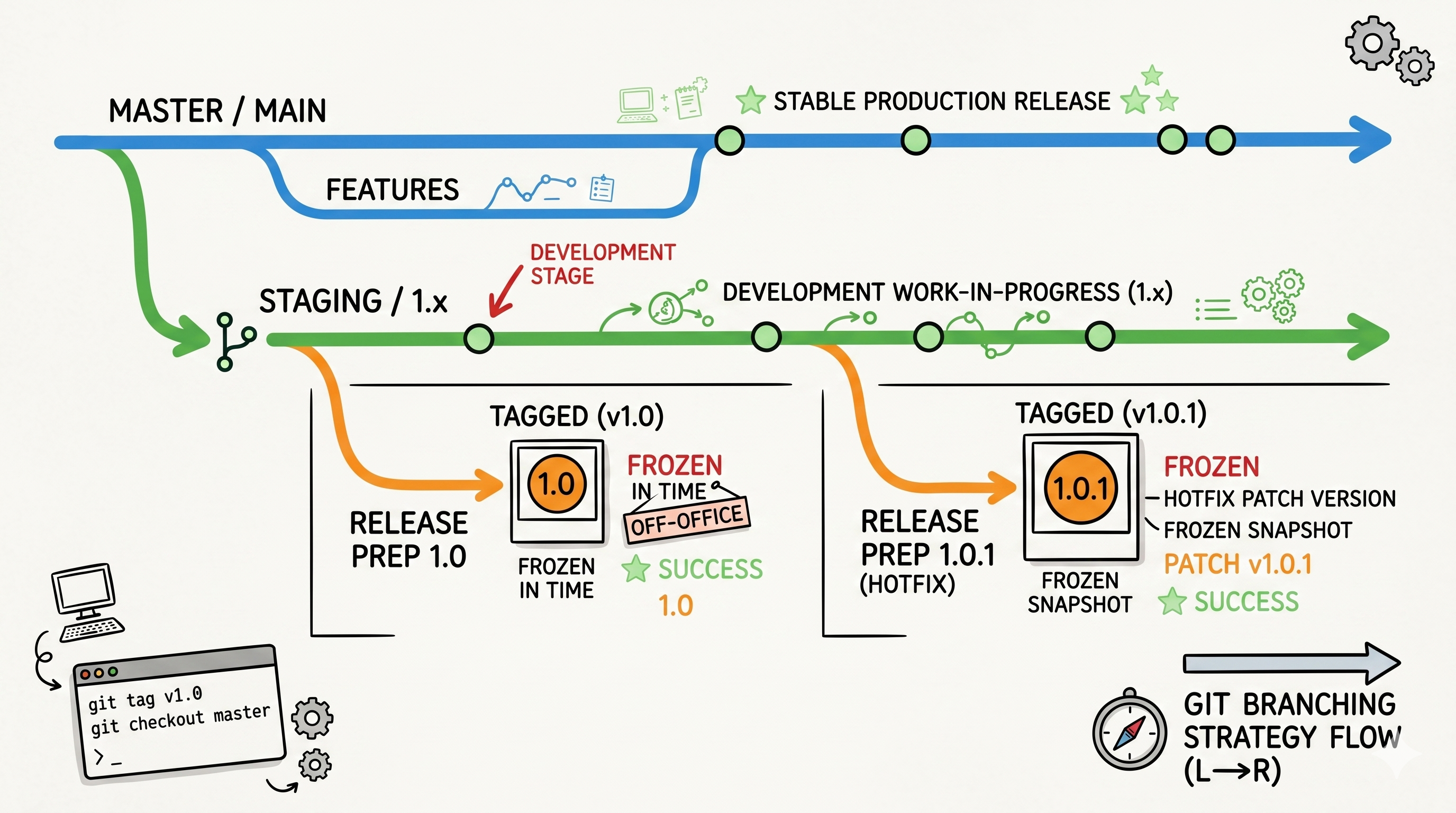
Most teams invent their Git strategy as they go. One developer starts tagging releases. Another uses branches. A third creates a hotfix branch and never deletes it. By the time you need to patch a six-month-old release, nobody remembers what release-final-v2 means or where hotfixes actually landed.
A clear branching strategy prevents this. This post covers a battle-tested Git workflow built around two parallel approaches — version control with branches and version control with tags — and tells you exactly when to use each.
The Branch Taxonomy
Before any workflow makes sense, you need a shared mental model of what each branch type means.
| Branch | Purpose | Lifetime |
|---|---|---|
master | Active development — the main integration branch | Permanent |
release/N.M.P | An immutable snapshot of a specific release | Permanent (read-only after creation) |
staging/N.x | Accumulates fixes for an entire minor series | Active while series is maintained |
feature/*, issue/* | Private branches for individual tasks | Short-lived — merged and deleted |
One critical clarification: master is the dev branch, not production. It holds in-progress work. Production state lives on release/* branches or tags, not on master.
master         →  active development (may be unstable)
staging/1.x    →  stable patch accumulation for 1.x series
release/1.0    →  frozen snapshot: exactly what shipped as 1.0
release/1.0.1  →  frozen snapshot: exactly what shipped as 1.0.1
Workflow A: Version Control with Branches
Use this workflow when your release artifacts are built directly from branches (e.g., OVA images, binary packages) and you need a persistent, auditable branch per release version.
Phase 1 — Before Any Release
Everyone commits to master. No release branches exist yet.
Phase 2 — Code Freeze for First Release (1.0)
When the team calls a code freeze, two branches get created:
# 1. Create the staging branch for the 1.x series (from master at freeze point)
git checkout master
git checkout -b staging/1.x
git push origin staging/1.x

# 2. Optionally create the release branch now (or wait until release day — step 3)
git checkout staging/1.x
git checkout -b release/1.0
git push origin release/1.0
From this point:
- New features commit to
masteronly - Fixes for 1.0 commit to
staging/1.xfirst, then cherry-pick or merge tomaster
# Fix a 1.0 bug
git checkout staging/1.x
git cherry-pick <fix-commit>
git push origin staging/1.x

git checkout master
git cherry-pick <fix-commit>
git push origin master
Phase 3 — Ship the First Release
If release/1.0 was not created at freeze time, create it now:
Your CI/CD system builds from release/1.0. This branch is now frozen — no direct commits after this point.
Phase 4 — Ongoing: Patch Fixes Between Releases
Between 1.0 and 1.1, fixes for the 1.x series accumulate on staging/1.x:
# Bug reported against 1.0
git checkout staging/1.x
git checkout -b issue/fix-auth-timeout
# ... fix, commit ...
git checkout staging/1.x
git merge issue/fix-auth-timeout
git push origin staging/1.x

# Also land it in master
git checkout master
git cherry-pick <fix-commit>
git push origin master
Phase 5 — Ship a Patch Release (1.0.1)
When enough fixes have accumulated on staging/1.x:
CI/CD builds from release/1.0.1. That branch is frozen.
Phase 6 — Code Freeze for 1.1 (repeat Phase 2)
Same pattern. staging/1.x continues to exist for further 1.x patches. A new staging/2.x would be forked from master when the 2.x series begins.
Workflow B: Version Control with Tags
Use this workflow when your CI/CD builds from tags. Simpler — one branch per minor series, tags mark individual releases.
Phase 1 — Before Any Release
Everyone commits to master.
Phase 2 — Code Freeze
Fork a release/1.x branch from master:
From this point:
- New features →
masteronly - Fixes for 1.x →
release/1.x+master
git checkout release/1.x
git cherry-pick <fix-commit>
git push origin release/1.x

git checkout master
git cherry-pick <fix-commit>
git push origin master
Phase 3 — Tag a Release
CI/CD triggers on the tag and builds the artifact. The branch stays open for future patches.
Phase 4 — Patch Release
Fix on release/1.x, cherry-pick to master, then tag:
git checkout release/1.x
git cherry-pick <fix-commit>
git push origin release/1.x

git tag -a v1.0.1 -m "Release 1.0.1 — fix auth timeout"
git push origin v1.0.1
Phase 5 — Next Minor Release
Fork release/2.x from master at the new freeze point. The release/1.x branch stays alive for continued maintenance.
Branches vs Tags: When to Use Which
| Criterion | Branches | Tags |
|---|---|---|
| Build system triggers on | Branch name | Tag name |
| Need to trace exactly what's in a release | Branch represents it | Tag points to exact commit |
| Multiple patch releases per minor series | staging/1.x accumulates | Same branch, multiple tags |
| Immutability | Enforced by convention (no push after creation) | Enforced by Git (annotated tags) |
| Audit: "what's in 1.0.1 vs 1.0.2?" | Diff between release branches | git log v1.0.1..v1.0.2 |
| Simplicity | More branches to manage | Fewer branches, cleaner history |
If your build system doesn't support tag-triggered pipelines, use branches. If it does, tags are cleaner — a tag is a permanent, immutable pointer to a single commit, which is exactly what a release is.
The One Rule That Prevents Most Mistakes
Every fix that lands on a release or staging branch must also land on master. Without this rule, your development branch silently diverges from maintenance branches and you ship regressions.
Enforce it in code review: before merging any fix to staging/1.x or release/1.x, confirm the corresponding commit exists — or is queued — for master.
# Check if a commit is in master
git log master --oneline | grep <short-hash>

# Or: check which branches contain a commit
git branch --contains <commit-hash>
Summary
| Concept | Branches workflow | Tags workflow |
|---|---|---|
| Integration branch for 1.x fixes | staging/1.x | release/1.x |
| Release snapshot | release/1.0, release/1.0.1 | v1.0.0, v1.0.1 tags |
| Code freeze action | Fork staging/1.x from master | Fork release/1.x from master |
| Patch release action | Fork release/1.0.1 from staging/1.x | Tag v1.0.1 on release/1.x |
| Fix routing | fix → staging/1.x → cherry-pick → master | fix → release/1.x → cherry-pick → master |
| Active development | master always | master always |
Pick one workflow per project and document it in your repo's CONTRIBUTING.md. The worst outcome is two developers on the same team using different mental models of where fixes land.
Questions or discussion? Connect on LinkedIn, X or reach out via email.
Discussion
Have thoughts on this post? Share them below — questions, corrections, or your own experience are all welcome.