Agentic AI Architectures: Patterns, Frameworks, and MCP for Enterprise Systems
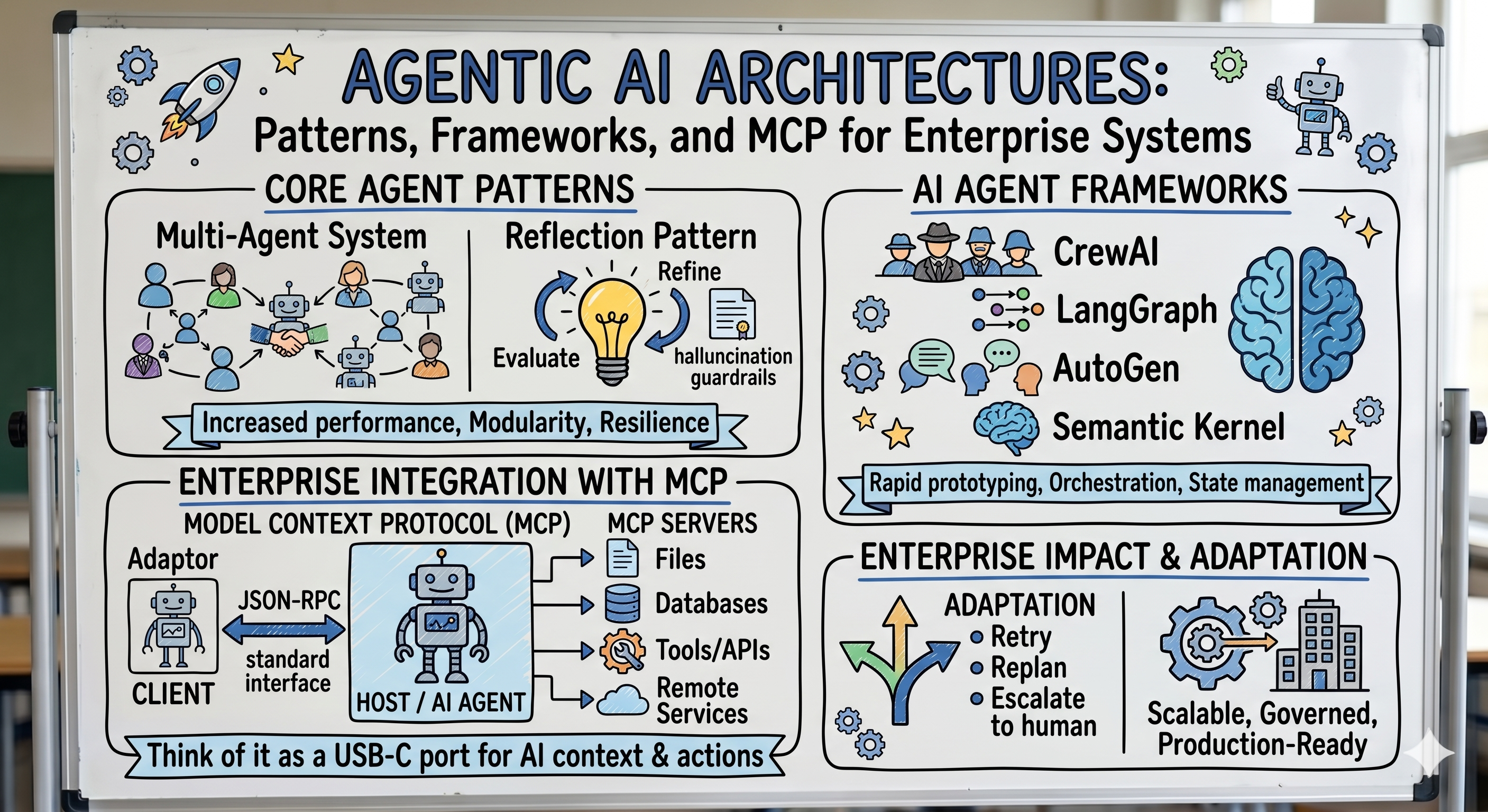
Most AI tutorials show you how to call an API and get a response. That's not an agent. An agent is a system that perceives, plans, acts, and adapts — autonomously — using tools, memory, and other agents to complete tasks that no single LLM call could handle.
In 2026, agentic AI is the dominant paradigm for building AI into enterprise software. Not chatbots. Not search bars with AI behind them. Full autonomous systems that can research a topic, write code, test it, file a ticket, notify a Slack channel, and self-correct when something goes wrong — without a human in the loop for every step.
This is the definitive guide. We cover every design pattern, every major framework, the Model Context Protocol that is quietly unifying the entire ecosystem, and how to wire all of it into production enterprise systems.
How to read this guide:
- New to agents? Read Parts 1–2 in order — the eight patterns are the foundation everything else builds on
- Choosing a framework? Jump to Parts 3 and 8
- Integrating enterprise systems? Parts 5–6 (MCP and production architecture)
- Prerequisites: comfortable Python; no prior agent or LangChain experience needed
A note on the code: samples are condensed for reading — helpers like
generate(),web_search(), and the worker nodes are stubs you'd implement. Two production habits the short samples skip: select the text block by type (next(b.text for b in response.content if b.type == "text")) instead of indexingcontent[0], since responses can also contain thinking and tool-use blocks; and nevereval()model-generated input outside a sandbox.
Part 1: What Makes a System "Agentic"?
The Four Properties of an Agent
A true AI agent has four properties that distinguish it from a simple LLM chain:
┌─────────────────────────────────────────────────────────────┐
│                                                             │
│  1. PERCEPTION    Reads its environment                     │
│                   (files, APIs, databases, user input)      │
│                                                             │
│  2. PLANNING      Decomposes goals into steps               │
│                   (ReACT, CoT, Tree of Thought)             │
│                                                             │
│  3. ACTION        Executes tools to change the world        │
│                   (writes files, calls APIs, runs code)     │
│                                                             │
│  4. ADAPTATION    Observes results and adjusts              │
│                   (retry, replan, escalate to human)        │
│                                                             │
└─────────────────────────────────────────────────────────────┘
The Spectrum: Chain → Agent → Multi-Agent System
Not every AI workflow needs to be a full agent. Understanding the spectrum helps you pick the right architecture:
CHAIN (deterministic)
  Input → Step A → Step B → Step C → Output
  Example: PDF text → extract → summarise → translate
  Use when: fixed workflow, predictable inputs

SINGLE AGENT (adaptive loop)
  Input → Think → Act → Observe → Think → Act → ... → Output
  Example: "Research competitor pricing and write a report"
  Use when: open-ended task, requires tool use

MULTI-AGENT SYSTEM (collaborative)
  Orchestrator → [Agent A || Agent B || Agent C] → Synthesise → Output
  Example: "Audit our entire codebase for security issues"
  Use when: task too large/complex for one agent, parallelism needed
Why "Agentic" Is Now the Enterprise Standard
Three converging forces in 2026 made agentic AI enterprise-ready:
- LLMs got reliable enough — Claude Opus 4.x / Sonnet 4.6, GPT-5, and Gemini 3 follow complex instructions with high fidelity and sustain long-horizon, multi-step work. Hallucinations are rare with grounded retrieval.
- Tool-calling became standard — Every major model has native, structured function-calling. Agents can reliably pick and invoke tools.
- MCP unified integrations — The Model Context Protocol (see Part 5) made connecting agents to enterprise systems a solved, standardised problem.
Part 2: The Eight Agentic Design Patterns
Every production agentic system is built from a small set of repeating patterns. Master these eight and you can design any agentic architecture.
Pattern 1: ReACT (Reason + Act)
The foundational pattern. Every iteration: think about what to do, do it, observe the result, repeat.
┌──────────────────────────────────────────────────────┐
│                   ReACT Loop                          │
│                                                      │
│  Question/Goal                                       │
│       ↓                                              │
│  ┌──────────┐   Thought: "I need to look this up"   │
│  │  REASON  │ ─────────────────────────────────────> │
│  └────┬─────┘                                        │
│       ↓                                              │
│  ┌──────────┐   Action: search("current BTC price") │
│  │   ACT    │ ─────────────────────────────────────> │
│  └────┬─────┘                                        │
│       ↓                                              │
│  ┌──────────┐   Observation: "$68,420"               │
│  │ OBSERVE  │ ─────────────────────────────────────> │
│  └────┬─────┘                                        │
│       ↓                                              │
│  Thought: "I have the data. Now I can answer."       │
│       ↓                                              │
│  Final Answer                                        │
└──────────────────────────────────────────────────────┘
from anthropic import Anthropic

client = Anthropic()
tools = [
    {
        "name": "web_search",
        "description": "Search the web for current information",
        "input_schema": {
            "type": "object",
            "properties": {"query": {"type": "string"}},
            "required": ["query"],
        },
    },
    {
        "name": "calculator",
        "description": "Evaluate a mathematical expression",
        "input_schema": {
            "type": "object",
            "properties": {"expression": {"type": "string"}},
            "required": ["expression"],
        },
    },
]

def run_tool(name: str, inputs: dict) -> str:
    if name == "web_search":
        return search_web(inputs["query"])      # real implementation
    if name == "calculator":
        # ⚠️ eval() on model output is a code-injection hole — demo only.
        # In production use a safe evaluator like simpleeval, or a sandbox.
        return str(eval(inputs["expression"]))

def react_agent(goal: str, max_iterations: int = 10) -> str:
    messages = [{"role": "user", "content": goal}]

    for _ in range(max_iterations):
        response = client.messages.create(
            model="claude-sonnet-4-6",
            max_tokens=4096,
            tools=tools,
            messages=messages,
        )

        # If no tool call, we have the final answer
        if response.stop_reason == "end_turn":
            return response.content[0].text

        # Execute tool calls and feed results back
        messages.append({"role": "assistant", "content": response.content})
        tool_results = []

        for block in response.content:
            if block.type == "tool_use":
                result = run_tool(block.name, block.input)
                tool_results.append({
                    "type": "tool_result",
                    "tool_use_id": block.id,
                    "content": result,
                })

        messages.append({"role": "user", "content": tool_results})

    return "Max iterations reached."
Best for: Open-ended research, multi-step problem solving, any task where the path to the answer isn't known in advance.
You rarely write this loop by hand anymore. The Anthropic Python SDK ships a tool runner (beta) that handles the whole loop: decorate your functions with
@beta_tooland pass them toclient.beta.messages.tool_runner(...)— the SDK generates the schemas from your type hints, executes tool calls, feeds results back, and stops when the model is done. Write the manual loop above when you need fine-grained control: custom logging, approval gates, or conditional execution.
Pattern 2: Plan-and-Execute
Separates planning from execution. A planner agent creates a step-by-step plan; executor agents run each step. The planner may replan based on execution results.
Goal → [PLANNER] → [Step 1, Step 2, Step 3, Step 4]
                         ↓        ↓        ↓        ↓
                    [EXEC-1] [EXEC-2] [EXEC-3] [EXEC-4]
                         ↓        ↓        ↓        ↓
                    Results → [PLANNER re-evaluates] → Final Answer
from dataclasses import dataclass

@dataclass
class Step:
    description: str
    tool: str
    completed: bool = False
    result: str = ""

def plan(goal: str) -> list[Step]:
    """Ask the LLM to decompose a goal into concrete steps."""
    response = client.messages.create(
        model="claude-sonnet-4-6",
        max_tokens=1024,
        system="""You are a planner. Given a goal, output a JSON array of steps.
Each step: {"description": "...", "tool": "web_search|calculator|code_exec|file_write"}""",
        messages=[{"role": "user", "content": f"Plan: {goal}"}],
    )
    import json
    steps_data = json.loads(response.content[0].text)
    return [Step(**s) for s in steps_data]

def execute(steps: list[Step]) -> list[Step]:
    """Execute each step and store the result."""
    for step in steps:
        step.result = run_tool(step.tool, {"query": step.description})
        step.completed = True
        print(f"  ✓ {step.description[:60]}")
    return steps

def synthesise(goal: str, steps: list[Step]) -> str:
    """Combine all results into a final answer."""
    context = "\n".join(f"Step: {s.description}\nResult: {s.result}" for s in steps)
    response = client.messages.create(
        model="claude-sonnet-4-6",
        max_tokens=2048,
        messages=[{"role": "user", "content": f"Goal: {goal}\n\nEvidence:\n{context}\n\nAnswer:"}],
    )
    return response.content[0].text

def plan_and_execute(goal: str) -> str:
    steps = plan(goal)
    steps = execute(steps)
    return synthesise(goal, steps)
Best for: Complex research tasks, multi-step workflows with predictable structure, tasks where you want to show the user the plan before executing.
Pattern 3: Reflection (Self-Critique)
The agent generates an output, then critiques its own output, then refines it — until the quality is sufficient or a maximum iteration count is reached.
Task → [GENERATOR] → Draft
                         ↓
                    [CRITIC]  ← evaluates quality, flags issues
                         ↓
               Issues found? → YES → [GENERATOR] refines → loop
                         ↓
                         NO → Final Output
def reflection_agent(task: str, quality_threshold: float = 0.85,
                     max_rounds: int = 3) -> str:

    draft = generate(task)

    for round_num in range(max_rounds):
        # Critique the draft
        critique = client.messages.create(
            model="claude-sonnet-4-6",
            max_tokens=1024,
            system="""You are a quality evaluator. Score the response 0.0-1.0 and list issues.
Output JSON: {"score": 0.75, "issues": ["issue 1", "issue 2"], "suggestions": ["..."]}""",
            messages=[{
                "role": "user",
                "content": f"Task: {task}\n\nResponse to evaluate:\n{draft}"
            }],
        )

        import json
        evaluation = json.loads(critique.content[0].text)
        score = evaluation["score"]
        print(f"  Round {round_num + 1}: score={score:.2f}")

        if score >= quality_threshold:
            break

        # Refine based on critique
        issues = "\n".join(f"- {i}" for i in evaluation["issues"])
        draft = generate(
            f"Improve this response.\nTask: {task}\n\nCurrent response:\n{draft}\n\nIssues:\n{issues}"
        )

    return draft
Best for: Writing tasks (reports, code, emails), any output where quality is measurable, generating content that must meet specific criteria.
Pattern 4: Tool-Use Specialisation
A single agent equipped with a diverse, well-documented toolkit. The key design principle: tools should be composable and documented precisely — the LLM reads the tool descriptions to decide when to use them.
ENTERPRISE_TOOLS = [
    {
        "name": "query_crm",
        "description": "Query Salesforce CRM for customer/deal data. Use when you need customer info, deal status, account history, or contact details.",
        "input_schema": {
            "type": "object",
            "properties": {
                "soql": {"type": "string", "description": "SOQL query string"},
            },
            "required": ["soql"],
        },
    },
    {
        "name": "create_jira_ticket",
        "description": "Create a Jira issue. Use when a bug, task, or story needs to be tracked.",
        "input_schema": {
            "type": "object",
            "properties": {
                "project":     {"type": "string"},
                "issue_type":  {"type": "string", "enum": ["Bug", "Story", "Task"]},
                "summary":     {"type": "string"},
                "description": {"type": "string"},
                "priority":    {"type": "string", "enum": ["Low", "Medium", "High", "Critical"]},
            },
            "required": ["project", "issue_type", "summary"],
        },
    },
    {
        "name": "send_slack_message",
        "description": "Send a Slack message to a channel or user. Use to notify team members of actions, results, or alerts.",
        "input_schema": {
            "type": "object",
            "properties": {
                "channel": {"type": "string", "description": "Channel name (e.g. #engineering) or user ID"},
                "message": {"type": "string"},
            },
            "required": ["channel", "message"],
        },
    },
    {
        "name": "run_sql_query",
        "description": "Execute a read-only SQL query against the analytics database. Use for business metrics, usage data, or reporting.",
        "input_schema": {
            "type": "object",
            "properties": {
                "sql": {"type": "string"},
                "database": {"type": "string", "enum": ["analytics", "reporting", "warehouse"]},
            },
            "required": ["sql", "database"],
        },
    },
]
Key principle: tool descriptions are part of the agent's intelligence. A vague description ("query database") forces the agent to guess. A precise description ("Execute a read-only SQL query... use for business metrics") tells the agent exactly when to reach for this tool.
Pattern 5: Multi-Agent Supervisor
A Supervisor agent receives the goal and routes subtasks to specialised Worker agents. Workers report results back to the Supervisor, which synthesises the final answer.
User Goal
    ↓
[SUPERVISOR]
    ├── "Research task" ──────→ [RESEARCH AGENT]   → web search, papers
    ├── "Data analysis" ──────→ [ANALYST AGENT]    → SQL, statistics
    ├── "Write report" ───────→ [WRITER AGENT]     → markdown, formatting
    └── "Review output" ──────→ [CRITIC AGENT]     → quality check
                                        ↓
                             [SUPERVISOR] synthesises → Final Output
from langgraph.graph import StateGraph, END
from typing import TypedDict, Annotated
import operator

class AgentState(TypedDict):
    goal:        str
    messages:    Annotated[list, operator.add]
    next_agent:  str
    final_answer: str

def supervisor_node(state: AgentState) -> AgentState:
    """Decide which worker agent to call next, or END."""
    response = client.messages.create(
        model="claude-sonnet-4-6",
        max_tokens=256,
        system="""You are a supervisor. Given the goal and progress so far,
decide which agent to call next: RESEARCH, ANALYST, WRITER, or FINISH.
Output only the agent name.""",
        messages=[
            {"role": "user", "content":
             f"Goal: {state['goal']}\nProgress: {state['messages'][-3:]}"}
        ],
    )
    next_agent = response.content[0].text.strip()
    return {**state, "next_agent": next_agent}

def build_supervisor_graph() -> StateGraph:
    graph = StateGraph(AgentState)

    graph.add_node("supervisor", supervisor_node)
    graph.add_node("research",   research_agent_node)
    graph.add_node("analyst",    analyst_agent_node)
    graph.add_node("writer",     writer_agent_node)

    graph.set_entry_point("supervisor")

    graph.add_conditional_edges(
        "supervisor",
        lambda s: s["next_agent"].lower(),
        {
            "research": "research",
            "analyst":  "analyst",
            "writer":   "writer",
            "finish":   END,
        },
    )
    # All workers return to supervisor after completing
    for worker in ["research", "analyst", "writer"]:
        graph.add_edge(worker, "supervisor")

    return graph.compile()
Pattern 6: Parallel Fan-Out / Fan-In
Dispatch multiple agents simultaneously to gather information from different sources in parallel, then merge results. Dramatically faster than sequential execution.
                     ┌─ [Agent: SEC filings]   ─┐
                     ├─ [Agent: News articles]  ─┤
Goal → [DISPATCHER] ─┼─ [Agent: Analyst reports]─┼─ [MERGER] → Answer
                     ├─ [Agent: Social sentiment]─┤
                     └─ [Agent: Financial data]  ─┘
         (all run simultaneously)
import asyncio
from anthropic import AsyncAnthropic

async_client = AsyncAnthropic()

async def research_agent(topic: str, source: str) -> dict:
    """One parallel worker — researches from a specific source."""
    response = await async_client.messages.create(
        model="claude-sonnet-4-6",
        max_tokens=1024,
        messages=[{
            "role": "user",
            "content": f"Research '{topic}' using {source}. Return key findings as JSON."
        }],
    )
    return {"source": source, "findings": response.content[0].text}

async def parallel_research(topic: str) -> str:
    """Fan-out: all sources queried simultaneously."""
    sources = [
        "SEC filings and official financial reports",
        "Recent news articles (last 30 days)",
        "Analyst research reports",
        "Social media sentiment",
        "Historical price and volume data",
    ]

    # All agents run concurrently — total time = slowest agent, not sum of all
    results = await asyncio.gather(*[
        research_agent(topic, source) for source in sources
    ])

    # Fan-in: merge all findings
    combined = "\n\n".join(
        f"## {r['source']}\n{r['findings']}" for r in results
    )
    synthesis = await async_client.messages.create(
        model="claude-sonnet-4-6",
        max_tokens=2048,
        messages=[{
            "role": "user",
            "content": f"Synthesise these research findings on '{topic}':\n\n{combined}"
        }],
    )
    return synthesis.content[0].text
Performance impact: 5 sequential agents at 3 seconds each = 15 seconds. Parallel = ~3 seconds. 5× faster.
Pattern 7: Human-in-the-Loop (HITL)
The agent pauses at defined checkpoints and waits for human approval before proceeding. Critical for high-stakes actions (sending emails, executing financial transactions, deploying code).
Agent working autonomously
         ↓
  [CHECKPOINT: High-risk action detected]
         ↓
  Pause → Notify human → Wait for approval
         ↓
  APPROVED → Continue          REJECTED → Replan
from typing import TypedDict
from langgraph.checkpoint.memory import MemorySaver
from langgraph.graph import StateGraph
from langgraph.types import interrupt, Command   # interrupt lives in langgraph.types

class WorkflowState(TypedDict):
    task:            str
    draft_action:    str
    human_approved:  bool
    result:          str

def plan_action(state: WorkflowState) -> WorkflowState:
    """Agent plans what action to take."""
    # ... generates draft_action
    return {**state, "draft_action": "Send email to 50,000 customers about price change"}

def human_review(state: WorkflowState) -> WorkflowState:
    """Pause for a human — interrupt() suspends the graph at this exact point.
    The value passed to Command(resume=...) becomes interrupt()'s return value."""
    approved: bool = interrupt(
        {"question": "Approve this action?", "action": state["draft_action"]}
    )
    return {**state, "human_approved": approved}

def execute_or_replan(state: WorkflowState) -> WorkflowState:
    if state["human_approved"]:
        result = execute_action(state["draft_action"])
        return {**state, "result": result}
    else:
        return {**state, "draft_action": "", "result": "Action rejected — replanning"}

# First run — executes until interrupt(), then suspends and checkpoints:
config = {"configurable": {"thread_id": "task-001"}}
app.invoke({"task": "Announce the price change"}, config=config)

# Later (even after a restart) — resume with the human's decision:
app.invoke(Command(resume=True), config=config)    # or Command(resume=False)
Enterprise rule: Any agent action that is irreversible or affects external parties should go through a HITL checkpoint.
Pattern 8: Memory-Augmented Agent
An agent with explicit memory tiers — allowing it to remember context across sessions, learn from past interactions, and access a personal knowledge graph.
User Message
      ↓
[MEMORY RETRIEVAL]
  ├── Short-term:  current session context (last N turns)
  ├── Working:     task-specific scratchpad (current task state)
  └── Long-term:   semantic search over past interactions + learned facts
      ↓
[AGENT] ← enriched context
      ↓
[MEMORY WRITE] → updates relevant memory tiers
      ↓
Response
import json
from datetime import datetime, timezone
from anthropic import Anthropic

client = Anthropic()

class AgentMemory:
    def __init__(self, vector_store, user_id: str):
        self.vector_store = vector_store
        self.user_id = user_id
        self.short_term: list[dict] = []     # last 20 messages
        self.working: dict = {}              # scratchpad for current task

    def retrieve(self, query: str, top_k: int = 5) -> str:
        """Pull relevant long-term memories by semantic similarity."""
        results = self.vector_store.search(
            query=query, filter={"user_id": self.user_id}, top_k=top_k
        )
        if not results:
            return ""
        return "\n".join(f"- {r['content']}" for r in results)

    def store(self, interaction: str) -> None:
        """Summarise and store important facts to long-term memory."""
        response = client.messages.create(
            model="claude-haiku-4-5",   # cheap model for summarisation
            max_tokens=256,
            system="Extract key facts worth remembering from this interaction. Output as JSON array of strings.",
            messages=[{"role": "user", "content": interaction}],
        )
        facts = json.loads(response.content[0].text)
        for fact in facts:
            self.vector_store.upsert({
                "content": fact,
                "user_id": self.user_id,
                "timestamp": datetime.now(timezone.utc).isoformat(),
            })

    def get_context(self, current_query: str) -> str:
        long_term = self.retrieve(current_query)
        recent = self.short_term[-6:]   # last 3 turns
        return f"""
Relevant past context:
{long_term}

Recent conversation:
{json.dumps(recent, indent=2)}
"""

def memory_agent(query: str, memory: AgentMemory) -> str:
    context = memory.get_context(query)
    response = client.messages.create(
        model="claude-sonnet-4-6",
        max_tokens=2048,
        system=f"You are a helpful assistant with memory.\n\n{context}",
        messages=[{"role": "user", "content": query}],
    )
    answer = response.content[0].text
    memory.short_term.append({"role": "user", "content": query})
    memory.short_term.append({"role": "assistant", "content": answer})
    memory.store(f"Q: {query}\nA: {answer}")   # async in production
    return answer
Part 3: The Major Agent Frameworks in 2026
LangGraph — Stateful, Graph-Based Orchestration
LangGraph models agent workflows as directed graphs where nodes are LLM calls or tools, and edges define conditional control flow. State is persisted across steps, enabling pause/resume, branching, and cycles.
from langgraph.graph import StateGraph, END
from typing import TypedDict, Literal

class ResearchState(TypedDict):
    query:        str
    search_results: list[str]
    analysis:     str
    report:       str
    quality_ok:   bool

def search_node(state: ResearchState) -> ResearchState:
    results = [web_search(state["query"])]
    return {**state, "search_results": results}

def analyse_node(state: ResearchState) -> ResearchState:
    combined = "\n".join(state["search_results"])
    analysis = llm_call(f"Analyse: {combined}")
    return {**state, "analysis": analysis}

def write_node(state: ResearchState) -> ResearchState:
    report = llm_call(f"Write a report based on: {state['analysis']}")
    return {**state, "report": report}

def review_node(state: ResearchState) -> ResearchState:
    score = evaluate_quality(state["report"])
    return {**state, "quality_ok": score >= 0.8}

def route_after_review(state: ResearchState) -> Literal["write", "__end__"]:
    return "__end__" if state["quality_ok"] else "write"

# Build the graph
graph = StateGraph(ResearchState)
graph.add_node("search",  search_node)
graph.add_node("analyse", analyse_node)
graph.add_node("write",   write_node)
graph.add_node("review",  review_node)

graph.set_entry_point("search")
graph.add_edge("search",  "analyse")
graph.add_edge("analyse", "write")
graph.add_edge("write",   "review")
graph.add_conditional_edges("review", route_after_review,
                             {"write": "write", "__end__": END})

app = graph.compile(checkpointer=MemorySaver())
LangGraph excels at: Complex stateful workflows, human-in-the-loop, cyclic graphs (retry loops), long-running processes that must survive failures.
AutoGen — Multi-Agent Conversation (now in maintenance mode)
AutoGen (Microsoft) models agents as conversational actors who pass messages between each other. A group chat with a manager determines who speaks next.
2026 status check: AutoGen is officially in maintenance mode — no new features, community-managed. Microsoft's recommended successor is the Microsoft Agent Framework, which carries AutoGen's multi-agent orchestration ideas forward with stable APIs, multi-provider model support, and A2A/MCP interoperability. Learn the pattern below (conversational actors + group chat manager — it transfers directly), but start new projects on Agent Framework.
import autogen

config_list = [{"model": "claude-sonnet-4-6", "api_key": "...", "api_type": "anthropic"}]
llm_config = {"config_list": config_list, "temperature": 0}

# Define specialist agents
engineer = autogen.AssistantAgent(
    name="Engineer",
    system_message="You write Python code to solve tasks. Always include tests.",
    llm_config=llm_config,
)
reviewer = autogen.AssistantAgent(
    name="CodeReviewer",
    system_message="You review code for bugs, security issues, and best practices. Be specific.",
    llm_config=llm_config,
)
product_manager = autogen.AssistantAgent(
    name="ProductManager",
    system_message="You verify that the solution meets the requirements and is production-ready.",
    llm_config=llm_config,
)
user_proxy = autogen.UserProxyAgent(
    name="UserProxy",
    human_input_mode="TERMINATE",          # only ask human at the end
    max_consecutive_auto_reply=10,
    code_execution_config={"work_dir": "/tmp/autogen"},
    is_termination_msg=lambda x: "APPROVED" in x.get("content", ""),
)

# Group chat — manager decides who speaks next
group_chat = autogen.GroupChat(
    agents=[user_proxy, engineer, reviewer, product_manager],
    messages=[],
    max_round=20,
)
manager = autogen.GroupChatManager(groupchat=group_chat, llm_config=llm_config)

# Start the conversation
user_proxy.initiate_chat(
    manager,
    message="Build a FastAPI endpoint that validates email addresses using regex and returns whether they're valid.",
)
This pattern excels at: Software engineering tasks, code review workflows, multi-expert consultation, any task that benefits from debate and critique between agents. For new builds, implement it on Microsoft Agent Framework rather than legacy AutoGen.
CrewAI — Role-Based Agent Teams
CrewAI thinks in terms of crew members with roles, goals, and backstories — like assigning work to a human team.
from crewai import Agent, Task, Crew, Process
from crewai_tools import SerperDevTool, FileWriterTool

search_tool = SerperDevTool()
file_tool   = FileWriterTool()

# Define the crew
analyst = Agent(
    role="Senior Market Research Analyst",
    goal="Uncover cutting-edge developments and market opportunities",
    backstory="""You are an expert analyst with 15 years of experience in
    tech market research. You synthesise complex data into clear insights.""",
    tools=[search_tool],
    verbose=True,
)
writer = Agent(
    role="Tech Content Strategist",
    goal="Craft compelling, factually accurate market reports",
    backstory="""You are a seasoned writer who transforms technical analysis
    into engaging reports that executive audiences can act on.""",
    tools=[file_tool],
    verbose=True,
)

# Define tasks
research_task = Task(
    description="Research the current state of {topic}. Focus on: market size, key players, recent developments, growth drivers, and risks.",
    expected_output="A comprehensive research brief with key findings, data points, and source citations.",
    agent=analyst,
)
writing_task = Task(
    description="Using the research brief, write a 1,500-word executive market report on {topic}.",
    expected_output="A professional market report with executive summary, key findings, competitive landscape, and recommendations.",
    agent=writer,
    output_file="market_report.md",
)

# Assemble and run the crew
crew = Crew(
    agents=[analyst, writer],
    tasks=[research_task, writing_task],
    process=Process.sequential,
    verbose=True,
)
result = crew.kickoff(inputs={"topic": "Agentic AI platforms for enterprise"})
CrewAI excels at: Content generation pipelines, research workflows, tasks that map naturally to human team roles.
Semantic Kernel — Enterprise .NET/Python SDK
Microsoft's Semantic Kernel is built for enterprise integration — strong typing, plugins (tool collections), and first-class support for enterprise systems (Azure, Microsoft 365, Copilot).
import asyncio
from semantic_kernel import Kernel
from semantic_kernel.connectors.ai.anthropic import AnthropicChatCompletion
from semantic_kernel.functions import kernel_function, KernelArguments

kernel = Kernel()
kernel.add_service(AnthropicChatCompletion(
    ai_model_id="claude-sonnet-4-6",
    api_key="...",
))

# Define a plugin (collection of tools)
class SalesforcePlugin:
    @kernel_function(description="Get customer details by ID")
    async def get_customer(self, customer_id: str) -> str:
        return await salesforce_client.get_contact(customer_id)

    @kernel_function(description="List open deals for a customer")
    async def get_deals(self, customer_id: str) -> str:
        return await salesforce_client.get_opportunities(customer_id)

kernel.add_plugin(SalesforcePlugin(), plugin_name="Salesforce")

# The agent can now call Salesforce naturally in any prompt
result = await kernel.invoke_prompt(
    "Get the details for customer C-12345 and list their open deals. "
    "Summarise in 3 bullet points.",
    KernelArguments(),
)
Semantic Kernel excels at: Enterprise Microsoft stack integration, Azure OpenAI, structured plugin architecture, .NET environments. (Note: Semantic Kernel's agent capabilities are also converging into the Microsoft Agent Framework — SK remains supported, but watch that project for Microsoft's long-term agent direction.)
Part 4: LangGraph in Depth — Enterprise State Machines
LangGraph deserves a deeper look because it's the framework most production enterprise agentic systems in 2026 are built on. The key concept is treating your agent as a state machine with persistence.
Persistent State and Checkpointing
from langgraph.checkpoint.postgres import PostgresSaver
from langgraph.graph import StateGraph

# Production: persist state to PostgreSQL
# → agent survives server restarts, long tasks, human review pauses
conn_string = "postgresql://user:pass@db:5432/agents"
checkpointer = PostgresSaver.from_conn_string(conn_string)
checkpointer.setup()   # creates checkpoint tables

app = graph.compile(checkpointer=checkpointer)

# Run with a thread_id — same thread_id resumes where it left off
config = {"configurable": {"thread_id": "task-abc-123"}}

# First run
result1 = app.invoke({"goal": "Analyse Q1 sales data"}, config=config)

# Resume later (even after server restart)
result2 = app.invoke({"human_feedback": "Focus on APAC region"}, config=config)
Subgraphs — Composable Agent Modules
# Build reusable agent modules as subgraphs
def build_research_subgraph() -> StateGraph:
    sg = StateGraph(ResearchState)
    sg.add_node("search", search_node)
    sg.add_node("extract", extract_node)
    sg.set_entry_point("search")
    sg.add_edge("search", "extract")
    sg.set_finish_point("extract")
    return sg.compile()

def build_report_subgraph() -> StateGraph:
    sg = StateGraph(ReportState)
    # ... similar structure
    return sg.compile()

# Compose them into a larger graph
main_graph = StateGraph(MainState)
main_graph.add_node("research", build_research_subgraph())
main_graph.add_node("report",   build_report_subgraph())
main_graph.add_edge("research", "report")
Streaming Agent Progress
# Stream each step's output to the user in real time
async for event in app.astream_events(
    {"goal": "Research competitor pricing"},
    config={"configurable": {"thread_id": "t-001"}},
    version="v2",
):
    kind = event["event"]
    if kind == "on_chat_model_stream":
        chunk = event["data"]["chunk"].content
        print(chunk, end="", flush=True)   # real-time token stream
    elif kind == "on_tool_start":
        print(f"\n🔧 Using tool: {event['name']}")
    elif kind == "on_tool_end":
        print(f"✓ Tool complete: {event['name']}")
Part 5: Model Context Protocol (MCP) — The Universal Integration Layer
What MCP Is and Why It Matters
The Model Context Protocol is an open standard developed by Anthropic (now supported by OpenAI, Google, Microsoft, and most major AI labs) that defines a universal way for AI agents to connect to external tools and data sources.
Before MCP: every agent needed custom integration code for every data source. Slack integration for LangChain was incompatible with AutoGen. A Postgres tool written for CrewAI had to be rewritten for LangGraph.
After MCP: one MCP server, compatible with every MCP-enabled agent and framework.
BEFORE MCP:                          AFTER MCP:

Agent A ──custom──→ Salesforce       Agent A ──┐
Agent A ──custom──→ Jira             Agent B ──┼──→ [MCP Client] → [MCP Server] → Salesforce
Agent A ──custom──→ Postgres         Agent C ──┤                → [MCP Server] → Jira
                                     Any LLM ──┘                → [MCP Server] → Postgres
Agent B ──custom──→ Salesforce
(rewrite everything)
MCP Architecture
┌────────────────────────────────────────────────────┐
│                   MCP Client                        │
│  (Claude Desktop, LangChain, LangGraph, AutoGen)    │
└──────────────────┬─────────────────────────────────┘
                   │  JSON-RPC 2.0 over stdio (local)
                   │  or Streamable HTTP (remote)
┌──────────────────▼─────────────────────────────────┐
│                   MCP Server                        │
│                                                     │
│  Exposes:                                           │
│  ├── Tools     (callable functions)                 │
│  ├── Resources (readable data: files, DB tables)    │
│  └── Prompts   (reusable prompt templates)          │
└──────────────────┬─────────────────────────────────┘
                   │
┌──────────────────▼─────────────────────────────────┐
│            Actual Data Source / Service              │
│    (PostgreSQL, Salesforce, Jira, Slack, GitHub)    │
└────────────────────────────────────────────────────┘
Building an MCP Server from Scratch
The official Python SDK's high-level FastMCP API generates the tool schemas from your function signatures and docstrings — a complete Postgres server is ~40 lines:
# mcp_server_postgres.py    (pip install "mcp[cli]" asyncpg)
import json
import os

import asyncpg
from mcp.server.fastmcp import FastMCP

mcp = FastMCP("postgres-mcp-server")
DATABASE_URL = os.environ["DATABASE_URL"]


@mcp.tool()
async def query(sql: str) -> str:
    """Execute a read-only SQL query against the analytics database (SELECT only)."""
    if any(kw in sql.upper() for kw in ["INSERT", "UPDATE", "DELETE", "DROP", "ALTER"]):
        return "Error: Only SELECT queries are allowed."
    conn = await asyncpg.connect(DATABASE_URL)
    try:
        rows = await conn.fetch(sql)
        return json.dumps([dict(r) for r in rows], default=str, indent=2)
    finally:
        await conn.close()


@mcp.tool()
async def list_tables() -> str:
    """List all available tables in the database."""
    conn = await asyncpg.connect(DATABASE_URL)
    try:
        rows = await conn.fetch(
            "SELECT table_name FROM information_schema.tables WHERE table_schema = 'public'"
        )
        return json.dumps([r["table_name"] for r in rows])
    finally:
        await conn.close()


@mcp.tool()
async def describe_table(table_name: str) -> str:
    """Get the column names and types for a specific table."""
    conn = await asyncpg.connect(DATABASE_URL)
    try:
        rows = await conn.fetch(
            """SELECT column_name, data_type FROM information_schema.columns
               WHERE table_name = $1 AND table_schema = 'public'""",
            table_name,
        )
        return json.dumps([dict(r) for r in rows], indent=2)
    finally:
        await conn.close()


if __name__ == "__main__":
    mcp.run()   # stdio transport by default
Don't trust the keyword deny-list as your only guard.
"UPDATE" in sql.upper()also matches a column calledupdated_at, and misses tricks likeSELECT ... INTO. The real fix is defense in depth: connect with a read-only database role (GRANT SELECTonly, ordefault_transaction_read_only = on) so even a query that slips through can't mutate anything. The deny-list then becomes a fast, friendly error message — not your security boundary.
Connecting an MCP Server to an Agent
Two real paths, depending on where the server runs.
Path 1 — remote servers: let the API connect for you. The Claude API has a native MCP connector: pass mcp_servers on the request and Anthropic's side handles discovery and tool calls. Zero client plumbing:
import anthropic

client = anthropic.Anthropic()

response = client.beta.messages.create(
    model="claude-sonnet-4-6",
    max_tokens=4096,
    mcp_servers=[{
        "type": "url",
        "url": "https://mcp.example.com/postgres",   # Streamable HTTP endpoint
        "name": "analytics-db",
    }],
    messages=[{
        "role": "user",
        "content": "How many orders were placed last month, broken down by product category?",
    }],
    betas=["mcp-client-2025-04-04"],
)
Path 2 — local stdio servers: the SDK's MCP helpers + tool runner. For a server running on your machine (like the Postgres server above), use the official mcp client to spawn it, then convert its tools with anthropic.lib.tools.mcp (pip install "anthropic[mcp]"):
from anthropic import AsyncAnthropic
from anthropic.lib.tools.mcp import async_mcp_tool
from mcp import ClientSession
from mcp.client.stdio import stdio_client, StdioServerParameters

client = AsyncAnthropic()

async with stdio_client(
    StdioServerParameters(command="python", args=["mcp_server_postgres.py"])
) as (read, write):
    async with ClientSession(read, write) as mcp_session:
        await mcp_session.initialize()
        tools_result = await mcp_session.list_tools()   # discovers all tools

        # The tool runner handles the full agentic loop — MCP tools
        # behave exactly like any other tool.
        runner = client.beta.messages.tool_runner(
            model="claude-sonnet-4-6",
            max_tokens=4096,
            tools=[async_mcp_tool(t, mcp_session) for t in tools_result.tools],
            messages=[{
                "role": "user",
                "content": "How many orders were placed last month, broken down by product category?",
            }],
        )
        async for message in runner:
            print(message)
The MCP Ecosystem in 2026
The MCP ecosystem now includes hundreds of pre-built servers:
OFFICIAL REFERENCE MCP SERVERS (modelcontextprotocol/servers):
├── filesystem    → read/write local files and directories
├── fetch         → HTTP requests to any URL
├── memory        → persistent knowledge-graph memory store
├── sequentialthinking → extended reasoning scratchpad
└── git           → read, search, and manipulate git repositories

COMMUNITY MCP SERVERS:
├── github        → repos, PRs, issues, code search
├── slack         → send messages, read channels
├── jira          → create/update issues, search projects
├── salesforce    → query CRM, update records
├── postgres      → query databases
├── stripe        → payment data
├── google-drive  → read/write Google Docs and Sheets
├── notion        → read/write Notion pages and databases
└── kubernetes    → cluster inspection, pod management
Part 6: Enterprise Multi-Agent System Architecture
The Reference Enterprise Architecture
                        ┌─────────────────────────────────────────┐
                        │            API Gateway / Auth            │
                        │   OAuth2, JWT, Rate Limiting, RBAC      │
                        └───────────────┬─────────────────────────┘
                                        │
                        ┌───────────────▼─────────────────────────┐
                        │          Orchestration Layer             │
                        │   LangGraph / Durable Workflows          │
                        │   State: PostgreSQL Checkpoints           │
                        └───┬───────────────────────┬─────────────┘
                            │                       │
           ┌────────────────▼────┐   ┌─────────────▼────────────────┐
           │   Agent Registry    │   │    Task Queue (Redis/Kafka)   │
           │  (agent discovery,  │   │  (async, durable, retryable)  │
           │   health checks)    │   └───────────────┬──────────────┘
           └────────────────────┘                   │
                                    ┌───────────────▼──────────────────────┐
                                    │          Worker Agents                │
                                    │                                       │
                                    │  [Research] [Analyst] [Writer]        │
                                    │  [Code Gen] [QA]     [Notifier]       │
                                    └───────────────┬──────────────────────┘
                                                    │
                            ┌───────────────────────▼───────────────┐
                            │          MCP Server Layer              │
                            │  [Postgres] [Salesforce] [Jira]        │
                            │  [Slack]    [GitHub]     [S3]          │
                            └───────────────────────────────────────┘
                                                    │
                            ┌───────────────────────▼───────────────┐
                            │         Observability Layer            │
                            │  Traces: OpenTelemetry + Jaeger        │
                            │  Metrics: Prometheus + Grafana         │
                            │  LLM Evals: opik / Arize              │
                            └───────────────────────────────────────┘
Durable, Fault-Tolerant Agent Execution
Long-running agents fail. Network timeouts, LLM API errors, and process crashes are inevitable. Production systems need durable execution — the ability to resume from where they left off.
from langgraph.checkpoint.postgres import PostgresSaver
import tenacity

@tenacity.retry(
    wait=tenacity.wait_exponential(min=1, max=60),
    stop=tenacity.stop_after_attempt(5),
    retry=tenacity.retry_if_exception_type((APIError, ConnectionError)),
    before_sleep=lambda rs: print(f"Retry {rs.attempt_number}/5..."),
)
async def resilient_llm_call(messages: list, **kwargs):
    return await async_client.messages.create(
        model="claude-sonnet-4-6",
        messages=messages,
        **kwargs,
    )

# Every agent step is checkpointed — crash and restart resumes from last step
async def enterprise_agent_run(task_id: str, goal: str) -> str:
    config = {"configurable": {"thread_id": task_id}}
    checkpointer = PostgresSaver.from_conn_string(DB_URL)

    # If this task_id has been run before, resume from checkpoint
    existing = checkpointer.get(config)
    if existing:
        print(f"Resuming task {task_id} from step {existing['channel_values'].get('step', 0)}")

    app = build_agent_graph().compile(checkpointer=checkpointer)
    result = await app.ainvoke({"goal": goal}, config=config)
    return result["final_answer"]
Observability for Multi-Agent Systems
Debugging a multi-agent system without tracing is impossible. Every agent call, tool invocation, and state transition must be traced.
from opentelemetry import trace
from opentelemetry.sdk.trace import TracerProvider
from opentelemetry.sdk.trace.export import BatchSpanProcessor
from opentelemetry.exporter.otlp.proto.grpc.trace_exporter import OTLPSpanExporter
from opentelemetry.instrumentation.anthropic import AnthropicInstrumentor

# Set up distributed tracing
provider = TracerProvider()
provider.add_span_processor(
    BatchSpanProcessor(OTLPSpanExporter(endpoint="http://jaeger:4317"))
)
trace.set_tracer_provider(provider)

# Auto-instrument all Anthropic calls
AnthropicInstrumentor().instrument()

tracer = trace.get_tracer("enterprise-agent")

async def traced_agent_step(step_name: str, state: dict) -> dict:
    with tracer.start_as_current_span(f"agent.{step_name}") as span:
        span.set_attribute("agent.goal",      state.get("goal", ""))
        span.set_attribute("agent.step",      step_name)
        span.set_attribute("agent.thread_id", state.get("thread_id", ""))

        try:
            result = await execute_step(step_name, state)
            span.set_attribute("agent.success", True)
            span.set_attribute("agent.tokens_used", result.get("tokens", 0))
            return result
        except Exception as e:
            span.record_exception(e)
            span.set_attribute("agent.success", False)
            raise
Cost Management
Agents can be expensive. Without cost controls, a single runaway agent can generate thousands of dollars in API calls.
class CostGuard:
    """Hard limits on agent API spend per task and per day."""

    def __init__(self, max_task_cost_usd: float = 1.0,
                 max_daily_cost_usd: float = 50.0):
        self.max_task = max_task_cost_usd
        self.max_daily = max_daily_cost_usd
        self.task_cost = 0.0
        self.daily_cost = 0.0

    # Claude Sonnet 4.6 pricing (2026 reference — always check current pricing)
    COST_PER_1K = {"input": 0.003, "output": 0.015}

    def record(self, input_tokens: int, output_tokens: int) -> None:
        cost = (input_tokens  / 1000 * self.COST_PER_1K["input"] +
                output_tokens / 1000 * self.COST_PER_1K["output"])
        self.task_cost  += cost
        self.daily_cost += cost

        if self.task_cost > self.max_task:
            raise RuntimeError(
                f"Task cost limit exceeded: ${self.task_cost:.4f} > ${self.max_task}"
            )
        if self.daily_cost > self.max_daily:
            raise RuntimeError(
                f"Daily cost limit exceeded: ${self.daily_cost:.2f} > ${self.max_daily}"
            )

# Usage
guard = CostGuard(max_task_cost_usd=0.50)
response = await resilient_llm_call(messages=messages)
guard.record(
    input_tokens=response.usage.input_tokens,
    output_tokens=response.usage.output_tokens,
)
Part 7: Real-World Enterprise Use Cases
Use Case 1: Autonomous Code Review Agent
async def code_review_agent(pr_url: str) -> dict:
    """
    Fetches a GitHub PR, reviews the diff across security/quality/tests,
    posts inline comments, and creates a Jira ticket for critical issues.
    """
    app = build_supervisor_graph()
    result = await app.ainvoke({
        "goal": f"Review PR {pr_url}",
        "tools": ["github_get_pr_diff", "create_jira_ticket",
                  "post_github_review_comment", "send_slack_notification"],
        "workers": {
            "security": "Find SQL injection, XSS, hardcoded secrets, OWASP Top 10",
            "quality":  "Find code smells, duplication, naming issues, SOLID violations",
            "tests":    "Check test coverage, missing test cases, edge cases",
        },
    })
    # Agent will: fetch diff → fan-out to 3 reviewers → merge findings →
    #             post GitHub review → create Jira for criticals → Slack summary
    return result
Use Case 2: Customer Intelligence Agent
async def customer_360_agent(customer_id: str) -> str:
    """
    Pulls data from CRM, support tickets, usage analytics, and billing,
    then generates a comprehensive customer health brief.
    """
    # Parallel fetch from all systems via MCP servers
    data = await asyncio.gather(
        mcp_call("salesforce", "get_account",     {"id": customer_id}),
        mcp_call("zendesk",    "get_tickets",      {"account_id": customer_id}),
        mcp_call("analytics",  "get_usage_trend",  {"account_id": customer_id}),
        mcp_call("stripe",     "get_billing_status", {"customer_id": customer_id}),
    )
    crm, tickets, usage, billing = data

    response = await async_client.messages.create(
        model="claude-sonnet-4-6",
        max_tokens=2048,
        messages=[{
            "role": "user",
            "content": f"""Generate a customer health brief for account {customer_id}.

CRM Data: {crm}
Support Tickets: {tickets}
Usage Trends: {usage}
Billing Status: {billing}

Include: health score (0-100), churn risk, expansion opportunity, recommended action.""",
        }],
    )
    return response.content[0].text
Use Case 3: Incident Response Agent
async def incident_response_agent(alert: dict) -> None:
    """
    On PagerDuty alert: diagnoses the issue, attempts auto-remediation,
    escalates if unable to resolve, and writes a timeline for the post-mortem.
    """
    app = build_incident_graph()   # LangGraph with HITL for risky actions
    await app.ainvoke({
        "alert":   alert,
        "actions": [
            "query_prometheus_metrics",
            "get_recent_deployments",
            "get_error_logs",
            "restart_pod",           # HITL checkpoint before executing
            "rollback_deployment",   # HITL checkpoint before executing
            "page_on_call_engineer", # final escalation
            "create_post_mortem_doc",
        ],
    })
Part 8: Choosing Your Stack — Decision Guide
"I need a complex stateful workflow with HITL, retries, and persistence."
  → LangGraph (+ PostgresSaver for durability)

"I have a software engineering task — coding, review, testing."
  → Microsoft Agent Framework (AutoGen's successor — multi-agent conversation)

"I need a role-based team: researcher, writer, reviewer."
  → CrewAI (clean role abstractions, fast to build)

"I'm in a .NET/Azure environment or the Microsoft ecosystem."
  → Semantic Kernel / Microsoft Agent Framework

"I want to connect to enterprise tools without custom integration code."
  → MCP servers (compatible with all frameworks above)

"I need a no-code/low-code automation that includes AI agents."
  → n8n (self-hosted) or Make.com (managed)

"I'm starting from scratch and want maximum flexibility."
  → LangGraph + Claude + MCP servers
| LangGraph | AutoGen | CrewAI | Sem. Kernel | |
|---|---|---|---|---|
| Status (2026) | Active | Maintenance mode (→ MS Agent Framework) | Active | Active (converging into MS Agent Framework) |
| Learning curve | Medium | Low | Low | Medium |
| State persistence | Excellent | Limited | Limited | Good |
| HITL support | Native | Manual | Manual | Good |
| MCP support | Yes | Yes | Yes | Yes |
| Enterprise ready | Yes | Partial | Partial | Yes |
| Best language | Python | Python | Python | Python/.NET |
| Graph complexity | Any | Conversational | Sequential | Plugin-based |
Summary
Agentic AI is the architecture of 2026 enterprise AI systems. The shift from single LLM calls to autonomous, tool-using, multi-agent systems is not cosmetic — it unlocks a fundamentally different class of tasks that no prompt or chain could handle.
The eight patterns are your building blocks: ReACT for adaptive reasoning, Plan-and-Execute for structured decomposition, Reflection for self-improving outputs, Tool-Use for connecting agents to the world, Supervisor for multi-agent coordination, Parallel Fan-Out for speed, Human-in-the-Loop for high-stakes actions, and Memory for context that compounds across sessions.
The frameworks each occupy a niche: LangGraph for stateful, production-grade workflows with persistence and HITL; Microsoft Agent Framework (AutoGen's successor) for multi-agent code and engineering tasks; CrewAI for role-based team simulations; Semantic Kernel for enterprise Microsoft environments.
MCP is the infrastructure layer that unifies everything. By standardising how agents discover and call external tools, MCP eliminates the N×M integration problem. One Postgres MCP server works with every framework. One Salesforce MCP server gives every agent in your organisation access to CRM data with a single deployment.
Enterprise production requirements go beyond the agent logic: durable state with checkpointing, distributed tracing with OpenTelemetry, cost guards to prevent runaway spend, and HITL checkpoints before any irreversible or externally-visible action.
The path forward is clear: start with one agent, one tool, one workflow. Prove the value. Then scale — more agents, more tools, richer MCP integrations — until your enterprise AI system can handle the complex, multi-system workflows that previously required entire human teams.
Go to the Source
| Topic | Primary source |
|---|---|
| Agent design fundamentals | Building Effective Agents (Anthropic) |
| Claude tool use & tool runner | Tool use docs |
| MCP specification & SDKs | modelcontextprotocol.io · Python SDK |
| Reference MCP servers | modelcontextprotocol/servers |
| LangGraph (interrupts, checkpoints, subgraphs) | LangGraph docs |
| Microsoft Agent Framework | microsoft/agent-framework |
| CrewAI | docs.crewai.com |
Questions or discussion? Connect on LinkedIn, X or reach out via email.
Discussion
Have thoughts on this post? Share them below — questions, corrections, or your own experience are all welcome.